Printing issues in Amazon, and ebay

I can not print packing slips in the Amazon Seller Portal. It tries to print one packing slip on 11 pages. The paper size and all other options are correct. This issue does not occur in Microsoft Edge. This problem also occurs with other sites. I'm using Firefox version 54.0.1.
選ばれた解決策
It's possible that these are PDFs, in which case Firefox's built-in PDF viewer isn't going to give you perfect fidelity. (Okay, I'm understating it a bit...)
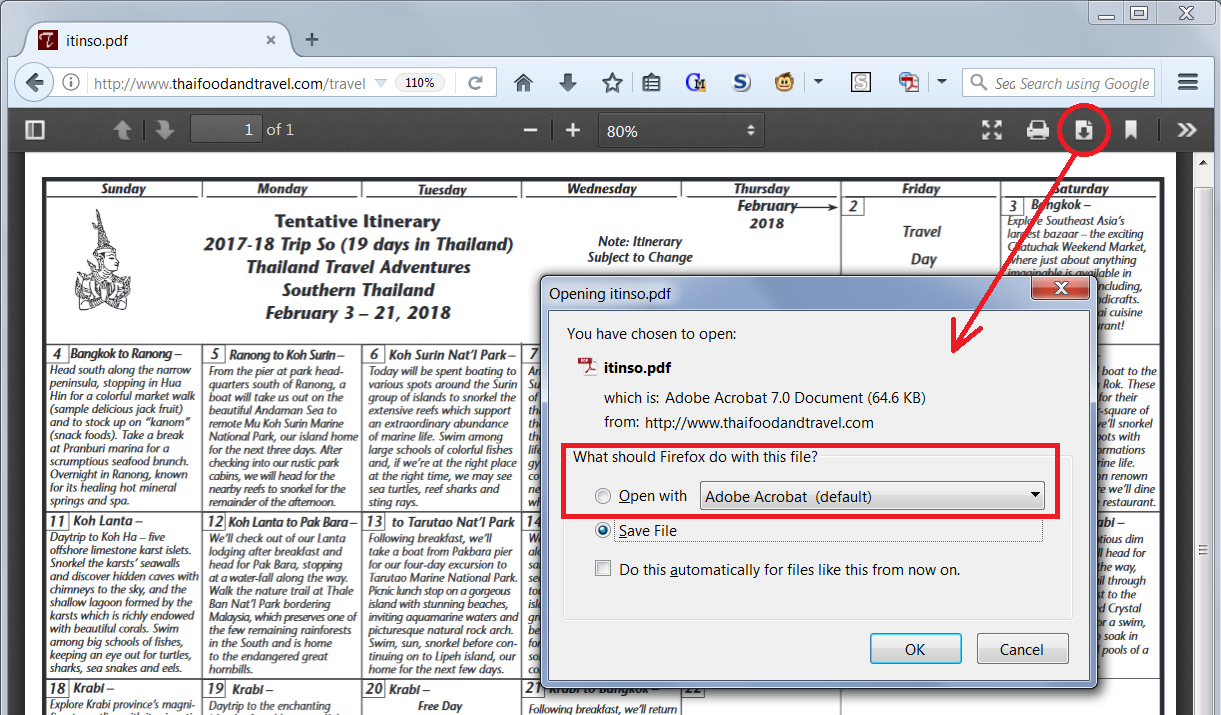
The PDF viewer has a black toolbar with a download button you can use to launch the PDF in your stand-alone PDF reader. I've attached a screenshot for reference.
Alternately, you can change a setting so that PDFs always open in your external reader. See: View and edit PDF files using Firefox’s built-in viewer.
Does any of that seem applicable to the problem pages?
この回答をすべて読む 👍 0すべての返信 (1)
選ばれた解決策
It's possible that these are PDFs, in which case Firefox's built-in PDF viewer isn't going to give you perfect fidelity. (Okay, I'm understating it a bit...)
The PDF viewer has a black toolbar with a download button you can use to launch the PDF in your stand-alone PDF reader. I've attached a screenshot for reference.
Alternately, you can change a setting so that PDFs always open in your external reader. See: View and edit PDF files using Firefox’s built-in viewer.
Does any of that seem applicable to the problem pages?