I just formatted my computer, installed Firefox again and logged into my account but my bookmarks are all missing. Can i obtain it back, please?

Hello
I used Firefox for a pretty long time and had a good share of bookmarked files and always had my account logged into the browser. But then formatted my computer cause of random driver issues I had but didn't think about making a backup file or anything of the sort about browser history and bookmarks. I thought that when logged back in again in Firefox I would have my things back again , just like Chrome does. But now , after spending a some time in the support page trying to figure out how to get my bookmarks the closest to my problem i get is when you refresh the browser you import the bookmarks again from a pre-existing file ,so well I don't have that at all. I'm here now asking if that's possible to obtain my bookmarks again somehow.
Thank you
すべての返信 (8)

Formatting the hard drive means that everything is cleaned out. Unless you have backups somewhere . . . . . . .
Were you using sync?
Yes i was using Sync and my account logged in all the time i used Firefox and that's what is really odd . I really thought my bookmarks would be there again.
Did you have any problem when trying to log into Sync after the format and re-installation of Firefox?
Such as a problem with your Firefox Account password, and then resetting that password?
Do Not Reset The Sync Password ! ! ! That will remove all data from the account.
Yes i had a problem while trying to log into my sync account when I downloaded FF again and ended up resetting my password. Okay so that's why my bookmarks and history got lost....Oh wow . At no point I was aware of that and i don't remember seeing a single warning that I would lose my data if i made such change. :(
What you can do for the future is to get an external hard drive and back up what you want to save.
Yeah I will have to keep that in mind from now on. I suppose there's no way of recovering that .
Thank you for the responses
The Sync password is used to create dual encryption "keys". Change that original password and the data that was encrypted by that password is useless and can't be decrypted with a different password and and the new "keys" that are created from that new password.
Stavale said
Yes i had a problem while trying to log into my sync account when I downloaded FF again and ended up resetting my password. Okay so that's why my bookmarks and history got lost....Oh wow . At no point I was aware of that and i don't remember seeing a single warning that I would lose my data if i made such change. :(
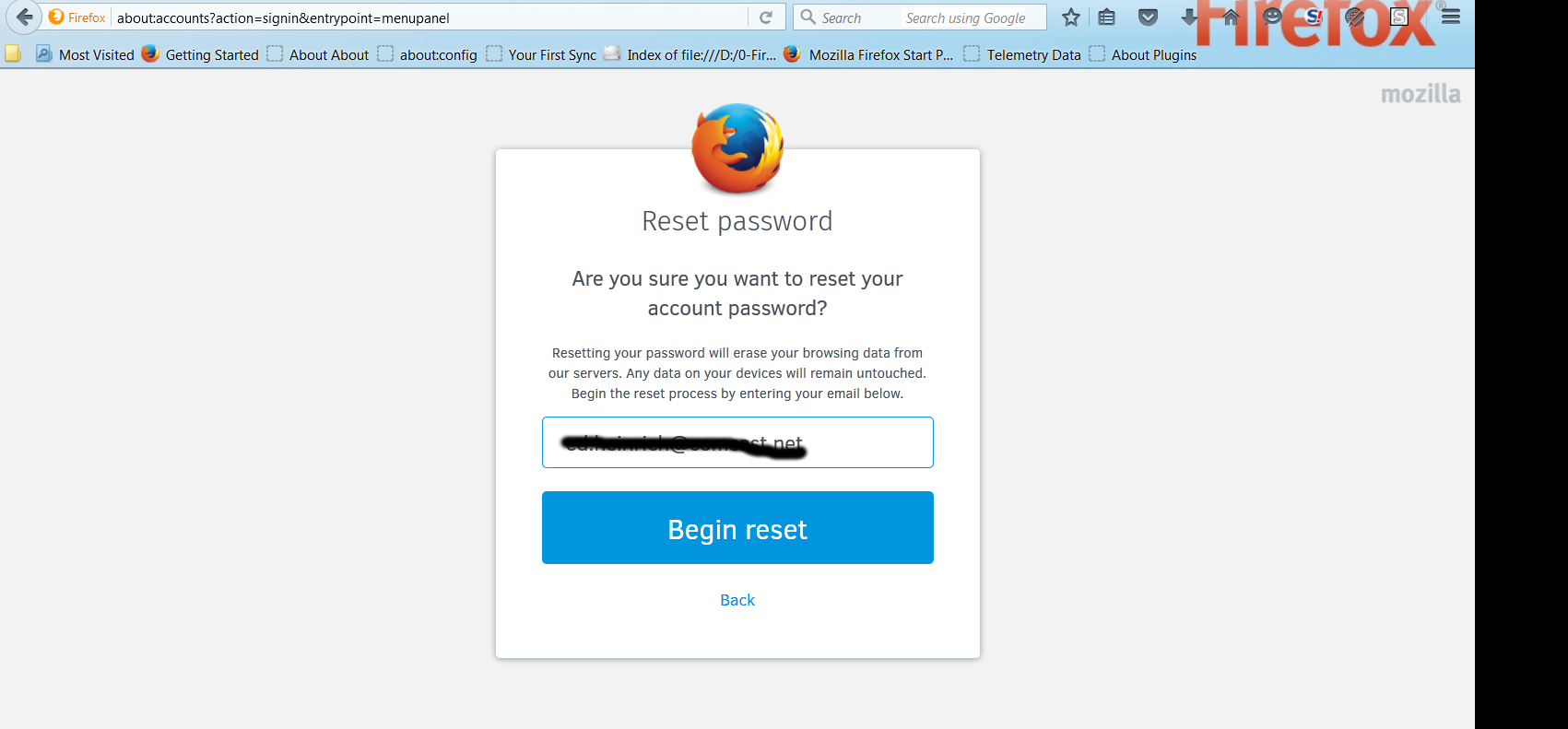
Please view the screenshot that I just posted.
"Resetting your password will erase your browsing data from our servers. Any data on your devices will remain untouched."
Sync wasn't intended to be used as a backup medium, its purpose it to synchronize Firefox data across multiple devices. So if the account password is changed, the data can be recovered from a device that still has the data when that device is connected to the Sync server using the new password and encryption / decryption "keys" - which the user never sees - they're a hidden implementation. IOW, the 2nd device that wasn't formatted.