


IWrong mail sending

I have 3 email accounts linked to Thunderbird. When I send an email from my email margaretha@omduvill.se recipient will receive an email from maggisen@hotmail.com Why and how can I change? Having looked at the settings but nothing strange there.
選ばれた解決策
Then I suggest you refer to the image posted above and actually look in the correct place.
すべての返信 (9)
There's a thread here that discusses similar problems: https://support.mozilla.org/en-US/questions/996194 How do those issues compare to yours? Are you composing a new message from scratch or are you replying to / forwarding one? Are you using Local Folders or do both your accounts have their own Inbox, Sent etc.?
Both my accounts have their own inboxes, sent etc... and I am sending new mails from the right adress bur the reciever got it from another...
And in your Account Settings, you have checked that the correct outgoing server is set for each account (i.e. they are different)?
Thanks for answer. I looked at the smtp adress and can´t change it. I have therefor used the standardserve and it was alright earlier. Now I have to change the smtp server for this account but I dont know where....
Use the Outgoing Server (SMTP) button at the bottom of the Account listing pane.
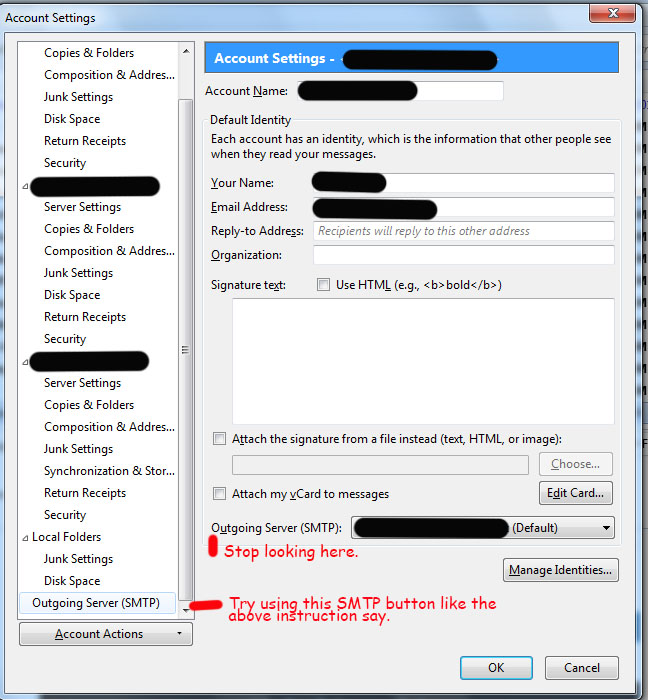
It is grayed and I can not change something there at all!
When you click on the 'outgoing server' button indicated by Airmail you should see the outgoing servers listed in a window. One of them should be labelled 'default' and below that list you should see the server settings -- grayed as you say. But to the right of the list of servers there should be an 'add' and an 'edit' button: don't you have those?
Sorry but that´s the problem... I don´t have any 'add' and an 'edit' button
選ばれた解決策
Then I suggest you refer to the image posted above and actually look in the correct place.