


Tried everything but can't restore bookmarks backupfile after reinstalling windows

I made a backup of my bookmarks. Then I reinstalled Winodws 7 on my computer. When I tried to restore my bookmarks, I can't open the file. The errormessage is in dutch "Verwerken van reservekopiebestand is niet mogelijk" / Processing of backupfile is not possible. I tried all the solution that I found on this support website like deleting places.sqlite files and installing the Places Maintenace.
I I open the backupfile with a text editor it begin with:
"{"guid":"jZA4MLgD-mzq","title":"","index":0,"dateAdded":1350157318368000,"lastModified":1367407220439000,"id":1,"type":"text/x-moz-place-container","root":"placesRoot","children":[{"guid":"xDTdGjb-d5u3","title":"Bladwijzermenu","index":0,"dateAdded":1350157318368000,"lastModified":1409465069063000,"id":2,"type":"text/x-moz-place-container","root":"bookmarksMenuFolder","children":[{"guid":"6p4qE9dwt7yf","title":"Recent aangemaakte "
Please, can somebody help me to solve my problem.
すべての返信 (8)
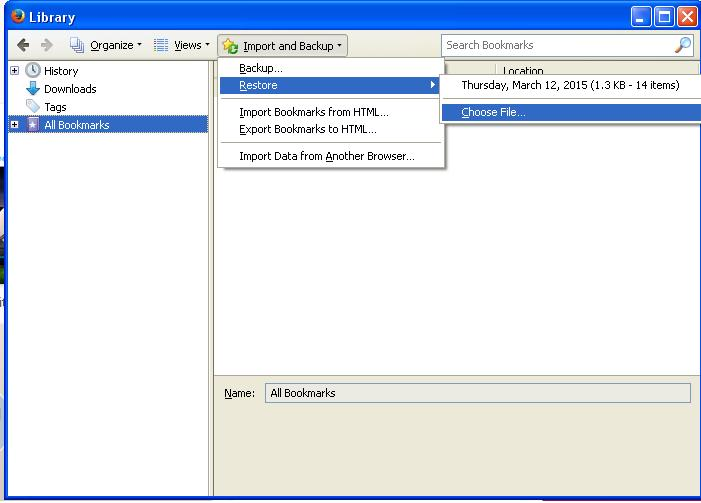
Open downloads window by presing Ctrl+J click on import and backup , then click restore and choose file.
Backup file name will end with json extension.
If you had made a backup using html , choose import bookmarks from html.
この投稿は Saurav により に変更されました
Thank you for your reply. But I do know how to restorethe file. The problem is the error message that the file can't be processed..
Change the starting of file to
{"guid":"root________","title":"","index":0,"dateAdded
Please keep backup before doing it.
Did you previously had problems with your Firefox profile folder?
With what Firefox version did you make this backup?
Dear Saurav, I've got just today the time to try your solution. Thamk you for your reply. I am not sure if I understood you correctly. This is what I have done, I changed the beginning of the file to:
{"guid":"root________","title":"","index":0,"dateAdded":1350157318368000,"lastModified":1367407220439000,"id":1,"type":"text/x-moz-place-container","root":"placesRoot","children":[{"guid":"xDTdGjb-d5u3","title":"Bladwijzermenu","index":0,
It doesn't work, could you one more time have a look at it ? Thank you.
Peter
Dear Cor-el, Unfortunately I don't know which version of Firefox I used. At the moment I have version 36.0.1.
Peter

Is there a folder called Old Windows or something like that?
You can try to install the Firefox 35 version and see if you can restore the JSON file in that version. If that works then update that version to Firefox 36.
Firefox 35 release: