


how can I restore FLASH to a URL that I previously blocked?

I have set Shockwave Flash to "Ask." I set a specific URL to ALWAYS ALLOW, then later changed my mind. How can I restore flash-deny functionality to that URL?
選ばれた解決策
hello Sandybrown, while you're on that page you can click on the site identity indicator on the left side of the address bar and then go to more information > permissions in order to change plugin click-to-play settings.
この回答をすべて読む 👍 0すべての返信 (2)
選ばれた解決策
hello Sandybrown, while you're on that page you can click on the site identity indicator on the left side of the address bar and then go to more information > permissions in order to change plugin click-to-play settings.
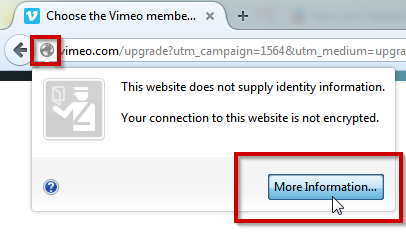
Note that you can click the Lego block icon on the at the left end of the location/address bar to change the plugin settings for a website. If you click the "Site Identity Button" (globe/padlock) on the location/address bar then you will see what permissions have been changed from the default.