

このスレッドはアーカイブに保管されました。
必要であれば新たに質問してください。

アーカイブに保管済み
Firefox crash X_GLXDesktopPixmap

Hi,
I got a crash in safe mode, CentOs 6
###!!! ABORT: X_GLXDestroyPixmap: BadLength (poly request too large or internal Xlib length error); 5 requests ago: file /builddir/build/BUILD/firefox-24.7.0/mozilla-esr24/toolkit/xre/nsX11ErrorHandler.cpp, line 157
###!!! ABORT: X_GLXDestroyPixmap: BadLength (poly request too large or internal Xlib length error); 5 requests ago: file /builddir/build/BUILD/firefox-24.7.0/mozilla-esr24/toolkit/xre/nsX11ErrorHandler.cpp, line 157
Hi,
I got a crash in safe mode, CentOs 6
<pre><nowiki>
###!!! ABORT: X_GLXDestroyPixmap: BadLength (poly request too large or internal Xlib length error); 5 requests ago: file /builddir/build/BUILD/firefox-24.7.0/mozilla-esr24/toolkit/xre/nsX11ErrorHandler.cpp, line 157
###!!! ABORT: X_GLXDestroyPixmap: BadLength (poly request too large or internal Xlib length error); 5 requests ago: file /builddir/build/BUILD/firefox-24.7.0/mozilla-esr24/toolkit/xre/nsX11ErrorHandler.cpp, line 157</nowiki></pre>
この投稿は cor-el により に変更されました
すべての返信 (2)

Please update your firefox to latest version of firefox 31
We're sorry to hear that Firefox is crashing. In order to assist you better, please follow the steps below to provide us crash IDs to help us learn more about your crash.
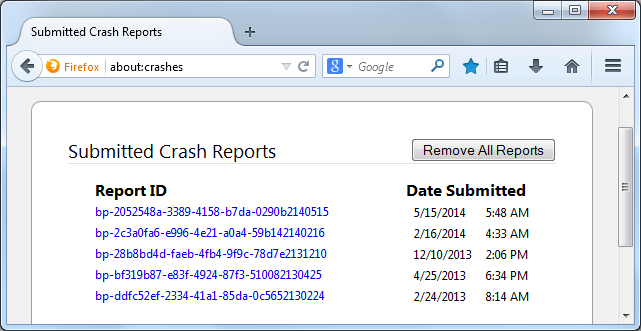
- Enter about:crashes in the Firefox address bar and press Enter. A Submitted Crash Reports list will appear, similar to the one shown below.
- Copy the 5 most recent Report IDs that start with bp- and then go back to your forum question and paste that into the "Post a Reply" box. (Please don't take a screenshot of your crashes, just copy and paste the ID's. The below image is just an example of what your Firefox screen should look like)
Thank you for your help!
More information and further troubleshooting steps can be found in the Troubleshoot Firefox crashes (closing or quitting unexpectedly) article.
According to that log the OP is using a possibly still supported Firefox esr24 version (latest:24.7.0)