


Open
shortcuts appear of any site i visit

I already tried everything, but those shortcuts keep appearing. Also, after restarting Firefox, new shortcuts to Wikipedia and Reddit appear. Can someone help me turn this off?
I already tried everything, but those shortcuts keep appearing. Also, after restarting Firefox, new shortcuts to Wikipedia and Reddit appear. Can someone help me turn this off?
All Replies (1)

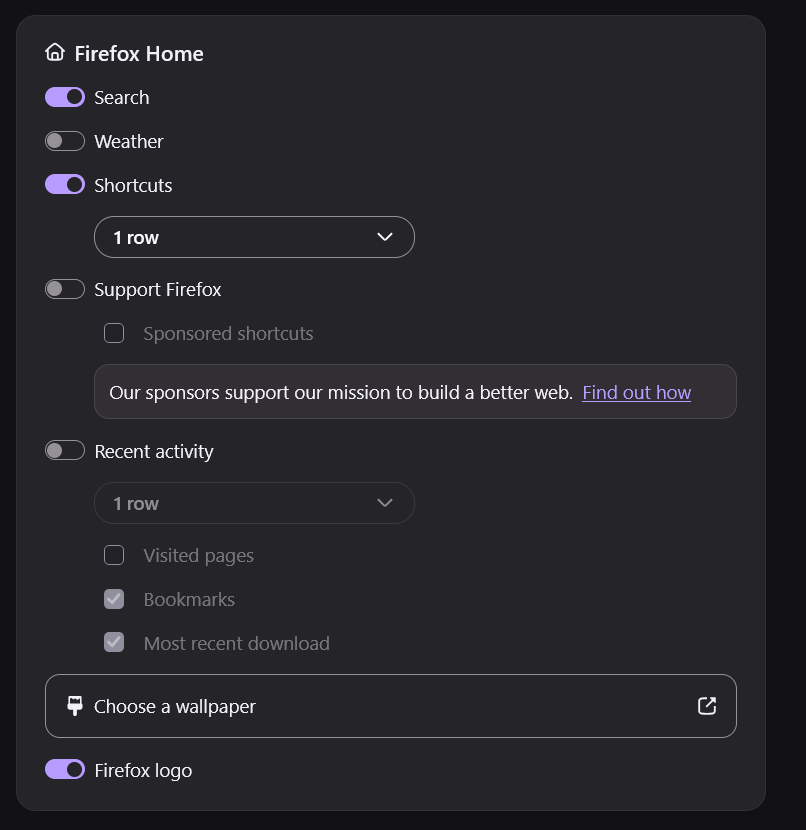
Firefox automatically fills shortcut tiles with websites from your browsing history, and Wikipedia or Reddit may appear as suggested or sponsored shortcuts. To stop this, open a new tab, click Customize (the pencil icon in the bottom right), and turn off Shortcuts. You can also go to Settings → Home and uncheck Sponsored shortcuts. Keep in mind that disabling sponsored shortcuts alone won't stop Firefox from adding sites you've visited. Mozilla's guide explains these settings.