


Windows 10 reached EOS (end of support) on October 14, 2025. If you are on Windows 10, see this article.

Search Support

Avoid support scams. We will never ask you to call or text a phone number or share personal information. Please report suspicious activity using the “Report Abuse” option.

Learn More
Open

Thunderbird Meadow email attachments problems

Wayne Mery replied
Tiger Tiger

Recently updated to ESR Meadow.

Now when I try to save attachment from an email by dragging and dropping to desktop, Windows pops up "Error Moving File or Folder - Unspecified error" and the operation fails.

And when I try to save attachment from an email by right click > open > Save dialog, the save filename is always "nsmail" but with the original file extension. E.g. a jpg attachment would come up as "nsmail.jpg", and a txt file attachment would come up as nsmail.txt. It does then save it, but why lose the filename?

It used to preserve the attachment filename, I'm sure! And drag and drop to desktop was such a convenient feature!

I have tried in Troubleshoot mode and behaviour is the same. I have tried in Windows Safe mode and behaviour for Save is the same; but drag and drop is completely disabled there (when I drag it, it shows a circle with line through icon).

Is it just me?
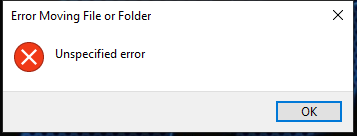
Recently updated to ESR Meadow. Now when I try to save attachment from an email by dragging and dropping to desktop, Windows pops up "Error Moving File or Folder - Unspecified error" and the operation fails. And when I try to save attachment from an email by right click > open > Save dialog, the save filename is always "nsmail" but with the original file extension. E.g. a jpg attachment would come up as "nsmail.jpg", and a txt file attachment would come up as nsmail.txt. It does then save it, but why lose the filename? It used to preserve the attachment filename, I'm sure! And drag and drop to desktop was such a convenient feature! I have tried in Troubleshoot mode and behaviour is the same. I have tried in Windows Safe mode and behaviour for Save is the same; but drag and drop is completely disabled there (when I drag it, it shows a circle with line through icon). Is it just me?
Nseta ihuenyo ndị agbakwunyere

All Replies (2)

Ok will try that

Yes confirmed. I get "Unspecified error message"

Works by right clicking and saving to desktop :)

Edeziri site na amoun

D&D is broken in 153. It' might be a few weeks before it returns.

Jụọ ajụjụ

You must log in to your account to reply to posts. Please start a new question, if you do not have an account yet.