


Translation widget
Hi,
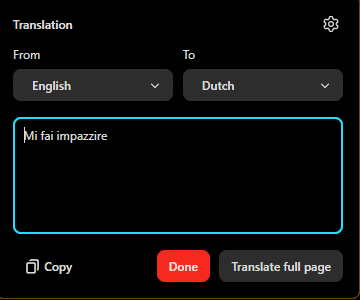
Is there a way to save the settings in the widget (see image)? It's very annoying that you have to constantly select it again, especially if you are on a long script. I put it on: Translate from Italian to English, and then it does remember for maybe one or two times, and then it falls back to English to Dutch. The tool itself is useful, but very annoying that it doesn't remember the settings. If it is somehow possible, please let me know how, cause I can't find it anywhere, or I just don't know how to do it. If it isn't possible, maybe it's an idea to add it to the widget?
Thanks in advance for the help or a reply.
Kind regards, Giaco
All Replies (1)
Hello
If you wish. https://support.mozilla.org/en-US/kb/file-bug-report-or-feature-request-mozilla You can send your comment, file a bug report.
Component: Translations. https://bugzilla.mozilla.org/buglist.cgi?product=Firefox&component=Translations
Firefox Translation. https://support.mozilla.org/en-US/kb/website-translation
To see it in operation, you can also type about:translations in the address bar.
About, browser.translations.mostRecentTargetLanguages. For illustration https://support.mozilla.org/en-US/questions/1535724 You can try browser.translations.mostRecentTargetLanguages and click on the Reset button.
Edeziri site na Agent virtuel