


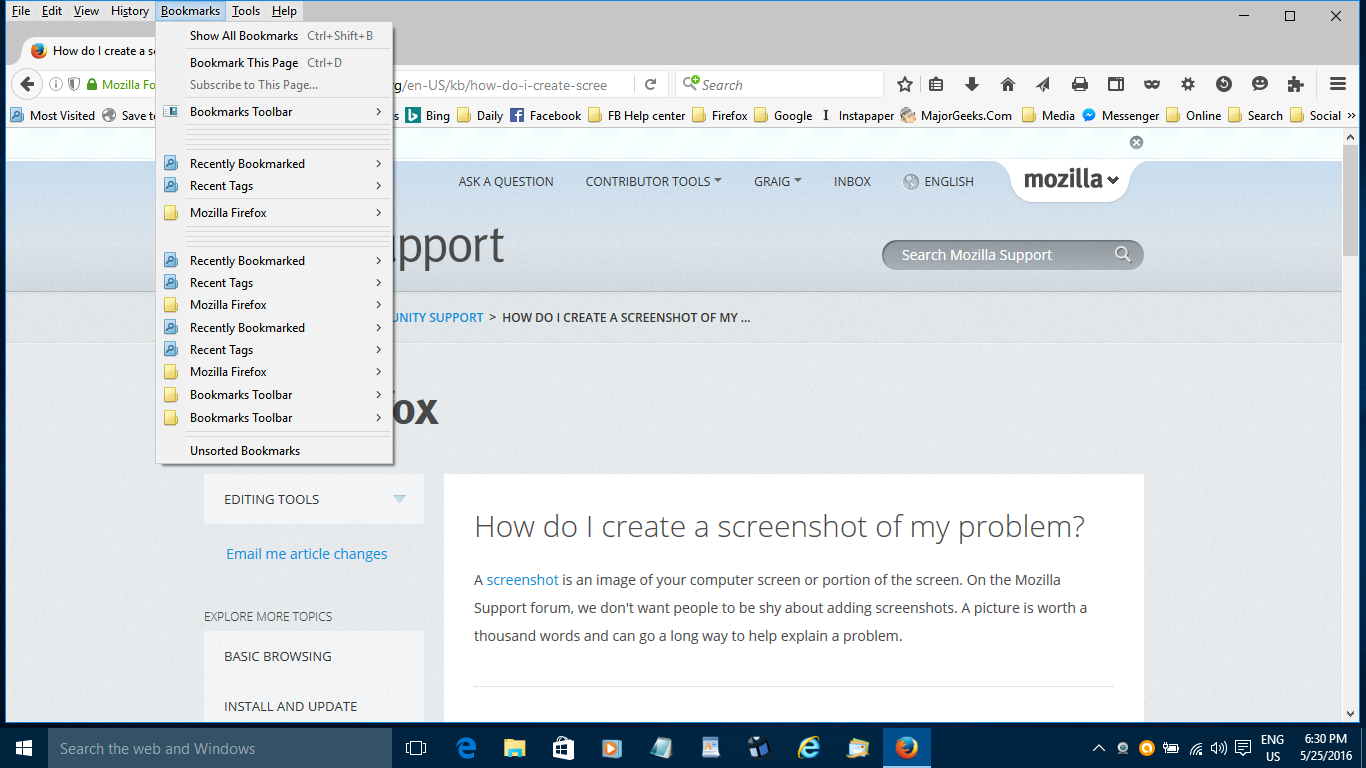
After importing bookmarks lines appear under Bookmarks toolbar and Mozilla firefox

I have imported HTML bookmarks several times and today there are a series of lines showing below Bookmarks Toolbar and Mozilla Firefox when I click on Bookmarks in top left. They did not appear in the past. Maybe they just indicate that past imports have been done. I have set Firefox to sync them now as it was a pain importing and exporting.
All Replies (5)
I don't see a question in your posting. Do you need support? Or is that merely comments about the import / export bookmarks feature?
If you do need support, please provide a screenshot.
See this support article. How do I create a screenshot of my problem? It is best to use a compressed image type like PNG or JPG to save the screenshot and make sure that you do not exceed a maximum file size of 1 MB.
Then use the Browse .... button below the Post a Reply text box to upload the screenshot.
You can check for problems with the places.sqlite database (bookmarks and history) in the Firefox profile folder.
See also:
- http://kb.mozillazine.org/Bookmarks_history_and_toolbar_buttons_not_working_-_Firefox
- https://support.mozilla.org/kb/Bookmarks+not+saved#w_fix-the-bookmarks-file
If you use Sync to sync bookmarks then best is to disconnect Sync while performing maintenance/repair efforts to files in the Firefox profile folder.
Here is a screenshot of my problem and it was a question albeit not worded as such. Thanks
the-edmeister said
I don't see a question in your posting. Do you need support? Or is that merely comments about the import / export bookmarks feature? If you do need support, please provide a screenshot. See this support article. How do I create a screenshot of my problem? It is best to use a compressed image type like PNG or JPG to save the screenshot and make sure that you do not exceed a maximum file size of 1 MB. Then use the Browse .... button below the Post a Reply text box to upload the screenshot.
Graig said
the-edmeister saidI don't see a question in your posting. Do you need support? Or is that merely comments about the import / export bookmarks feature? If you do need support, please provide a screenshot. See this support article. How do I create a screenshot of my problem? It is best to use a compressed image type like PNG or JPG to save the screenshot and make sure that you do not exceed a maximum file size of 1 MB. Then use the Browse .... button below the Post a Reply text box to upload the screenshot.
It was a question sorry, not the best wording.