


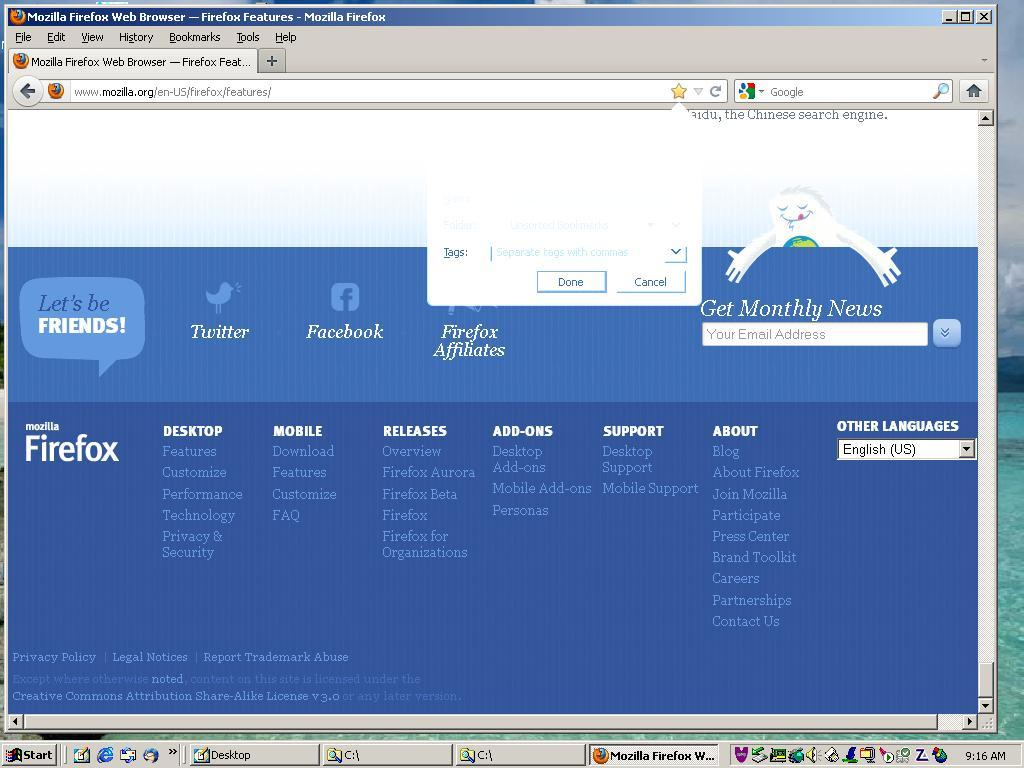
Using FireFox 10.0.2, when I try to bookmark a page, why is the bookmark pull down menu faded?

I can provide a screen shot of the problem if it will help. I also uninstalled 10.0.2, went back to the 9.0.1 version and this occurs too. I checked all options and I could not find anything that would change the background of the bookmark menu. I did find that if the web page had a dark background, the bookmark pull down menu was visible but not visible on a white web page.
Diperbarui oleh gtmercier pada
Semua Balasan (3)
I've included a screen shot of the faded bookmark pull down menu.
Try to disable hardware acceleration.
- Tools > Options > Advanced > General > Browsing: "Use hardware acceleration when available"
If disabling hardware acceleration works then check if there is an update available for your graphics display driver.
Thank you cor-el for the response. I tried disabling the "hardware acceleration", shut down Firefox then restarted and get the same results. I can see the pull down menu well when there is a dark background. I may just have to wipe the system, reload the o/s then reload Firefox. Do you think it would help to load an earlier version of Firefox?