


Suggestion: Colorize settings menu icons

Hi,
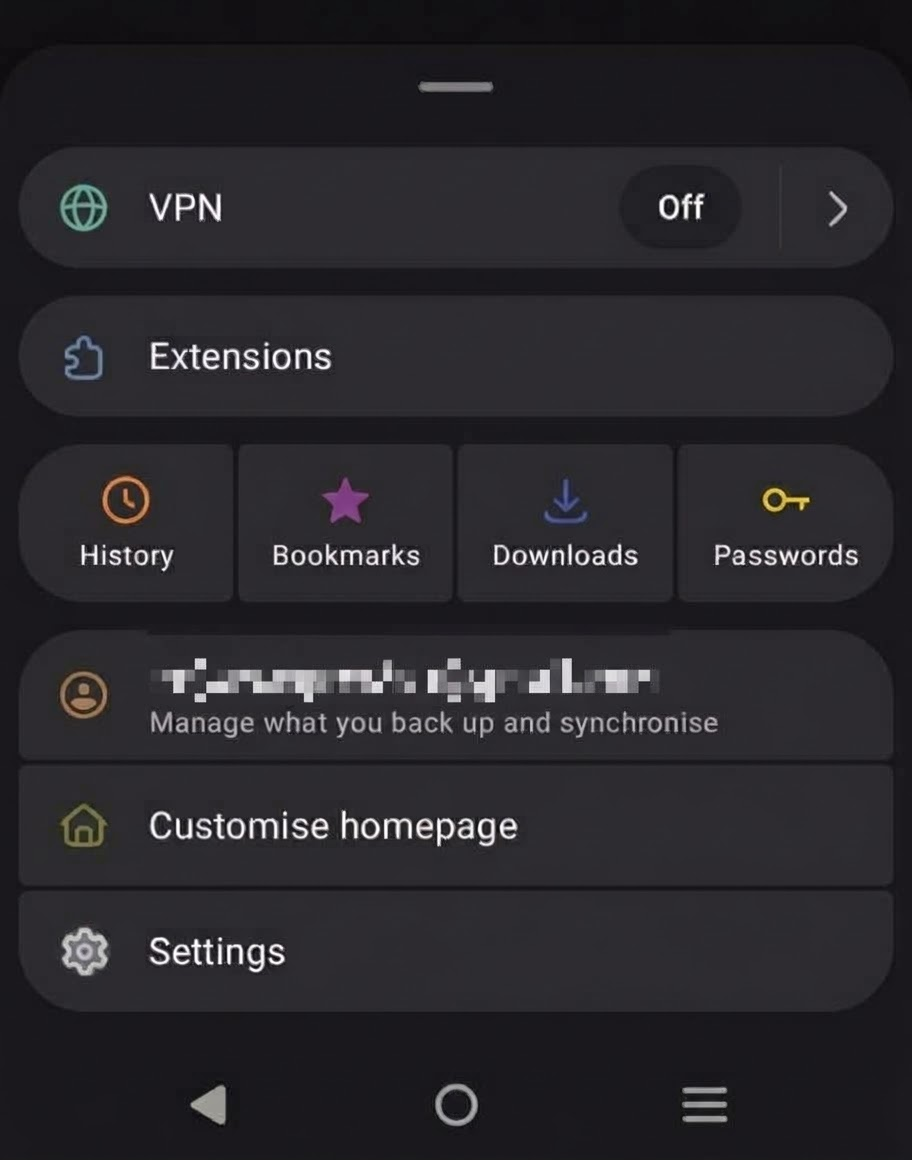
The menus are well structured. One thing that might make them easier to navigate would be to use a color for at least the commonly used icons.
The current monochromatic icons need to be "parsed" them to recognize them. If a subtle colour was added, I think most people would be able to use them more quickly.
Yes, people would complain about the choice of colour, and if they change by default, but people complain about everything.
Please find attached a dark mode mock-up that uses a few of the common choices, e.g. password being yellow. Not every icon would need a color, and different intensity colours would be required for light mode.
Kind regards,
James
Semua Balasan (2)
Hi,
The people who answer questions here, for the most part, are other users volunteering their time (like me), not Mozilla employees or developers. When a Mozilla employee jumps into a discussion, you'll see the Mozilla Staff label next to their name.
If you wish, you can leave feedback for developers on the Mozilla Connect website. Click the Firefox Menu  button in the toolbar, click Help and Report and select Share ideas and feedback…. Alternatively, you can use this link. Your feedback is collected by a team that reads it and gathers data on the most common issues.
You can also file a bug report or feature request. See File a bug report or feature request for Mozilla products for details.
Solusi Terpilih
I know you and the team get a lot of traffic, but I'm not going to do that, sorry. I also wasn't paid to provide this feedback haha! As an outsider I searched the available feedback channels in the app and online and they ALL lead here for whatever reason. I'll let the idea live or die here based on it's merits beyond that. Lock the thread.
Cheers!
James
ps. Faults and bugs are a different fight, this was just an improvement idea.