


Firefox's built-in VPN stopped working without an external VPN connection, despite previously working with my regular Iranian internet connection.

Hi tHello Mozilla Support Team,
I am a user from Iran, and I have been using Firefox's built-in VPN (the 50 GB monthly VPN included with a Mozilla account).
Previously, I was able to use the built-in VPN directly with my Iranian internet connection, without needing any external VPN or proxy.
However, after connecting to an external VPN configuration while using Firefox, the built-in VPN stopped working independently.
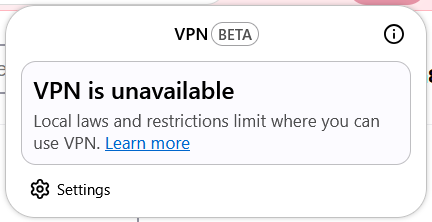
Now, whenever I disconnect my external VPN and try to enable Firefox's built-in VPN, I receive the following error message:
"VPN is unavailable due to local laws and restrictions."
Interestingly, the built-in VPN works again whenever my external VPN is connected.
I have already tried restarting Firefox, testing a different internet connection (mobile hotspot), and checking my browser's connection settings. Unfortunately, none of these steps resolved the issue.
I would like to emphasize that I was previously able to use this feature from Iran without an external VPN connection.
Could you please investigate why my access has changed and let me know whether there is a way to restore the previous functionality?
I would really appreciate your help, as I rely on this service and would like to continue using it.
Thank you for your time and support.
Best regards
Semua Balasan (2)
Solusi Terpilih
Hi kimia81ce,
We recently discovered potential abuse of Firefox’s free built-in VPN by unauthorized third-party apps and temporarily disrupted access to investigate. Service has now been restored.
FYI, we're also running a holiday promotion with unlimited data for the Firefox built-in VPN users. The promotion is running from Nov 9 - Jan 31, 2026. You can check out this thread for more info. This means that once the service is restored for you, you shouldn't be restricted with the 50 GB quota anymore while the promotion is running.
Can you try again and see if it works now?
Hi!
Yes, it's working perfectly now! I can connect to the Firefox VPN without any issues.
Thank you so much for your help and for looking into this issue. I really appreciate your support!
Best regards, Kimia