Garbage
I have used and use Thunderbird on the desktop for decades. It's my primary email application. I've donated to support Module.
I installed the mobile app on my Galaxy Z Fold 7 and connected it to two email accounts: Gmail and my own domain.
My experience has been terrible.
Connecting to Outlook specifically was impossible. The app and Outlook were utterly confused and couldn't authenticate.
Conversation view doesn't work.
Notifications don't work.
Email shows up in the Gmail but not Thunderbird.
With conversation enabled, not only can't you read email as conversations, but basic email history/threads don't appear in messages. If you disable conversation view, then they appear. (That was the biggest warning sign that this app is in trouble.)
I could go on. Using Thunderbird Mobile is like living in the Bizarro universe. IIt pains me to say it, but that's been my experience.
I'm a highly experienced user and developer. I've checked all the settings and rechecked. It ain't me. It's the app.
Uninstalling.
Semua Balasan (4)
Module = Mozilla
Just to add: l
Unified Folders don't unify.
Automatic checking of email for new mail? Doesn't work. Set it for 15 minutes, never checked unless I forced it to sync.
Mail arrives in Gmail. Never shows up in Thunderbird even on a forced sync.
UI is slightly confusing, but I can give that a pass. Not a bug.
There were other issues that I didn't jot down.
Anyway, sorry to rant, but I had high expectations for this app and it really let me down.
One hopefully final comment. I just tried the QR code technique, grabbing the QR code from my Thunderbird desktop and trying it with Thunderbird for Android and also with K9, which this appears to be built on. It only worked for Gmail. The other two accounts were unable to authenticate.
Apologies for any typos on this thread but I'm using dictation.
At the end of the day this is super frustrating because I would like to be using Thunderbird on all my devices. Oh well.
Diperbarui oleh RBLevin pada

Hi
Threaded / conversation view
I haven't used or tested threaded view so I can't comment on it's capabilities. There's a couple of existing Github issue tickets which you can add your feedback on, or open a new one.
https://github.com/thunderbird/thunderbird-android/issues/9981 https://github.com/thunderbird/thunderbird-android/issues/6197
Synchronisation
For timely synchronisation, please check the app is excluded from any battery optimisation and allowed to run in the background. This is enabled using android settings. Navigate to android settings > all apps > Thunderbird > Battery Usage
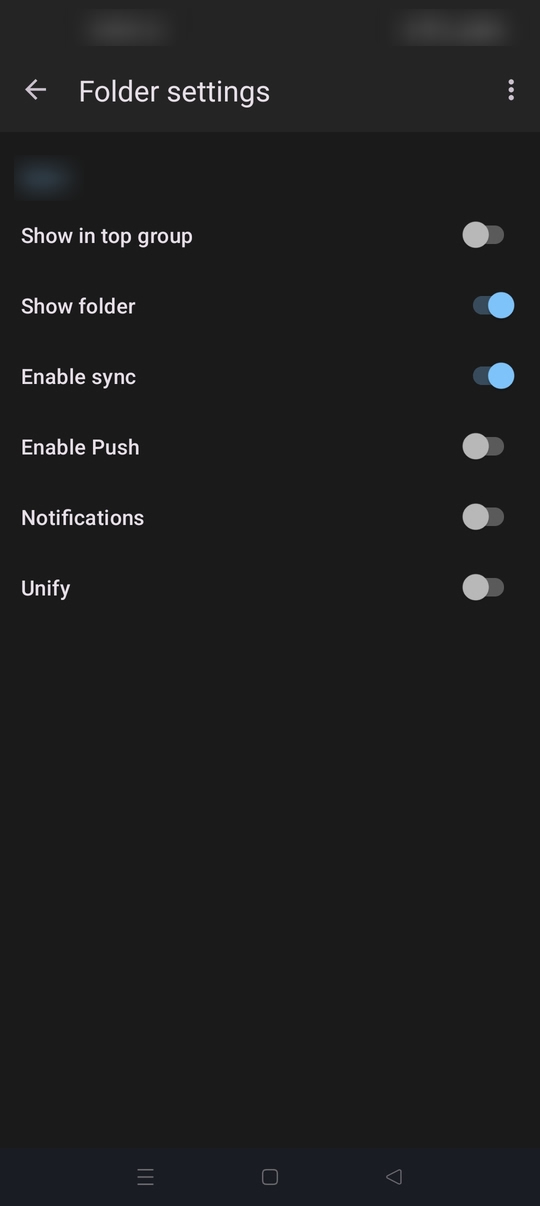
Sync is managed on a per folder basis and only enabled by default for Inbox. To toggle sync on for other folders.
1. Open the account sidebar with your account folders displayed 2. Press the manage folders button (bottom of list) 3. Tap a folder name 4. Tap "Enable Sync"
You also have the choice to enable the PUSH feature (Imap idle) which delivers emails immediately. Guide: https://support.mozilla.org/en-US/kb/configure-push-email-thunderbird-android
RBLevin said
Unified Folders don't unify.
To display the content of a folder within Unified inbox, toggle the "Unify" setting to ON.
TB have an open pull request to add unified Outbox, Drafts, Sent, Archive, Spam and Trash folders in a future update. see PR #11744
You can find more information about active and planned development on the below roadmap. https://roadmaps.thunderbird.net/en-US/android/
Feel free to share your ideas and improvement suggestions on Mozilla connect. https://connect.mozilla.org/t5/ideas/idb-p/ideas/label-name/thunderbird%20android