


Firefox's intrusive update process constantly interrupts my work, with no option to disable update notifications.

Almost every time I launch Firefox, I'm interrupted by another update. Instead of getting straight to work, I have to deal with update downloads, installation prompts, or restart requests.
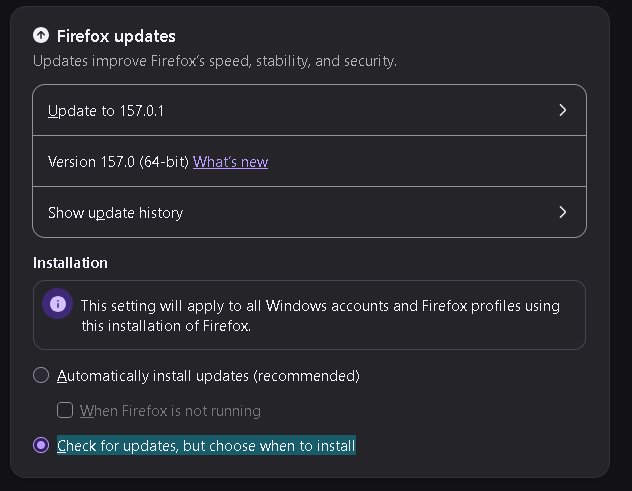
There is no reasonable way to disable this behavior. Even selecting "Check for updates, but let you choose to install them" doesn't help, because Firefox still interrupts me with update notifications.
Why can't users simply check for and install updates manually, without constant interruptions?
For a browser with such a small market share, Firefox is remarkably aggressive about imposing this intrusive UX on its users.
Please provide an option to completely disable automatic update checks and notifications. Let users decide when to update their own software.
Semua Balasan (7)
Why can't Firefox handle updates the way Chrome does? Chrome downloads updates silently in the background and simply displays an Update button. You click it whenever you're ready. No intrusive popups, no repeated reminders, no interruptions.
Long history. What you actually want, comparing to Chrome, is the opposite: Automatically install updates, and also check the option to update in the background — that's the way how to have Firefox updated outside of its running processes.
The other options basically mean the auto–updater does not run, so you're getting the manual update prompts since you don't want anything updated automatically. Which means you have to drive the updates, and they will need the Firefox process 1.) running, and then 2.) close it off to update.
Generally, consider using Microsoft Store as the installation source for Firefox to have updates handled on the side, if the built–in workflow doesn't suit you.
jbr said
Long history. What you actually want, comparing to Chrome, is the opposite: Automatically install updates, and also check the option to update in the background — that's the way how to have Firefox updated outside of its running processes. The other options basically mean the auto–updater does not run, so you're getting the manual update prompts since you don't want anything updated automatically. Which means you have to drive the updates, and they will need the Firefox process 1.) running, and then 2.) close it off to update. Generally, consider using Microsoft Store as the installation source for Firefox to have updates handled on the side, if the built–in workflow doesn't suit you.
why just not having an Updates turned off option?
jbr said
Long history. What you actually want, comparing to Chrome, is the opposite: Automatically install updates, and also check the option to update in the background — that's the way how to have Firefox updated outside of its running processes. The other options basically mean the auto–updater does not run, so you're getting the manual update prompts since you don't want anything updated automatically. Which means you have to drive the updates, and they will need the Firefox process 1.) running, and then 2.) close it off to update. Generally, consider using Microsoft Store as the installation source for Firefox to have updates handled on the side, if the built–in workflow doesn't suit you.
I also have user profiles, bookmarks, history, etc. I don't want to destroy everything by reinstalling from Microsoft Store
Bonjour
https://connect.mozilla.org/t5/discussions/too-many-update-notifications/m-p/142481#M58290 As for me, i choose my favorable moment to perform the updates. I use, DisableAppUpdate (e.g.) https://www.youtube.com/watch?v=dSdjN13SIps
I use, DisableAppUpdate (other illustration) https://connect.mozilla.org/t5/discussions/upgrade-notification-spam/m-p/115143/highlight/true#M44920