


You just introduced a new "HTTPS-Only Mode" -- as of the last version or two, it no longer allows access to an "http://" site. All such sites are blocked only by Firefox. Is there a fix?

In the Settings, the "HTTPS-Only" feature seems broken. There is an option to 'Don't enable" this feature, but that doesn't make any difference. I can get to an "http:" site using any other browser, but not with the latest Firefox.
Semua Balasan (27)
The https:// only mode has been there for a couple of years from what I recall or even longer, when did you last update?
and see image
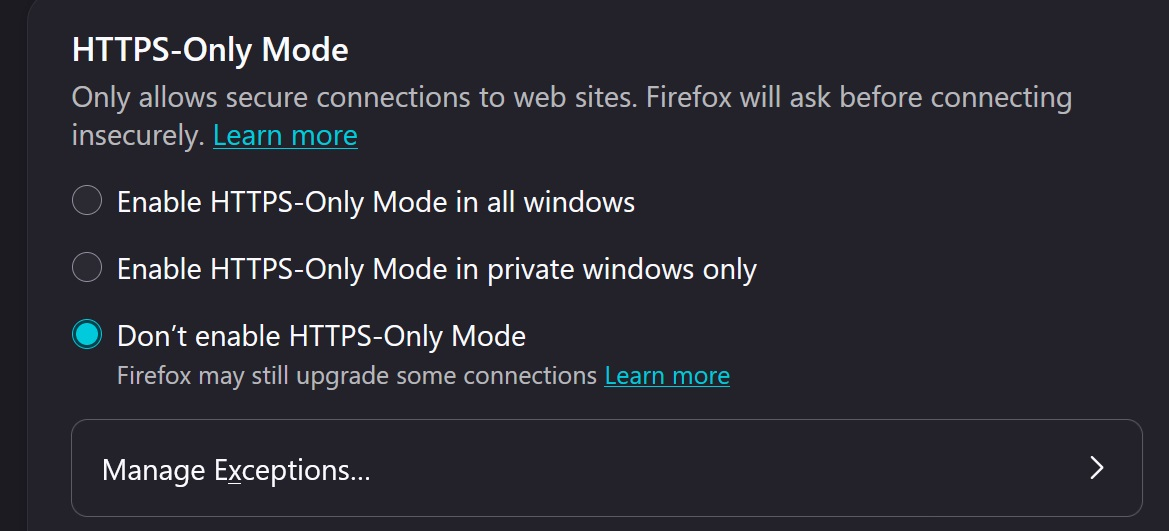
As of a couple of days ago, I was at Firefox 154.0.1. My settings are as you show in the image -- to "Don't Enable" the block. Yesterday I updated to 155.0.1. The HTTPS-Only setting is the same, but now it ALWAYS blocks any http:// call.
Here's an example you can run:
http://www.ancestXXX.com.launch/default.asp?fn=Hannah&ln=Stones&by=1794
Firefox 155.0.1 now converts this to:
https://www.ancestXXX.com.launch/default.asp?fn=Hannah&ln=Stones&by=1794
Which always fails, whereas prior to version 155, this always succeeded.
I create a genealogy software, that allows users to do online research. They initiate such calls to the Internet via our software. Starting a couple of days ago, we started getting a lot of calls asking why their calls to initiate research are always failing, and we have traced it to Firefox 155. We are now encouraging them to use a different default browser so that the calls to "http://" will function properly.
I expect that this is a bug in Firefox 155.0.1, which they would like to get fixed, but it is currently causing havoc with my customers.
Diperbarui oleh gfindlay pada

I have a similar issue with an http:// page I go to every day. Starting from 155.0.1 (or possibly 155.0) the page redirects to https:// which brings up an error page from the hosting company. I did a full uninstall and folder cleanup followed by a clean reinstall of Firefox. I made all the settings step by step checking the http:// website after each change and it worked fine UNTIL I enabled DNS over HTTPS (DOH). The problem is there when using Cloudflare, Quad9 or Google. If I turn DOH off the site works OK. I tried on a different machine (laptop) with the same setup and exactly the same results.
I hope this will be fixed soon.
Thanks
P.S I'm using Windows 11 Pro 25H2 fully up to date. The second machine / laptop runs Windows 10 Pro 22H2 with Extended Security Updates. I also tried the http:// site using Brave Browser (latest version) with DOH enabled and everything works OK there, so this seems to be specific to Firefox.
Diperbarui oleh Tony J pada
Tony - Thanks. This work-around actually works. I did an altered version, where rather than completely disable DNS over HTTPS, I added our domain (ancestXXX.com) to the list of exclusions. Both methods solved this for me. I would mark your answer as the Solution, except that until Firefox fixes the root problem, we will have a significant number of customers who we can't reach to alert them to the resolve, and many or most of them would be hesitant to make changes to their Firefox. The only true resolve is for Mozilla to fix this.
Diperbarui oleh gfindlay pada
Glad it helped . Yes, please keep the thread open until we get a fix. I will also try to set an exception for sites that need it on my side.
I just observed one more piece of information. I first turn DOH off to see if that would work, and it did. Then I set it back to the 'Default' setting and established an exception. That seemed to work also, but then I noticed that the DOH settings page told me that DOH was OFF, even though the radio selection was for Default. So apparently, they have another bug, where once you turn DOH off, you can't turn it back on.
Yes, you're right. I set some exceptions. all worked OK, but when I go back to the the settings again DOH is now turned off! When I enable it again the exceptions are gone.
Diperbarui oleh Tony J pada
I found that while most settings in Firefox seem to get permanently set just by clicking on an option, in this case I had to exit Firefox (FF) then restart. So after setting the DOH to the "Default" setting, but it still working as if it were Off, I then exited Firefox and restarted. Now it was actually back on and the request for the "http://" site no longer worked.
This time, I left the DOH setting to "Default" and added my domain as an exception. Then exited FF and restarted. This time, the setting stuck, and the "http://" request works.
attached are my settings. I set Cloudflare as my DOH provider rather than using the default option. Indeed, after restarting Firefox the http:// site exceptions I set before are visible again but they are ignored and the behaviour is the same as before i.e force redirecting to https://

Diperbarui oleh Tony J pada
Can you reproduce in a clean profile, and can you provide a URL to reproduce?
Seems working as expected with default settings, tested just with and explicit DoH provider as shown below:

Hello JBR, not sure which of us you replied to, but see above (Tony J 9/10/26, 19:14 UTC / 20:14 UK). I already did a complete fresh install of Firefox 155.0.1. The site with issues for me are http://dk0wcy.de or http://www.dk0wcy.de these divert to https:// whenever DOH is enabled and so get an error page from the hosting company. Both I and gfindlay have done extensive testing and you can see all of the results in detail above. Thank you.
Hello JBR
Please see all of the info both I and gfindlay provided above. As mentioned in Tony J 9/10/26, 19:14 UTC (20:14 UK) I did a complete reinstall of Firefox 155.0.1 with a new profile, only importing my bookmarks afterwards. The issue also happens on another machine with a different user profile so its not specific to my device or profile.
Site that is affected for me is http://dk0wcy.de also http://www. dk0wcy.de these work fine with DOH off but not when DOH is enabled using Cloudflare, Quad9 or Google.
I go to this site every day and the issues only started with 155.0.1 or possibly 155.0 (they were only a few days apart).
Thanks Tony J
Hello JBR
Please see all of the info both I and gfindlay provided above. As mentioned in Tony J 9/10/26, 19:14 UTC (20:14 UK) I did a complete reinstall of Firefox 155.0.1 with a new profile, only importing my bookmarks afterwards. The issue also happens on another machine with a different user profile so its not specific to my device or profile.
Site that is affected for me is http://dk0wcy.de also http://www. dk0wcy.de these work fine with DOH off but not when DOH is enabled using Cloudflare, Quad9 or Google.
I go to this site every day and the issues only started with 155.0.1 or possibly 155.0 (they were only a few days apart).
Thanks Tony J
I am trying to post a reply but links seem not allowed ?
Hello JBR
Please see all of the info both I and gfindlay provided above. As mentioned in Tony J 9/10/26, 19:14 UTC (20:14 UK) I did a complete reinstall of Firefox 155.0.1 with a new profile, only importing my bookmarks afterwards. The issue also happens on another machine with a different user profile so its not specific to my device or profile.
The Http:// Site that is affected for me is dk0wcy.de also www. dk0wcy.de these work fine with DOH off but not when DOH is enabled using Cloudflare, Quad9 or Google.
I go to this site every day and the issues only started with 155.0.1 or possibly 155.0 (they were only a few days apart).
Thanks Tony J
Hello JBR
Please see all of the info both I and gfindlay provided above. As mentioned in Tony J 9/10/26, 19:14 UTC (20:14 UK) I did a complete reinstall of Firefox 155.0.1 with a new profile, only importing my bookmarks afterwards. The issue also happens on another machine with a different user profile so its not specific to my device or profile.
The http:// Site that is affected for me is dk0wcy<dot>de also www<dot>dk0wcy<dot>de these work fine with DOH off but not when DOH is enabled using Cloudflare, Quad9 or Google.
I go to this site every day and the issues only started with 155.0.1 or possibly 155.0 (they were only a few days apart).
Thanks Tony J
Diperbarui oleh Tony J pada
well, I wrote some answers here. when I finally managed to add link to it, it has vanished.
please refer to all of the details both I and the question owner have provided. I did a full uninstall and clean new install of Firefox 155.0.1 with a new profile, only importing my bookmarks from a backup afterwards. Also same issue on a different machine with a different user profile.
You can test on these http:// sites dk0wcy<dot>de and www<dot>dk0wcy<dot>de
With DOH enabled using Cloudflare, Quad9 or Google the site is redirected to https:// which gets an error from the hosting company. It only works correctly with DOH turned off.
I use the site daily and can say for sure that the issue occurred only with version 155.0.1 or possibly 155.0 (they were only a few days apart).
Thanks Tony J
I referred to all the details, and the only URL available was bogus. Also sites.dk0wcy.de does not exist (no A/AAAA/CNAME records). I do however see the upgrade on http://www.dk0wcy.de (no matter the DoH provider) where the invalid wildcard cert from the hosting provider should make it fall through back to the HTTP, unless there's some preload set — I'll see if I can find anything suspicious.
Interestingly if you open just dk0wcy.de (no www.) it seems to work just fine.
please see screenshot below, this is using Brave Browser with DOH enabled.
The site is functional and also works in Firefox when DOH is turned off.

Diperbarui oleh Tony J pada