


Autoplay blocking only mutes Youtube when clicking a video on the site

Lately, whenever I click into a youtube video from within youtube, instead of Firefox blocking autoplay, it mutes the video but lets it play.
Initially, it was muting EVERY video I pulled up, but messing with my settings has fixed the problem if I click into a youtube video from elsewhere (ex. a google search result), or if I refresh the page. It's super annoying to having navigating youtube be this non-functional right now, though, since everything just silently plays until I catch and unmute it! Any help would be super appreciated!
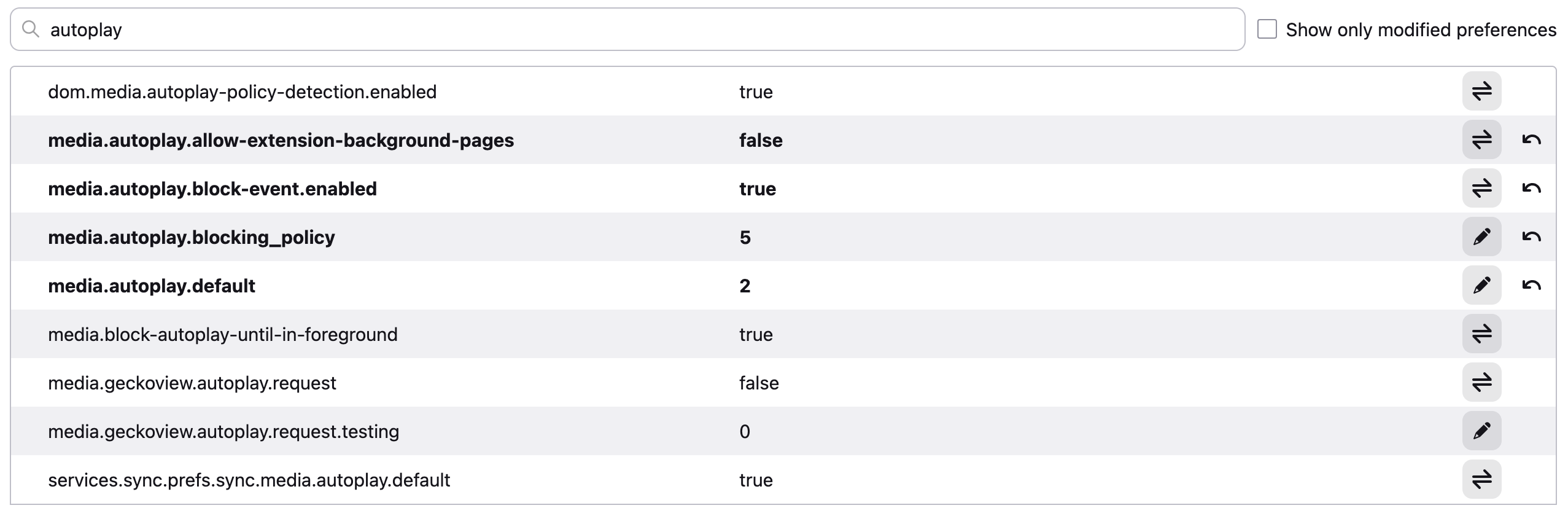
(I'll attach an image with my current autoplay settings.)
Semua Balasan (4)
Hello
Just for information https://support.mozilla.org/en-US/questions/1580396
Ah, I did have the values on media.autoplay.blocking_policy and media.autoplay.default swapped. That's helping with stopping the autoplay, so thank you!
Unfortunately, it's still muting the video on the youtube level instead of the normal way, if that makes sense? Like, historically I could just press play and the video would play with sound as usual, but now I have to manually unmute it every time.


I'm having the same issue with the latest Firefox version. All Youtube and Twitch videos are automatically muted. My media.autoplay.default setting is at 0 which should not block them.
Bonjour
You?, that's another subject, because i tested by default and i don't see your problem.
And, about, my feedback (e.g) https://www.youtube.com/watch?v=S85O1R8ikUc