Open
There is no "send" button appearing when I am creating an e-mail (new or reply)

Thunderbird 152.0.1 Windows 11 Pro 10.0.26200 Build 26200
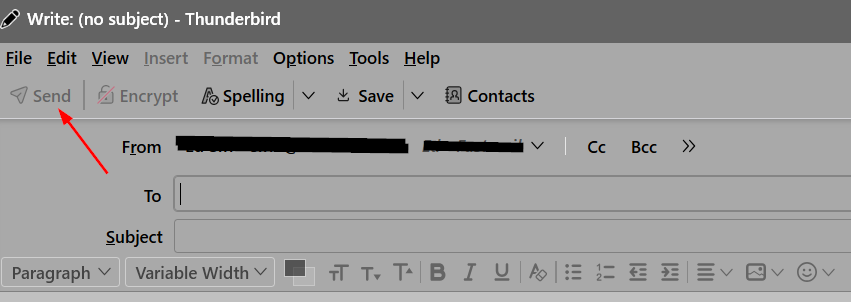
When I create a new e-mail or reply to one that I have received I am able to type in all fields, but there is no "Send" button to the left of the "From", "To", and "Subject" fields.
I can work around this by clicking "File...Send Now", but that is very inconvenient when I am sending many e-mails.
Thunderbird 152.0.1
Windows 11 Pro 10.0.26200 Build 26200
When I create a new e-mail or reply to one that I have received I am able to type in all fields, but there is no "Send" button to the left of the "From", "To", and "Subject" fields.
I can work around this by clicking "File...Send Now", but that is very inconvenient when I am sending many e-mails.
Semua Balasan (3)
- click the 'new message button
- then, if the menu bar is not visible, press the alt key
- then, click view>toolbars and tick 'composition toolbar'
Up until a few weeks ago there was a large "SEND" button in the empty space to the left of "From", "To", and "Subject". Why did they remove that? I have no need for the other buttons in the Composition toolbar.

There has never been a native Send button at that location. It is on the composition toolbar, as David mentioned.
BTW, Ctrl-Enter also sends the message.