


The "send" button is missing from the menu of my emails, I can write replies but not send them.

A "send later" button came up one morning instead of the usual "send" button. When I clicked on the write button to see where the "send" button was, several choices came up but when I clicked on the "write" choice I lost the other choices and now can't get back to the original write button and still no "send" button appears anywhere on the menu. I can save messages to Draft but still can't actually send them. I can still receive emails, just can't send them! Help!
Solusi terpilih
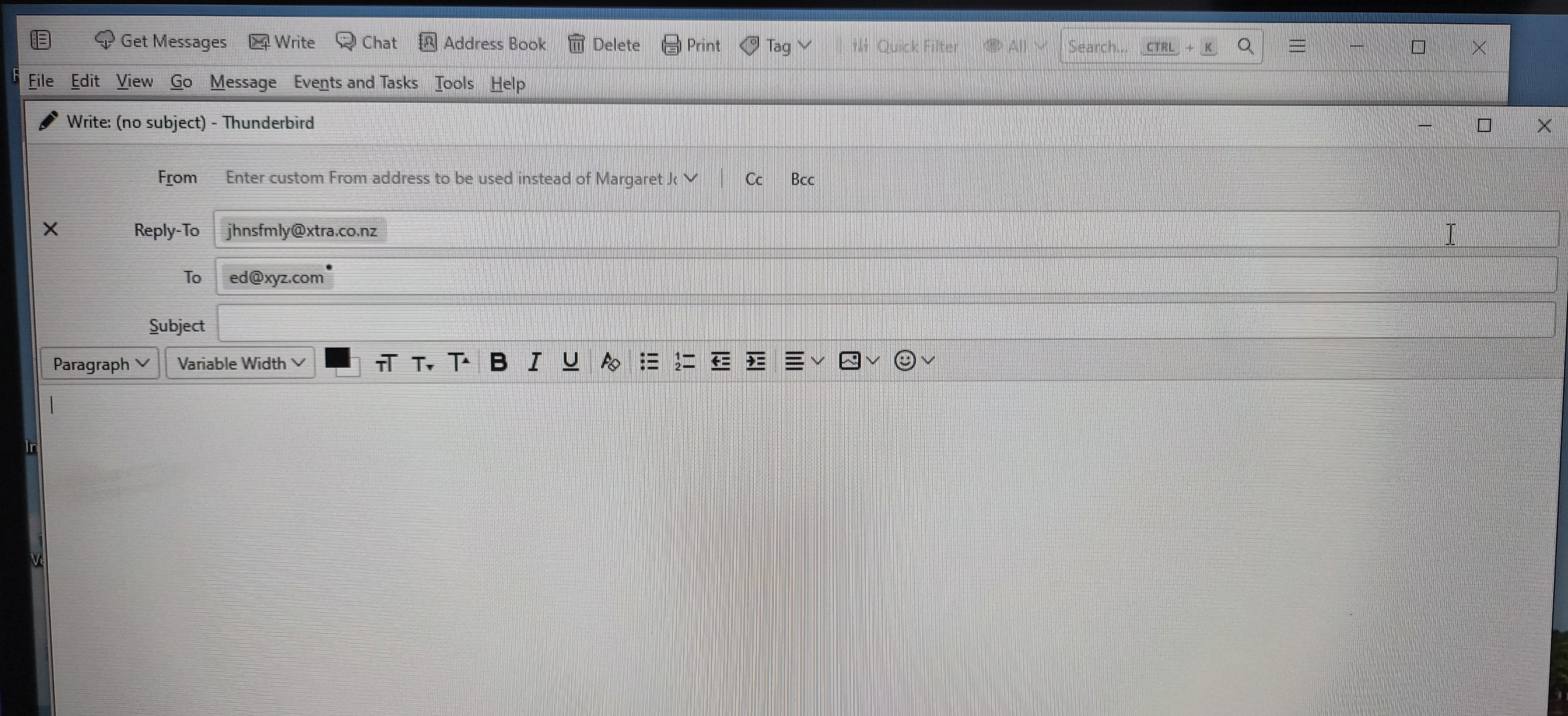
It looks to me like you have the Composition Toolbar hidden, as I suggested earlier.
While in the Write window.
- Press <Alt> to reveal the menu bar.
- Click the menu option <View | Toolbars > and check "Composition Toolbar". You might consider also checking "Menu Bar" so all options are more easily available, unless screen space is at a premium.
Baca jawaban ini dalam konteks 👍 1Semua Balasan (7)

I don't completely understand your description, but as far as I know, the "Send Later" button is only available when you are in offline mode. If you are online, that button is replaced by the "Send" button. Check the menu option <File | Offline> and see of "Work offline" is checked.
This also might happen if you lose network connectivity.
I have checked and am definitely not offline. Emails are coming in okay I just have no SEND button anywhere in the menu - I have checked all the lists but cannot find a SEND button. (I can write replies and new messages and save them to draft but just cannot send them.)
Is the Composition Toolbar visible? If it's hidden, you can reveal it from the Write window menu <View | Toolbars>. If the toolbar is visible but the Send button is missing, you can add it by choosing Customize from the above menu. Buttons can be dragged onto and off of the toolbar from there.
Still can't find the SEND button anywhere - have tried both suggestions (one from Ed as well). The email/computer is not offline and I have checked all the settings and menus but still can't find the SEND button. (I'm using Thunderbird 140.8.0 esr).

Please do this:
- start a new message
- address it to ed@xyz.com
- click your address in the From field > choose 'Customize From Address'
- press the Delete key to erase your address
- post a screenshot of the whole top part of the screen
Solusi Terpilih
It looks to me like you have the Composition Toolbar hidden, as I suggested earlier.
While in the Write window.
- Press <Alt> to reveal the menu bar.
- Click the menu option <View | Toolbars > and check "Composition Toolbar". You might consider also checking "Menu Bar" so all options are more easily available, unless screen space is at a premium.