


Attaching photo from my phone (not iphone)

Just a couple hours ago I tried to attach a photo from my Samsung phone. I was successful doing so earlier today. Now I get this message and have no idea what to do? "C:\Users\Owner\Desktop\Jack.jpg could not be opened, because the associated helper application does not exist. Change the association in your preferences." Can you help?
Semua Balasan (21)
Someone sent you a link to a photo on their PC, which is not available. The error was the sender's, not creating an attachment, but attempting as a link. Write back and request that the person send photo as an attachment.
I received this notice??? "Someone sent you a link to a photo on their PC, which is not available. The error was the sender's, not creating an attachment, but attempting as a link. Write back and request that the person send photo as an attachment"
Hopefully you know how to deal with it??
Is there any part that you did not understand? Let me know.
I think I understand better now. I am attempting to describe a problem I am having attaching a photo from my Samsung (with the phone's permissions) to an email I am attempting to send using Thunderbird. As noted in my original post, I had successfully done so a couple hours earlier but am now receiving the quoted notification (my original post). Thank you

How did you try to attach the photo? You should not need a helper application to *attach and send* files. That message appears when a user tries to *open* an attachment and Thunderbird does not know which application to open it with.
Following the error message anyway:
Go to Thunderbird settings > general > files & attachments. Is there a helper application listed for jpg files? If not, add one by opening a jpg attachment in a message, telling Thunderbird to open it, which application to use.
Now Thunderbird has an association between jpg files and a helper application. See if that makes a difference when you are trying to attach and send. I don't know why it would.
My skill level really poor.. How do I get to Thunderbird settings? (using Windows 10)
Press the alt key to show the menu. Then I do not know where the settings menu option is on Windows. Under a “Thunderbird” menu?
You could also click on the three-lined button at top right and find settings.
There is a jpg image support app there (attached) When I send a jpg from another email, it is received as a .dat? Checked back to originating source, it is being sent as .jpg???
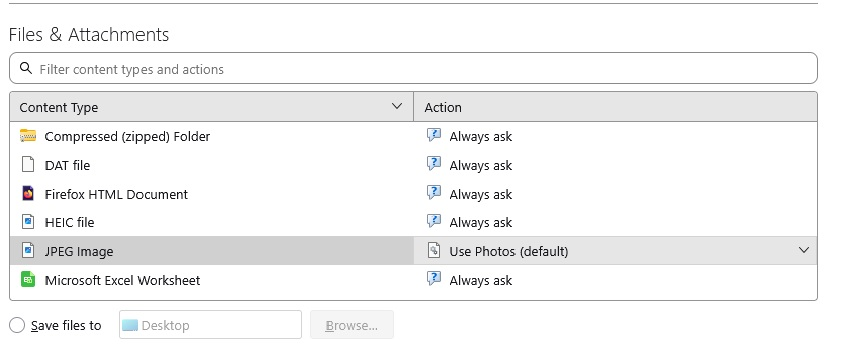
I opened an old email with a jpg attachment.. it opened fine. still not able to attach a .jpg to an outgoing email??? Will deleting and reloading Tbird help?
No, do not re-install.
How are you trying to attach the file?
Clicking attach button (upper L), open phone, scroll to photo, select. I also attempted to attach a file from my PC using a gmail address through Tbird. Same problem.
Sent a .jpg from my go-daddy address. It arrived as a .dat It appears the problem is in Tbird..
I don't mean to interfere, but I am confused. Are you attempting to send a photo from your phone or from your PC? I see text in this thread that refers to both. Your first post indicated sending from a phone, but the link you posted was from a PC. Is the photo on the phone or on the PC? Thank you.
david said
I don't mean to interfere, but I am confused. Are you attempting to send a photo from your phone or from your PC? I see text in this thread that refers to both. Your first post indicated sending from a phone, but the link you posted was from a PC. Is the photo on the phone or on the PC? Thank you.
David, help is always welcome.
I too was confused. Russl1, was C:\Users\Owner\Desktop\Jack.jpg on your phone or are you describing two unrelated situations? — 1) you cannot attach a photo from your phone, and 2) you received a message about C:\Users\Owner\Desktop\Jack.jpg?
Thunderbird on my Mac cannot access photos on my iPhone through the attach function. Russl1, have you been able to do it with your computer and phone before? What happens when you try now?
How does one "attach a file from my PC using a gmail address through Tbird"? I do not understand that process.
Usually, one would attach a file that is on a computer drive — local internal, local external, or cloud.
Sent a .jpg from my go-daddy address. It arrived as a .dat.
You sent a photo from one of your accounts to another? How did you attach that photo?
If you use the simple scenario of attaching a photo that is on your desktop, can you send it and receive it successfully?
Diperbarui oleh Rick pada
I am attempting to attach a .jpg to an outgoing email using my PC. My phone was the original photo source. During this discussion, I have attempted to attach a .jpg from my PC. Same result.
As noted, to further confuse the issue an email (received via Tbird), sent from a go daddy account with a jpg attachment is being received as a .dat attachment.
Would you please try attaching a photo in troubleshooting mode (under the help menu) and report what happens?
To answer Rick's questions: I have been able to attach photos from my phone and/or PC until yesterday afternoon. In fact I had attached a couple photos earlier in the day before I suddenly could not. This has resulted in this discussion.
I have a business email through microsoft/Go Daddy that is completely separate from my Tbird system. That allows me to send from an independent source. This is how I sent an email with a .jpg attachment that is being received through Tbird as a .dat.
I am unable to attach a .jpg to an outgoing email through the Tbird system. This is regardless of whether the .jpg is from my phone or PC
I just attempted to attach under the trouble shooting mode.. same result
russl1 said
I just attempted to attach under the trouble shooting mode.. same result
If you mean that you tried to attach a photo that was on your computer and Thunderbird reported that " ...could not be opened, because the associated helper application does not exist. Change the association in your preferences", then I am stumped.
What version of Thunderbird are you using? Have you always been able to attach files until recently?
Always (until yesterday afternoon) able to attach files (once I learned how to access on my phone). I don't know how to find Tbird version, however, it has been updated within the past few months... so not old.
One place to find the version is Help > Troubleshooting information, near the top.
This may be the answer: https://support.mozilla.org/en-US/questions/1544386