


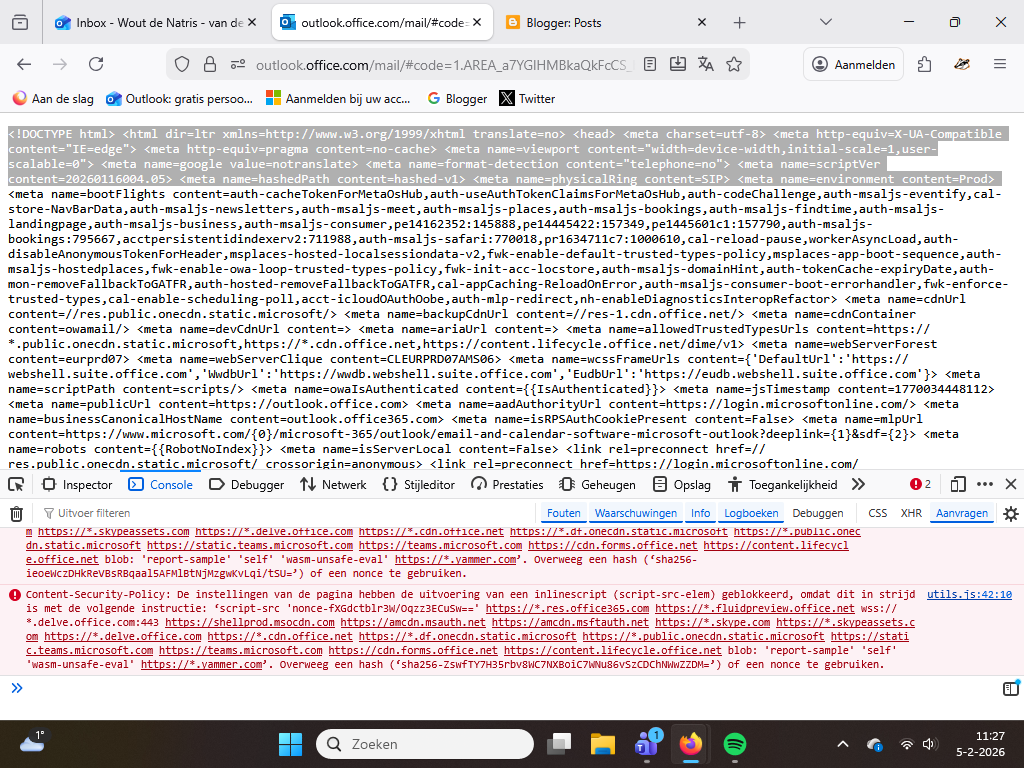
My email account on my desktop is stuck in html mode.

Hi,
Since Monday my account (as logged in with here) is stuck in HTML mode. It happened after an email would not open and I used the back arrow to go back to my inbox. Instead of arriving there, I got the html code. I've tried several options advised by Microsoft 365, to no avail. My sys admin said it was most likely a browser issue, so I hope you can help me with the action to get my account back. The issue is only on my desktop and I can access the account there using another browser. See attachement as example. Please advise.
Kind regards,
Wout
P.S. Latest version Firefox, whatever the number is.
Solusi terpilih
U zou eens kunnen proberen om cookies en de buffer voor outlook.office.com te verwijderen. Hierdoor wordt de boel feitelijk ‘gereset’. U moet dan wel weer opnieuw aanmelden, maar hopelijk verhelpt het uw probleem. Zie Cookies en websitegegevens wissen in Firefox.
Baca jawaban ini dalam konteks 👍 0Semua Balasan (2)

Solusi Terpilih
U zou eens kunnen proberen om cookies en de buffer voor outlook.office.com te verwijderen. Hierdoor wordt de boel feitelijk ‘gereset’. U moet dan wel weer opnieuw aanmelden, maar hopelijk verhelpt het uw probleem. Zie Cookies en websitegegevens wissen in Firefox.