


I have lost the bar across the top of my firefox screen.

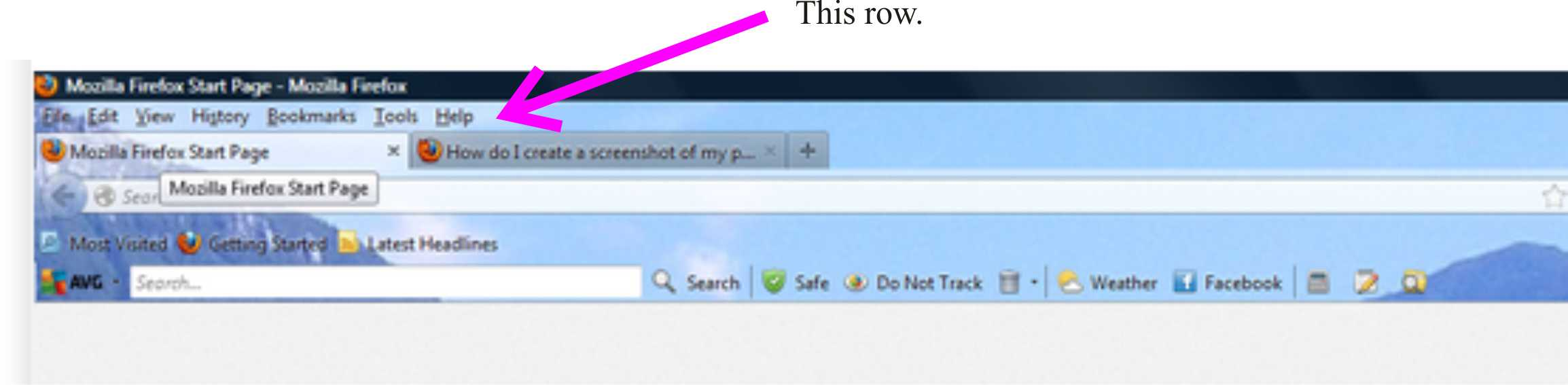
Hello, Until the weekend, my firefox home screen has a row or bar across the top that had File - Edit - View - Bookmarks - Tools - etc. (see 'firefox' image attached) Now that row is gone (see second screenshot) Can someone tell me how to get it back please? I tried searching for this but, as I have no idea what this row is called, I came up blank. Thanks Chris
Hello, Until the weekend, my firefox home screen has a row or bar across the top that had File - Edit - View - Bookmarks - Tools - etc. (see 'firefox' image attached)
Now that row is gone (see second screenshot)
Can someone tell me how to get it back please?
I tried searching for this but, as I have no idea what this row is called, I came up blank.
Thanks
Chris

Solusi terpilih
Hi Chris
This support article should help:
https://support.mozilla.org/en-US/kb/restore-menu-bar-firefox
Baca jawaban ini dalam konteks 👍 0Semua Balasan (2)
Solusi Terpilih
Hi Chris
This support article should help:
https://support.mozilla.org/en-US/kb/restore-menu-bar-firefox
Hi Paul, So, it's called a menu bar eh? Simple when you know how :) All fixed and thanks heaps for your help. Chris