Quick filter gets stuck for a long time while searching

Hi, when using the quick filter, after entering the sender's name, for example, I first see a few emails and an hourglass symbol. It finds all my emails within about a minute or two, but until then, Thunderbird is very slow. Until recently, it managed to do it in a few seconds, and if I start it in safe mode, it searches fine in a matter of seconds. I don't have any add-ons and I don't have any themes. I tried the procedure in BUG 1908761 with adding and sorting by order received, unfortunately without success. Do you have any tips on what to try?
Semua Balasan (2)
Globálna databáza je indexovací systém umožňujúcí Thunderbirdu vyhľadávať v správach. Znovuvytvorenie globálnej databázy preindexuje správy a vizitky z adresára. (Správy z konferencií nie sú indexované.)
Postup znovuvytvorenia globálnej databázy: - Ukončite Thunderbird. - Vyhľadajte vo svojom profile Thunderbirdu súbor global-messages-db.sqlite - Odstráňte tento súbor. - Spustite Thunderbird. Automaticky sa začne proces vytvárania indexu. V závislosti na počte správ môže indexácia trvať dosť dlhý čas. Počas indexácie môžete Thunderbird používat, iba bude znížený jeho výkon a vyhľadávania prinesú iba čiastočné výsledky, alebo dokonca žiadne. Proces indexácie môžete sledovať v Správcovi aktivít (ponuka Nástroje > Správca činnosti).
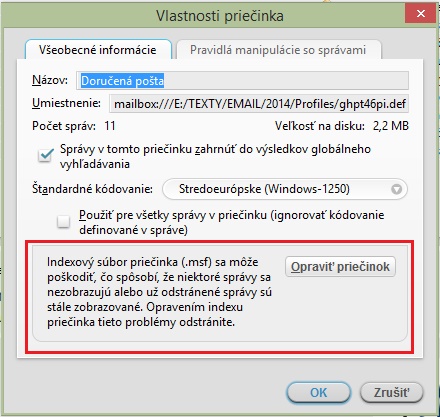
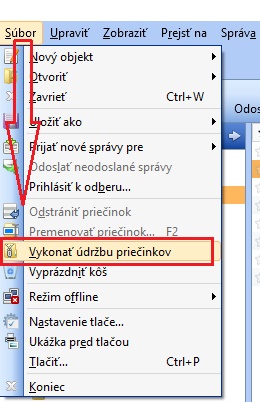
V mnohých prípadoch pomôže opraviť priečinok, - kliknite na priečinok pravým tlačidlom myši a zvoľte "Vlastnosti" a zvoľte "Opraviť priečinok": http://imgbank.cz/images/2014/09/23/Thunderbird_opravit_priecinok.jpg - postupne opravte aj ostatné priečinky Potom je nutné ešte "Vykonať údržbu priečinkov".: - Thunderbird - Súbor - Vykonať údržbu priečinkov: http://imgbank.cz/images/2015/08/19/Thunderbird_udrzba_priecinkov.jpg