


when I type direct into the address bar, my first ever search always populated.
Eg if I type 'firefox' the following comes up in a google search bar: Lens clean Dublin firefox
Semua Balasan (5)
Hi
Yes, this is coming from your keyboard application trying to be helpful. The easiest way to clear this history is:
- Open the Settings app (typically a cogwheel icon)
- Open Applications
- Find the keyboard application (the default Google one is call GBoard)
- Select Clear Data
This resets the keyboard app completely.
I hope this helps.
Thanks Seburo, unfortunately that didn't work
Hi, what do you mean by
Eg if I type 'firefox' the following comes up in a google search bar: Lens clean Dublin firefox
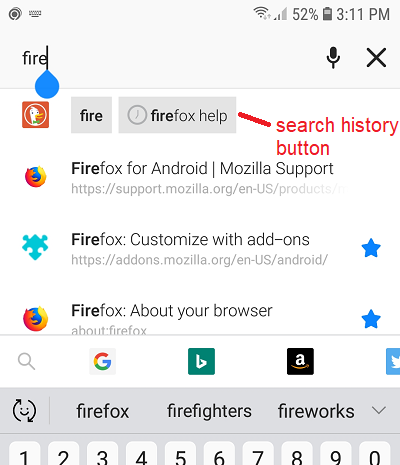
Is it a search history item? Those show up with a little clock face icon below the Firefox address/search bar at the top of the screen and work as a one-tap search button:

The only way I know to remove those is to clear all of your search and form history through the "Clear private data" feature. See: Clear your browsing history and other personal data on Firefox for Android.
Thanks but that doesn't work either :( I'm convinced its a Firefox issues :(
markysparky said
Thanks but that doesn't work either :(
Is the example in my screenshot the same kind of thing you are seeing? Yours is a Firefox search history match?
I'm convinced its a Firefox issues :(
I was showing a screenshot of Firefox and giving you a support article for a menu command in Firefox, so I think we are in agreement on this. However,
menu button > Settings > Clear private data > check the box for Search History, uncheck the others > tap Clear Data
should take care of it.