


Disable the code overview in the Inspector?
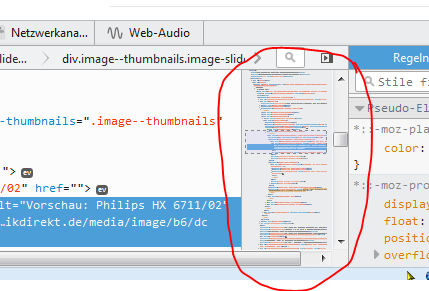
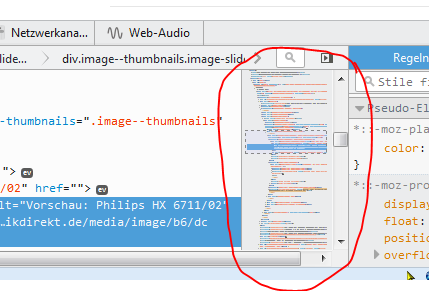
This little preview / overview / miniature view of the markup code is getting in my way and I can't figure out how to get rid of it... It feels like I'm overlooking something rather obvious, but... alas, here I am, I can't find anything.
FF v42.0 on Win7
Diperbarui oleh Benjamin Philipp pada
Solusi terpilih
I think I found it, but I don't know how it got turned on.
(1) In a new tab, type or paste about:config in the address bar and press Enter/Return. Click the button promising to be careful.
(2) In the search box above the list, type or paste DEVT and pause while the list is filtered
(3) Double-click the devtools.inspector.markupPreview preference to restore it to its default value of false
(4) If the Inspector is currently open in a tab, close it and re-open it so the change takes effect
Does that work for you?
Baca jawaban ini dalam konteks 👍 1Semua Balasan (4)
For F's sake, it didn't upload my picture.... Circle just kept spinning, and now it's not there.
Here it is (hopefully)
Edit: ...now that I managed to upload the screenshot on the original answer I'd like to delete this reply. But it seems I can't.
Diperbarui oleh Benjamin Philipp pada
Solusi Terpilih
I think I found it, but I don't know how it got turned on.
(1) In a new tab, type or paste about:config in the address bar and press Enter/Return. Click the button promising to be careful.
(2) In the search box above the list, type or paste DEVT and pause while the list is filtered
(3) Double-click the devtools.inspector.markupPreview preference to restore it to its default value of false
(4) If the Inspector is currently open in a tab, close it and re-open it so the change takes effect
Does that work for you?
jscher2000 said
restore [...] devtools.inspector.markupPreview [...] to FALSE
[...] Does that work for you?
Yes! Thank you, it's been nagging me the whole time :)
Diperbarui oleh Benjamin Philipp pada
See also "Inspector Preferences":