


After upgrade to v 29 I now get "Access denied" page going to many pages

Hello, I just upgraded to Firefox 29, restarted the browser and now get a page showing "Access denied" attempting to access many pages. For example I get "Access denied" when trying to go to any of: http://www.reddit.com/, http://oss.sheetjs.com/, http://www.techtalkshub.com/how-to-write-clean-testable-code/, http://www.techtalkshub.com/essence-c-examples-c84-c98-c11-c14/. This did not happen prior to the upgrade to v29. This does not happen on, for example, google.com, linkedin.com I'm on Windows 7
Wubrane rozrisanje
I would try clearing your cookies and cache first then try the "No proxy settings" if clearing the cache doesn't work.
Tutu wotmołwu w konteksće čitać 👍 0Wšě wotmołwy (5)
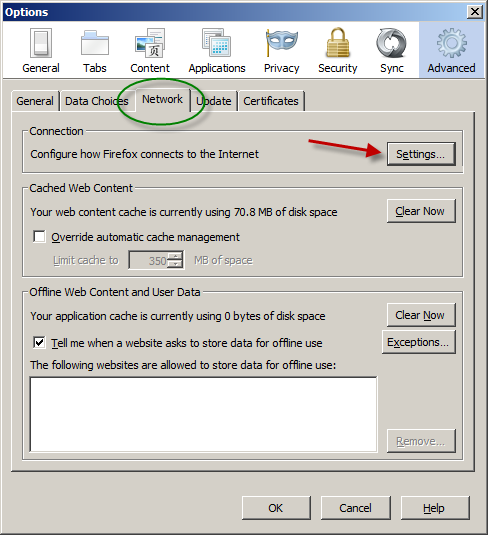
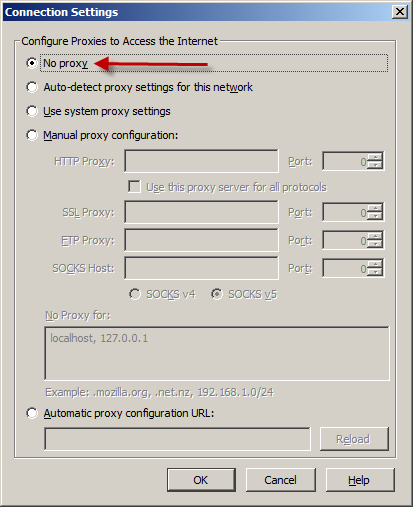
Try changing your proxy settings like this: Firefox button (or Tools menu) > Options > Advanced > "Network" mini-tab > "Settings" button then select the "No Proxy" option
Wot cryptochange změnjeny
Wubrane rozrisanje
I would try clearing your cookies and cache first then try the "No proxy settings" if clearing the cache doesn't work.
This fixed the issue. I'm behind a corporate firewall so my proxy settings need to be "Use system proxy settings" which was in conflict with an earlier reply to this post. Thank yo
Glad that I was able to help :)
This question has been locked because the original author has deleted their account. While you can no longer post new replies, the existing content remains available for reference.