


Synchronization with a dead pc

I reinstalled the OS 'cause of problems with my PC. New Firefox has no sync by a Firefox Sync key. How can I take my bookmarks back?
Wubrane rozrisanje
in this case you'd probably have to download the prior firefox version, disable automatic updating for the moment (in options > advanced > update), link it to the old sync account and upgrade after you have successfully restored your data this way...
Install an older version of Firefox
Tutu wotmołwu w konteksće čitać 👍 1Wšě wotmołwy (6)
Should be able to go to the little icon on the top right and see a little section that says Sign in near the bottom of the drop down menu.
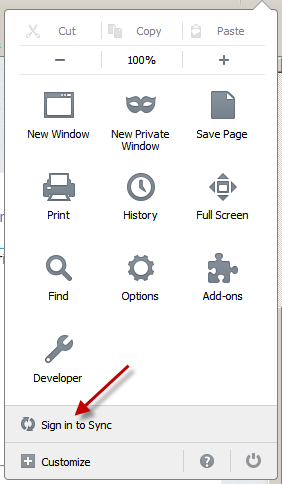
Sorry, this is a better representation to what I was saying

The problem that there's only a new sync, and my bookmarks was synchronized by the old one (that used a Firefox Sync Key).
Wubrane rozrisanje
in this case you'd probably have to download the prior firefox version, disable automatic updating for the moment (in options > advanced > update), link it to the old sync account and upgrade after you have successfully restored your data this way...
Found this little gem for ya: How to update to the new Firefox Sync
Wot cryptochange změnjeny
Thank you, it worked!