I've read through this entire thread but none of this is working for me. If I right click (control-click on mac) to customize, there is nothing to drag to the t

If I right click (control-click on mac) to customize, there is nothing to drag to the toolbar to re-populate it. I dragged the dark star on the white rectangle but it had no effect. (Not sure what that icon is supposed to do.)
The only way I can see the toolbar bookmarks is to put them in a sidebar, which takes up an inordinate amount of space.
If I right click (control-click on mac) to customize, there is nothing to drag to the toolbar to re-populate it. I dragged the dark star on the white rectangle but it had no effect. (Not sure what that icon is supposed to do.)
The only way I can see the toolbar bookmarks is to put them in a sidebar, which takes up an inordinate amount of space.
Wšě wotmołwy (1)

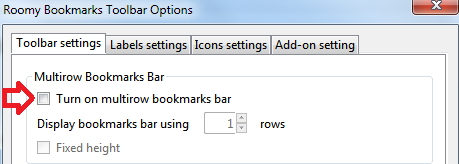
Thank you sheilakc and cor-el, I just upgraded to firefox 27 and my bookmarks disappeared from the bar. Thanks to you, I discover it was a problem with Roomy addon. Unchecked this option and the bookmarks was back again.