


Incomplete Import From Windows to Mac

I'm moving from Windows to Mac. I exported my Profile from the Windows setup to a ZIP. The import to the Mac seemed to go smoothly but the result is I got all my custom headings I'd nested under Inbox (etc.) but none of the contents. The ZIP is well over 1 gig in size so clearly the export caught all but none of the contents imported. '
For example, under Inbox I created a Heading named Receipts that was populated by receipts from purchases. The import added that heading but none of the emails under that Heading.
I tried simply copying the Profile file from the Windows profile folder to the Mac profile folder but that clearly did not work.
I'm on the edge of desperation here. I'd greatly appreciate any and all help.
Wšě wotmołwy (5)
Wubrane rozrisanje
If you still have access to the PC I propose to copy the "xxxxxxxx.default-release" (or ..... -default) profile folder from the Thunderbird folder in ....\AppData\Roaming\Thunderbird\ Profiles\ on an USB stick without compacting it.
• Transfer the profile folder on your Mac and keep it temporarily on the Desktop.
• Open a Finder window, in the menu bar click on "Go", press the Alt ⌥ (Option) key and select "Library" in drop-down menu. The user Library will now be displayed in the Finder window.
• Navigate from Library to Thunderbird > Profiles > and drag & drop the migrated profile folder from the Desktop in the folder Profiles.
• Now start Thunderbird, go to Help > Troubleshooting Information > Profiles > about:profiles: this will open a new tab "About Profiles" which contains the Thunderbird profile manager
• in this tab click "Create a New Profile" in the upper left corner; this opens the "Create Profile Wizard" box
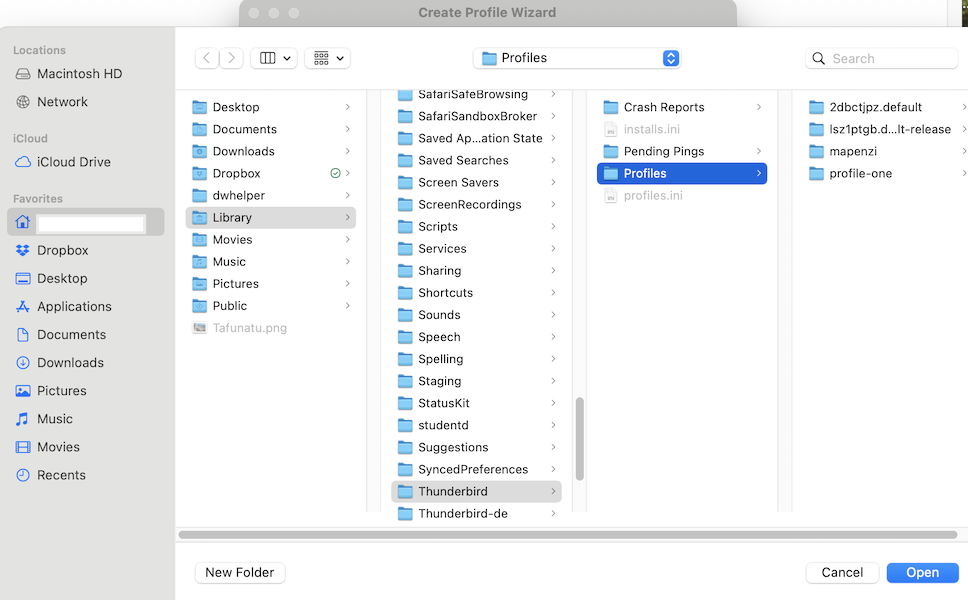
• click "Continue", give a name to the new profile (in my picture I call it "Import") and click "Choose Folder"
• this opens a Finder window in which you must navigate to your imported profile folder in Profiles: select the profile folder and click "Open" (see picture)
• the Finder window closes and you are back in the Create Profile Wizard box where you have to click on "Done"
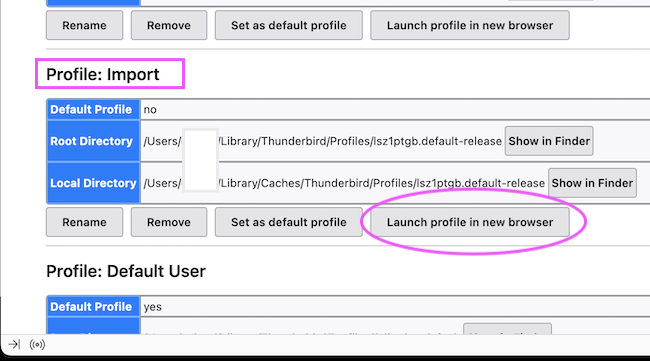
• the Create Profile Wizard box will close and you are back in the About Profiles tab: look for your newly created profile which contains all your data from your Thunderbird installation on the PC and click the button "Launch profile in a new browser" . This means that you will open the profile in a new Thunderbird instance. Do not wonder that it opens in the background....
If you are sure that your migrated profile contains all your accounts, folders messages, address books, settings, ...etc you can open the About Profiles tab and set the imported profile as "default profile"
Wot Mapenzi změnjeny
Thank you for this detailed reply. I will try it tomorrow when I return and then post my results. Again, thanks. Until tomorrow...
Before you go too much further, check Error Console (command+shift+J) for errors.
Mapenzi's solution solved my problem. I was so relieved to find my data recovered that I almost....in my pants. I want to thank Mapenzi openly in the forum.
Wayne Mery: I checked the error console finding nothing probative.
All: the problem stemmed from the Mac malfunctioning which required a wipe then reinstall of MacOS. I could not get a full data restoration using the export / import routine. I'd like to know what, short of the process outlined by Mapenzi would work if this were to recur. I was both surprised and disappointed by this failure.
Edit:
Is is OK for me to delete the old copy of Thunderbird? Seems to me to be all right but I'm in super cautious mode. Again, thanks.
Wot Paul Cassel změnjeny
Paul Cassel said
Mapenzi's solution solved my problem. I was so relieved to find my data recovered that I almost....in my pants. I want to thank Mapenzi openly in the forum.
Know the feeling.
Paul Cassel said
Wayne Mery: I checked the error console finding nothing probative.
Thanks for checking.
Paul Cassel said
All: the problem stemmed from the Mac malfunctioning which required a wipe then reinstall of MacOS. I could not get a full data restoration using the export / import routine. I'd like to know what, short of the process outlined by Mapenzi would work if this were to recur. I was both surprised and disappointed by this failure.
I don't know why zip failed. But I can share with you the principle we use in business. At a minimum (we sometimes do more than the minimum) is two different backups should be taken, preferable using different tools/methods and not to the same backup location. Do both on a regular basis. And ideally also frequently test that the restore process works - if you don't test then a) you don't know that you have the skills to restore, and b) you don't know that the backup is any good.
Paul Cassel said
Is is OK for me to delete the old copy of Thunderbird? Seems to me to be all right but I'm in super cautious mode. Again, thanks.
After some period of time, when know you are fully satisfied and safe, sure.
Wot Wayne Mery změnjeny