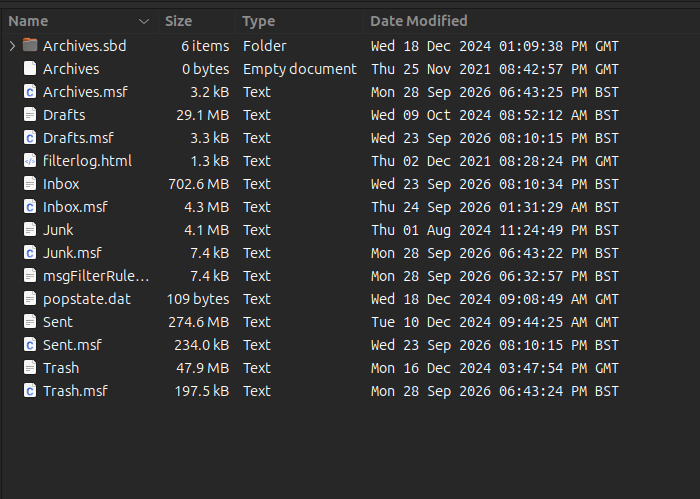
Thunderbird reinstall, cannot connect to recent profile. Appears to have installed in two locations.

Hi, hoping someone could help as I am struggling to get my information back. I am using Ubuntu Cinnamon.
Thunderbird crashed last night, wouldn't work, tried safe mode. Nothing fixed it. It hung when opening up and after 30 seconds said force quit. So I was forced to reinstall. I did a manual backup but not using the inbuilt tool as I couldn't get into Thunderbird. I just copied the data from username/.thunderbird
After spending a long time uninstalling. Because it reached 78% and then crashed on uninstall. Eventually after reading various pages on the internet I managed to reinstall from the Ubuntu software manager using the latest snap version. (Which I am not sure was what was actually installed previously).
However having used thunderbird for nearly 20 years or so. I have a username/.thunderbird folder. And when I moved to this platform, I have a snap/thunderbird/common/.thunderbird folder.
I installed this new distro 2 years ago, and remember having issues getting my data into the system under Snap. But eventually got it to work somehow back then.
However since reinstalling I cannot see the last 2 years of emails, archives or data. It has launched into a 2 year old profile. I appear to have lost most of the emails from the archive folders (but kept the folders) removed all of the personal folders but then dumped all those emails into my inbox. Giving me 6500 emails that were in various personal folders. (I don't get 6500 emails in a year so don't know what has happened.) It has even changed all of the new dates to the US format, so nothing makes any sense.
I now have 2 Thunderbird profiles, over 12GB in size. And have apparently lost 2 years of my life. But reading support pages, suggests I should be okay because thunderbird doesn't delete data when you reinstall?
I have looked through various other threads which talk about pointing it at the profiles and mail boxes, however nothing works.
Any help much needed.
Wšě wotmołwy (25)
Toad-Hall said
If you changed the account 'Local Directory' to say: ~/snap/thunderbird/common/.thunderbird/B6yonth6.default/Mail/pop.mail.yahoo-2.com Then it should have an Archives folder that contains 2021,2023 (both empty) and 2024 with some emails. It should be pointing to that location because that is the default profile. In Account Settings Select 'Local Folders' Look bottom right for Local Directory and confirm it points to:Just so we know it is pointing to the correct location. If you have both the account and the Local Folders pointing to correct location that is good.
- home/alistair/snap/thunderbird/common/.thunderbird/B6yonth6.default/Mail/Local Folders
Now to try and track down where any missing emails are lurking.
You mention you always like to keep archived emails in the 'Local Folders' - so What do you see in :
- home/alistair/snap/thunderbird/common/.thunderbird/7dgsf2wp.Main/Mail/Local Folders
Post an image showing all contents of that 'Local Folders' folder.
In the beginning you mentioned :I just copied the data from username/.thunderbird
Perhaps it would be useful to know what is in that location. Access your copied username/.thunderbird' folder Post image showing contents so we can names of profiles.
check each profilename/Mail/Local Folders folder Do you see any mention of 'Archives' and Archives.sbd' folders ? Do any contain dates of missing years and do they contain emails? Post an image of any containing the missing files and folders.
re :I appear to have lost most of the emails from the archive folders (but kept the folders) removed all of the personal folders but then dumped all those emails into my inbox. Giving me 6500 emails that were in various personal folders. (I don't get 6500 emails in a year so don't know what has happened.)
Can you confirm that the Inbox emails are not any you would have archived ? The Inbox emails are only emails you would sort into personal created folders.
Hi, sorry I was busy for the weekend.
Attached is the screenshot for snap-7dgsf2wp folder. There is no mail folder inside it.
"Perhaps it would be useful to know what is in that location. Access your copied username/.thunderbird' folder. Post image showing contents so we can names of profiles."
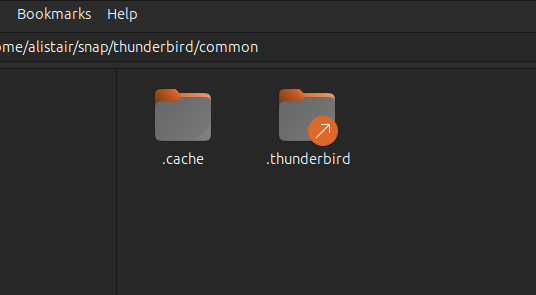
When looking at the snap/thunderbird/common. There is a redirect. (screenshot attached)
So the username/.thunderbird is the same as the snap/thunderbird/common/.thunderbird folder. I can test it by deleting something and it is removed in the other. So the contents are the same in each.
"Can you confirm that the Inbox emails are not any you would have archived ?
The Inbox emails are only emails you would sort into personal created folders."
I archive at the end of each year. So I would at the very least expect a 2025 archive folder which has gone. And then my inbox should have every email I have received during 2026. Which are all missing - This also includes those emails I would expect to have been 'sorted' as junk or message filters I have in place.
Did a deeper dive because I have a Googlemail address and my own domain. They are also dated upto the end of 2024. Nothing is recent. So all three mailboxes have lost everything post 12/18/2024.
That would suggest that it isn't just the inbox of yahoo, but the installation folder that is wrong because all mail boxes are broken.
I did a search for the inbox file and can only find the ones I expected. But there is also a /run/user/1000 folder. I added the screenshot.
Cheers
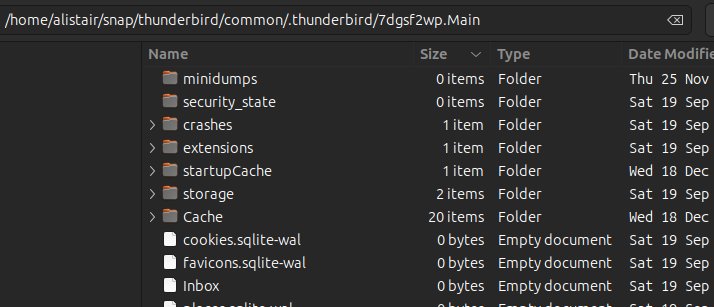

I've been looking at the various popstate.dat files and they seem to be 2 years old. Which means nothing was downloaded after that date into that profile.
You mention: Thunderbird crashed last night......... So I was forced to reinstall. I did a manual backup ........ I just copied the data from username/.thunderbird
You copied the original .thunderbird folder which had been created many years ago when you downloaded Thunderbird program from the Thunderbird download webpage.
re: What is missing is anything dated after December 2024. Which is when I installed Thunderbird on the machine with the new Distro.
But for last two years on Cinnamon Ubuntu did you reinstall Thunderbird from: https://www.thunderbird.net/en-US/thunderbird/all/
Or (2 years ago) did you install Thunderbird using Snap? If you were using Snap , you do not mention copying/backup of what was your current profile in the snap profile location.
If you used snap, then 2 years ago it would have set up a new profile in:
- home/alistair/snap/thunderbird/common/.thunderbird/
Did you remove it before reinstalling the recent Thunderbird from snap ? Or did you reinstall and overwrite contents ?
Or(2 years ago) did you install Thunderbird using Flatpak ?
If you used Flatpak, then 2 years ago it would have set up a new profile in:
- ~/.var/app/org.mozilla.Thunderbird/.thunderbird
Check to see if you have anything in that location.
What exactly have you got stored in:
/run/user/1000/doc/64900eco/pop.mail.yahoo-2.com ?
please post Images of contents
re :When looking at the snap/thunderbird/common. There is a redirect. (screenshot attached)
When did you set that up ? Was that something you set up 2 years ago or more recently ?
You do not need to do a redirect. You just needed to copy this .thunderbird folder : username/.thunderbird And paste it into the 'common' folder: home/alistair/snap/thunderbird/common
Then both are identical and independent. But from then onwards emails will go to the home/alistair/snap/thunderbird/common/.thunderbird location. That would be the .thunderbird folder you need for backups.
It makes it a lot easier to know exactly where emails are located and what to backup.
Toad-Hall said
re :When looking at the snap/thunderbird/common. There is a redirect. (screenshot attached) When did you set that up ? Was that something you set up 2 years ago or more recently ? You do not need to do a redirect. You just needed to copy this .thunderbird folder : username/.thunderbird And paste it into the 'common' folder: home/alistair/snap/thunderbird/common Then both are identical and independent. But from then onwards emails will go to the home/alistair/snap/thunderbird/common/.thunderbird location. That would be the .thunderbird folder you need for backups. It makes it a lot easier to know exactly where emails are located and what to backup.
Hi,
I never did a redirect (I don't know how) that was put back in on the (re)install. Until I started testing I assumed there was two separate locations for the files. Only through testing did I realise deleting a file in one, deleted it in the other.
Toad-Hall said
I've been looking at the various popstate.dat files and they seem to be 2 years old. Which means nothing was downloaded after that date into that profile. You mention: Thunderbird crashed last night......... So I was forced to reinstall. I did a manual backup ........ I just copied the data from username/.thunderbird You copied the original .thunderbird folder which had been created many years ago when you downloaded Thunderbird program from the Thunderbird download webpage. re: What is missing is anything dated after December 2024. Which is when I installed Thunderbird on the machine with the new Distro. But for last two years on Cinnamon Ubuntu did you reinstall Thunderbird from: https://www.thunderbird.net/en-US/thunderbird/all/ Or (2 years ago) did you install Thunderbird using Snap? If you were using Snap , you do not mention copying/backup of what was your current profile in the snap profile location. If you used snap, then 2 years ago it would have set up a new profile in:Did you remove it before reinstalling the recent Thunderbird from snap ? Or did you reinstall and overwrite contents ? Or(2 years ago) did you install Thunderbird using Flatpak ? If you used Flatpak, then 2 years ago it would have set up a new profile in:
- home/alistair/snap/thunderbird/common/.thunderbird/
Check to see if you have anything in that location. What exactly have you got stored in: /run/user/1000/doc/64900eco/pop.mail.yahoo-2.com ? please post Images of contents
- ~/.var/app/org.mozilla.Thunderbird/.thunderbird
I installed via snap. When it crashed I reinstalled from snap.
I didn't use flatpak and don't have that folder available to search.
The only oddity that I can think that might have broken things is I obviously re-installed the latest version which would have been a few versions more upto date.
Attached is my /run/user yahoo profile. I have already connected my mailbox to that and it is the same files in terms of emails for 2024.
It appears that the install via snap of Thunderbird has installed into a place that none of my backups have managed to save. I took one manual backup just before reinstalling from the place I assumed the data was stored.
The crash has broken something. Reinstalling has over written it and I have lost all my data.
The crash itself was thunderbird loading, then totally hanging when trying to open some previously opened emails. Then after about ten seconds coming up with the 'force quit' buttons. Giving me no options but to try a reinstall.