


Restoring previous profile

I want to restore a previous profile which I can see on File Explorer, but no previous profiles appear on the About Profiles page. How can I access this previous profile?
Wubrane rozrisanje
Finally solved this on my own by logging out of Firefox, then pressed Windows + R to open dialog box. Chose "Create" and a new name, then pasted the name of the profile I wanted to use into the file dialog. When I opened Firefox my correct profile had been restored.
Tutu wotmołwu w konteksće čitać 👍 0Wšě wotmołwy (2)
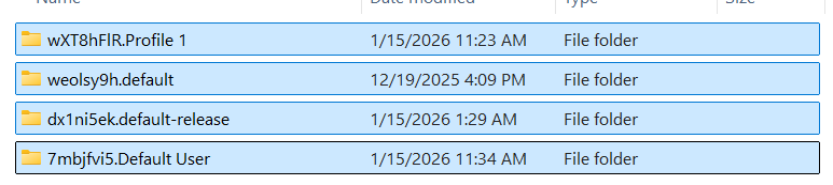
I want to use this file for my profile: dx1ni5ek.default-release.
I have attached a picture of my Profiles folder on File Explorer. Firefox is currently using 7mbjfvi5.Default User, and no other options are showing on the About Profiles page. Why am I not seeing the other three files shown here?
Wubrane rozrisanje
Finally solved this on my own by logging out of Firefox, then pressed Windows + R to open dialog box. Chose "Create" and a new name, then pasted the name of the profile I wanted to use into the file dialog. When I opened Firefox my correct profile had been restored.