


Windows 10 reached EOS (end of support) on October 14, 2025. For more information, see this article.

Pomoc přepytać

Hladajće so wobšudstwa pomocy. Njenamołwimy was ženje, telefonowe čisło zawołać, SMS pósłać abo wosobinske informacije přeradźić. Prošu zdźělće podhladnu aktiwitu z pomocu nastajenja „Znjewužiwanje zdźělić“.

Dalše informacije

Firefox for iOS Settings / Configuration / Integration

  • Žane wotmołwy
  • 0 ma tutón problem
  • 39 napohladow
dalše nastajenja

Greetings all,

The topic that best describes my question / challenge is Firefox browser settings- at least I hope there is setting for this. I have looked within Firefox and the appropriate iOS settings but I am coming up blank so far.

Important to note, the behavior I describe below is specific to Firefox for iOS. Using Safari, I get a different behavior -one that I used to see in Firefox.

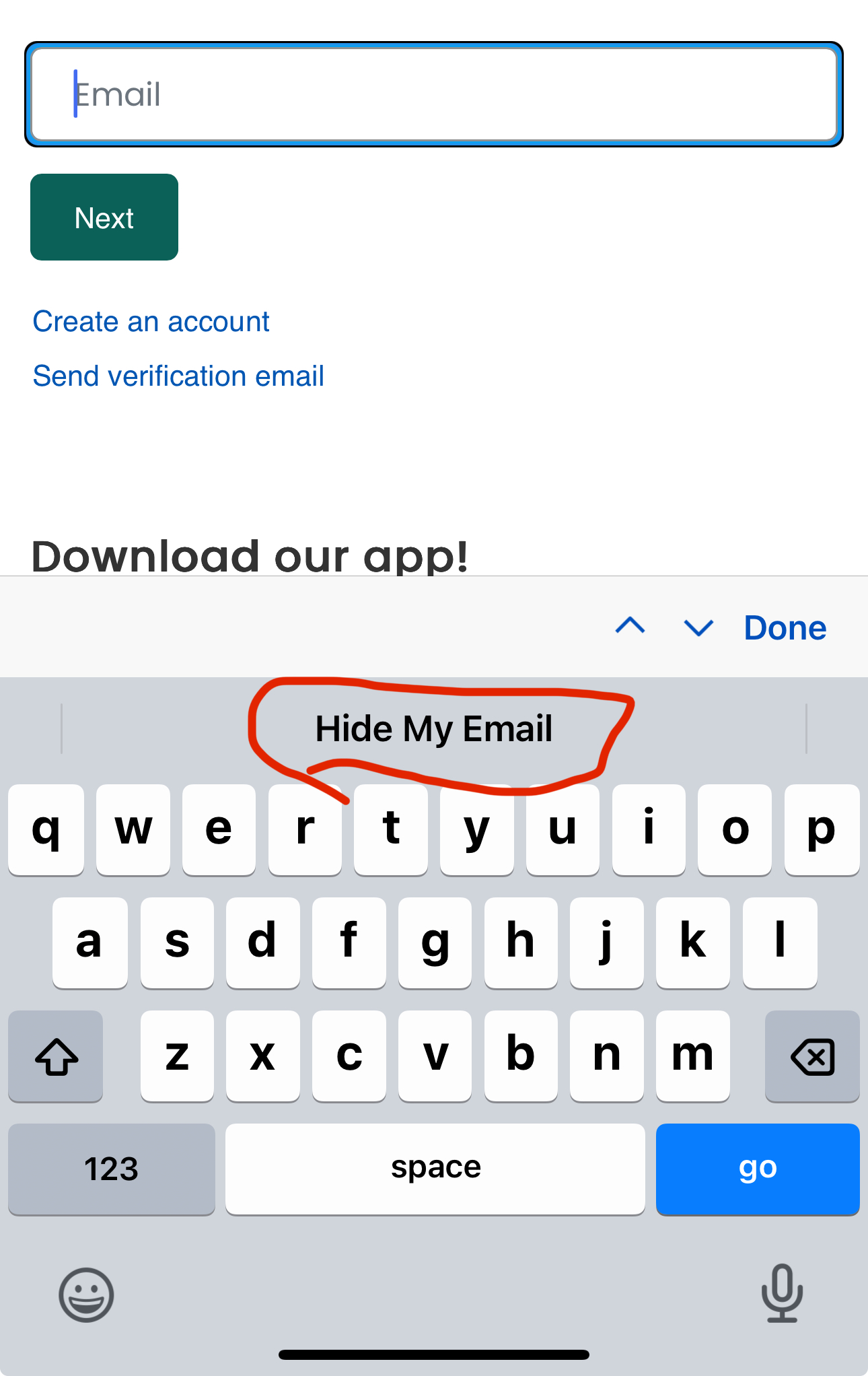
In the screenshot I have attached we can see a website offering the first portion of an authentication prompt: the field to enter an email address.

Placing the cursor inside the email address field -to select / activate it- the text ‘Hide My Email’ appears just above the keyboard. I have circled this in red to highlight what I am referring to.

What I used to see in this space is integration with my Password Manager of choice. Now I see ‘Hide My Email’ and I cannot figure out how to get the password manager back in there.

As I mentioned earlier, Safari is showing my password manager in this space -as expected- but Firefox is not.

I am not using ‘Hide My Email’ through iCloud+. I have not configured it within iOS, and I don’t see a way to turn it off.

Ideas?
Greetings all, The topic that best describes my question / challenge is Firefox browser settings- at least I hope there is setting for this. I have looked within Firefox and the appropriate iOS settings but I am coming up blank so far. Important to note, the behavior I describe below is specific to Firefox for iOS. Using Safari, I get a different behavior -one that I used to see in Firefox. In the screenshot I have attached we can see a website offering the first portion of an authentication prompt: the field to enter an email address. Placing the cursor inside the email address field -to select / activate it- the text ‘Hide My Email’ appears just above the keyboard. I have circled this in red to highlight what I am referring to. What I used to see in this space is integration with my Password Manager of choice. Now I see ‘Hide My Email’ and I cannot figure out how to get the password manager back in there. As I mentioned earlier, Safari is showing my password manager in this space -as expected- but Firefox is not. I am not using ‘Hide My Email’ through iCloud+. I have not configured it within iOS, and I don’t see a way to turn it off. Ideas?
Připowěsnjene fota wobrazowki