


Bookmarks Toolbar will not show up.

I have recently got a new work laptop and have imported my bookmarks and passwords. However, I am unable to get the bookmarks toolbar to show up? The usual way of enabling it to always show or only show on new tabs doesn't work and I have a message on the toolbar that says "For quick access, place your bookmarks here on the bookmarks toolbar. Manage Bookmarks..." But nothing works. Please can you assist as it is driving me nuts.

Wšě wotmołwy (10)
Try "Restore Defaults" in the customize page.
I have tried restoring defaults and all other suggestion that I could find online but nothing helps.
If anyone has encountered this or has any suggestions that could help me resolve this issue, I would greatly appreciate it.
Make sure toolbars like the "Bookmarks Toolbar" are visible.
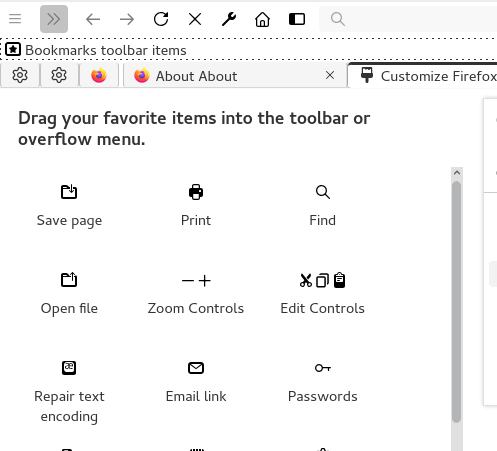
Open the Customize page and set what toolbars (Show/Hide Toolbars) and toolbar items to display.
- Right-click empty toolbar area => Customize
- "3-bar" menu button => Customize
- View -> Toolbars
*you can tap the Alt key or press the F10 key to show the hidden Menu Bar temporarily
- check that "Bookmarks Toolbar Items" is on the Bookmarks Toolbar
- if "Bookmarks Toolbar Items" is not on the Bookmarks Toolbar, drag it back from the Customize page to the Bookmarks Toolbar
- if missing items are in the Customize palette, drag them back from the Customize page to the toolbar
- if you do not see an item on a toolbar and in the Customize palette, click "Restore Defaults" in the Customize page to restore the default toolbar set.
You can check for problems with the places.sqlite and favicons.sqlite files in the Firefox profile folder.
- use the "Places Database" -> "Verify Integrity" button in "Help -> More Troubleshooting Information" (about:support)
If errors are reported with "Verify Integrity", close and restart Firefox or reboot the computer and retry.
I don't appear to have a "Bookmarks Toolbar Items" in the customize palette? All I have is Bookmarks Menu which isn't what I need? Even after I click Restore nothing turns up relating to Bookmark Toolbar Items. As I mentioned, I have the Bookmarks Toolbar enabled on the toolbar but for some reason it just won't show up like it did on the previous laptop.
You should see this in customize mode.
Do you see any bookmarks listed in the Bookmarks Toolbar folder if you check this folder in the sidebar (Ctrl+B) and in the Bookmarks Manager (Library; Ctrl+Shift+O)?
The Bookmarks Menu button  shows the bookmarks in a drop-down list.
The Bookmarks Menu button has a "View bookmarks sidebar" menu item.
shows the bookmarks in a drop-down list.
The Bookmarks Menu button has a "View bookmarks sidebar" menu item.
See "How do I add the Bookmarks Menu button to the toolbar?"
When you import using the "Import HTML file" method, Firefox might not always return your bookmarks to their original locations. Could you use the Bookmarks Sidebar (Ctrl+B) to see whether the missing bookmarks are under the Bookmarks Toolbar category at all, or whether they ended up in an Imported Bookmarks folder on the Bookmarks Menu or somewhere in Other Bookmarks? (If you need to move things around, the Library window (Ctrl+Shift+O as in Organizer) is easier.)

I just restarted my computer. On restart it didn't show the installing a new version of Firefox that I often get. After Firefox restarted all of my bookmarks have disappeared as with James. I have the same message where the bookmarks toolbar should be. I see bookmarks toolbar as an option. I can turn it off and on. I've tried importing from another browser, I have two others with similar bookmarks, and nothing happens. I have exported the bookmarks from the other browserts and the import doesn't work. I've tried dragging bookmarks onto the toolbar and that doesn't work. I've tried typing in the url of the site after clicking "mangage bookmarks" and I can type things in but not way to save it. I am at my wits end. I've stuck with Firefox since it came out in the early 2000's. I've stuck with it through all the problems but the bookmarks toolbar is something I use every single day, many times and it is vital to my work. I will need to switch to another browser until this is fixed.
Hi avery1317, could you use the Bookmarks Sidebar to check where your bookmarks are currently slotted -- Ctrl+B (or on Mac, Command+B). You should see three categories: Bookmarks Toolbar, Bookmarks Menu, Other Bookmarks. Where are the bookmarks that you want to see on your Bookmarks Toolbar -- anywhere?
Also, did you read the discussion in this thread about why the Bookmarks Toolbar might not show your bookmarks that are slotted under Bookmarks Toolbar in the sidebar? It involves the "Bookmarks Toolbar Items" control not being at the left end of the bar. You can check this on the Customize panel and if you aren't able to move it there, try the Restore Defaults button at the bottom of the panel.
Thanks jscher2000 for the quick response. I tried using customize the bookmark toolbar to no avail. Still now bookmarks to be seen. I clicked restore defaults and got some very strange screen with vertical dotted lines with a couple of my extension icons in the middle of the screen. The weirdest screen I've ever seen on a browser. At that point I just closed Firefox and restarted. Magically my bookmarks reappeared on the bookmarks toolbar. I should have done a restart. That seems to cure 75% of the digital ills. Thanks again for responding quickly.

jscher2000 - Support Volunteer said
Hi avery1317, could you use the Bookmarks Sidebar to check where your bookmarks are currently slotted -- Ctrl+B (or on Mac, Command+B). You should see three categories: Bookmarks Toolbar, Bookmarks Menu, Other Bookmarks. Where are the bookmarks that you want to see on your Bookmarks Toolbar -- anywhere? Also, did you read the discussion in this thread about why the Bookmarks Toolbar might not show your bookmarks that are slotted under Bookmarks Toolbar in the sidebar? It involves the "Bookmarks Toolbar Items" control not being at the left end of the bar. You can check this on the Customize panel and if you aren't able to move it there, try the Restore Defaults button at the bottom of the panel. Customize Firefox controls, buttons and toolbars
This was the solution for me! Mine disappeared with the update to 139.0.1. After dropping the "Bookmarks Toolbar Items" back on the toolbar it appeared right away.