


Thunderbird email setup settings don't work with office365 server in godaddy email

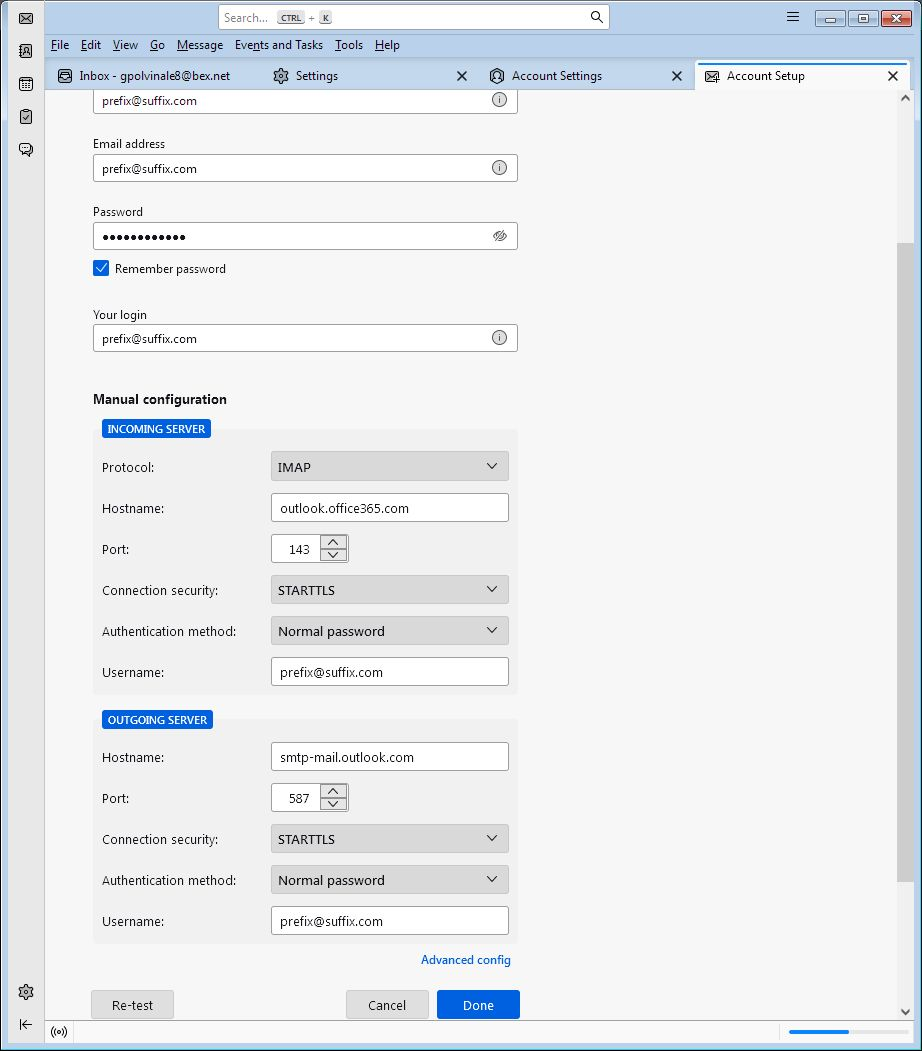
Thunderbird email setup settings don't work with office365 server in godaddy email. Their server wants STARTTLS with port 993. When I select STARTTLS in Thunderbird setup, the port changes automatically to port 143. This I can't connect to godaddy's IMAP mail server using Thunderbird email client. Is there a way to make it happen?
Wšě wotmołwy (1)
These are the settings godaddy advertise for their mail accounts. Perhaps enter them. https://au.godaddy.com/help/use-imap-settings-to-add-my-workspace-email-to-a-client-4714
If you are using office365 from godaddy read the instructions here https://au.godaddy.com/help/find-my-microsoft-365-server-settings-9012 Note there is not IMAP or POP settings for this Microsoft proprietary product you are paying for.
You can probably use the OWL addon to set up a 365 account in Thunderbird. They do provide a fee month for you to determine if it will do the job for you. See https://addons.thunderbird.net/en-US/thunderbird/addon/owl-for-exchange/