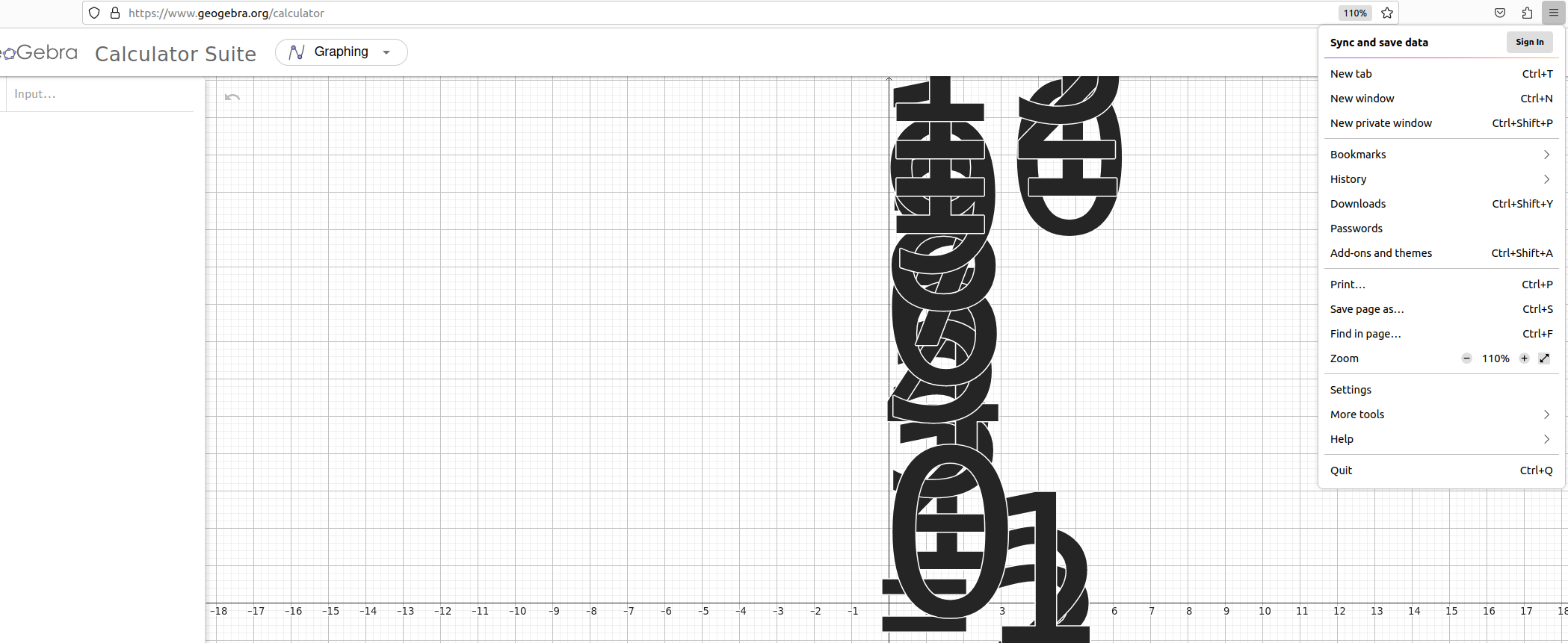
Zooming Font Size make unreadable some websites

Step to reproduce: 1. Open website https://www.geogebra.org/calculator 2. Check option in Settings -> General -> Zoom Text Only 3. Change Zoom. 120% for example. 4. Font are unreadable (axis numbers)
It's a render bug Firefox side or bug of proprietary NVIDIA drivers?
Wšě wotmołwy (3)
Can you attach a screenshot?
- https://support.mozilla.org/en-US/kb/how-do-i-create-screenshot-my-problem
- use a compressed image type like PNG or JPG to save the screenshot
Note that zooming with Zoom Text Only is not recommended as this doesn't enlarge containers and can cause issues with webpages that position text absolutely. This is similar with setting a minimum font size what also can cause problems. Best is always to use full page zoom.
1. Screenshot attached. 2. I have 4K display. And for me it optimal if graphical elements small, but fonts are increased. But I want find what is a problem. As I remember with Xorg (open source) NVIDIA drivers not have this problem.