


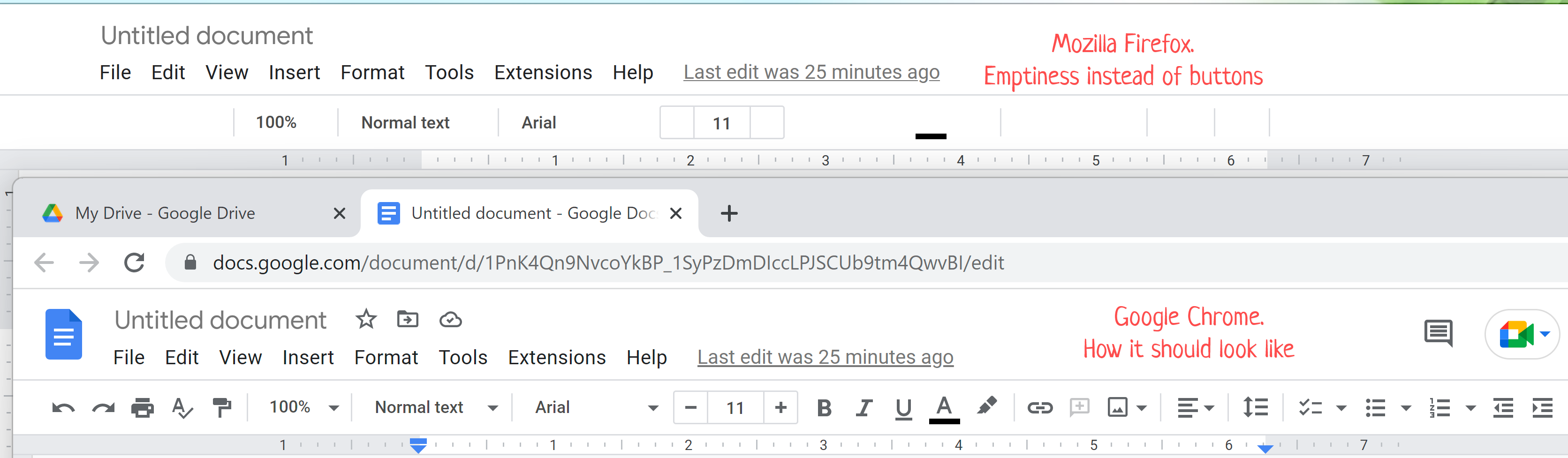
Google docs buttons disappeared in Firefox on my new laptop
Hi! I bought new laptop with windows 11, installed the last last version of Firefox, then opened Google docs file, but there were empty spaces instead of buttons. In google chrome it works properly. I tried to refresh many times, tried to delete all extensions, tried to install new Firefox and opened doc in just installed browser - I still have the same problem. I would be grateful for any advice.
Wšě wotmołwy (2)

How to Get the Toolbar Back in Google Docs Open your Google Docs document. Locate the two arrows at the top-right of the window. Click these arrows to restore the menu to view.
Regards, Will
This thread about the problem of Google Docs toolbar buttons disappearing at high zoom/scaling levels continues over here: https://support.mozilla.org/questions/1400638