


Windows 10 reached EOS (end of support) on October 14, 2025. If you are on Windows 10, see this article.

Pomoc přepytać

Hladajće so wobšudstwa pomocy. Njenamołwimy was ženje, telefonowe čisło zawołać, SMS pósłać abo wosobinske informacije přeradźić. Prošu zdźělće podhladnu aktiwitu z pomocu nastajenja „Znjewužiwanje zdźělić“.

Dalše informacije
Archiwowany

Quantities in inbox do not match what is displayed

wayne69

How do I change the display of the number of emails in the folder to just the ones unread? If I double-click on the folder it displays what I want, but I want it to stay displaying the unread number only. I need this so at a quick glance I can tell if new emails are in those Inboxes.

See the mailbox shows 194 (194 what?) doesn't allow me to determine that I have 1 or 2 new emails that had come in so I have to open up the mailbox each time to verify if any new emails had arrived. Also, there are only 27 emails in that mailbox so why is there a discrepancy between the 194 listed, the 27 that are actually there, and the 7 that are unread?
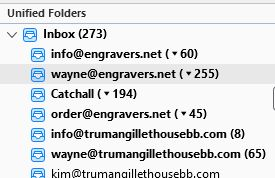
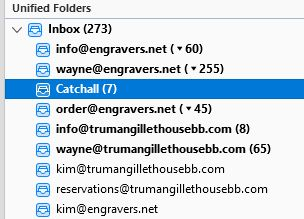
How do I change the display of the number of emails in the folder to just the ones unread? If I double-click on the folder it displays what I want, but I want it to stay displaying the unread number only. I need this so at a quick glance I can tell if new emails are in those Inboxes. See the mailbox shows 194 (194 what?) doesn't allow me to determine that I have 1 or 2 new emails that had come in so I have to open up the mailbox each time to verify if any new emails had arrived. Also, there are only 27 emails in that mailbox so why is there a discrepancy between the 194 listed, the 27 that are actually there, and the 7 that are unread?
Připowěsnjene fota wobrazowki

Wšě wotmołwy (1)

Is this a question about Thunderbird or about Firefox ?

If the question is about Thunderbird then we can move the question thread to Thunderbird Support.