


application on Generals tab
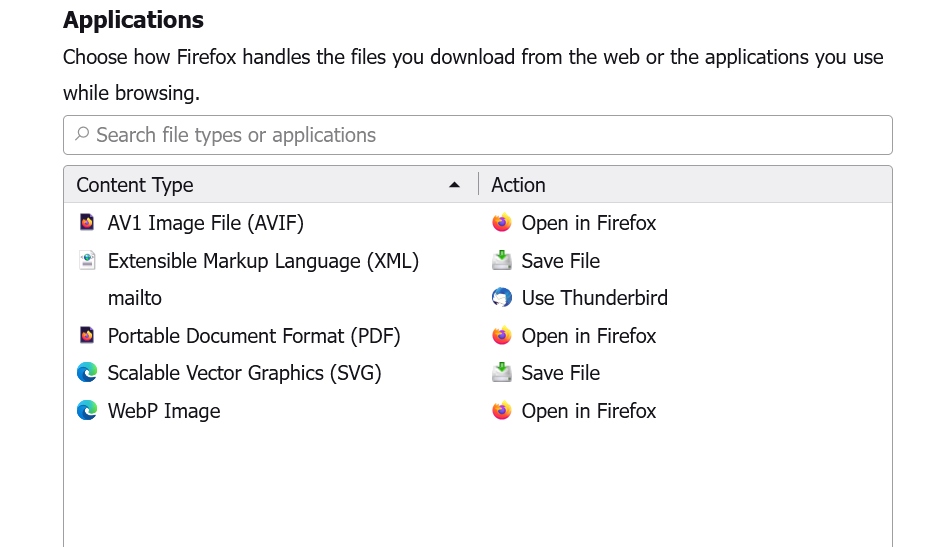
in the generals tab on the left in Firefox where it says application i do not see anything that says where and how to play videos or which application plays them i am sending a snip it photo to show you. and video files from firefox and facebook will not load to my desktop I have tried multiple video add on and nothing. y default player is Windows media player
Wšě wotmołwy (4)
i have about 5 different facebook video downloader on firefox and nothing I have even tried disabling all add on and still nothing

Were there video entries previously? Others have lost file types from Applications and an old handlers.json is available on a non-Mozilla site if you are game to try replacing yours. You could rename the existing handlers.json file in case you want to reuse it.
I have no idea what you are talking about. I am not any kind of computer whizz just a ignorant lay person. Explain it to me like you are trying to explain to a kid
The list of Applications in Settings is contained in a file called handlers.json in your Firefox profile. You could try replacing it with a more comprehensive file found online.
Do you want to play or download videos on/from sites other than Facebook, for example, YouTube?