


everytime I get an update it causes my internet browser to crash, how can I go back to before the update or make this thing stop crashing??????????????!!!!!!!!!!!!!

Every time firefox pushes to update my browser when I finally do it causes my browser to crash repeatedly. I can not do anything online. It's frustrating beyond words. how can I delete the update and go back to when my browser was working right. Or how do you make it stop CRASHING??????!!!!!!!
Wšě wotmołwy (2)

Going back to a previous version can cause its own issues. There is an article describing how to get help with crashing (first link below). Having experienced a minor crash issue myself, I think you would save yourself a lot of time if you create a new profile; you can do that without opening Firefox.
https://support.mozilla.org/en-US/kb/firefox-crashes-troubleshoot-prevent-and-get-help
https://support.mozilla.org/en-US/kb/profile-manager-create-remove-switch-firefox-profiles https://support.mozilla.org/en-US/kb/recovering-important-data-from-an-old-profile https://support.mozilla.org/en-US/kb/profiles-where-firefox-stores-user-data#w_what-information-is-stored-in-my-profile

In the address box, type about:crashes<enter>. Note: If any reports do not have BP- in front of the numbers/letters, click it to submit them.
The crash report is several pages of data. We need the report numbers to see the whole report.
Using your mouse, mark the most recent 7 - 10 Submitted crash reports, and copy them. Now go to the reply box and paste them in.
Please, Do not post a screenshot ! !
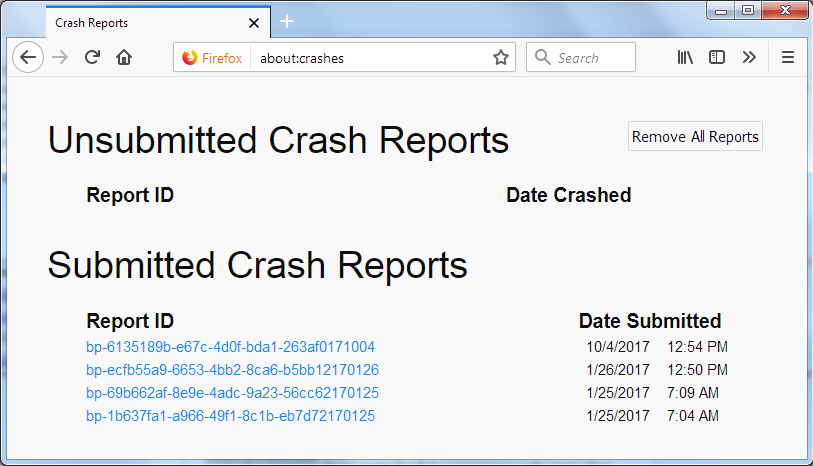
For more help on crash reports, see; https://support.mozilla.org/en-US/kb/firefox-crashes-asking-support