Windows 10 reached EOS (end of support) on October 14, 2025. If you are on Windows 10, see this article.

Pomoc přepytać

Hladajće so wobšudstwa pomocy. Njenamołwimy was ženje, telefonowe čisło zawołać, SMS pósłać abo wosobinske informacije přeradźić. Prošu zdźělće podhladnu aktiwitu z pomocu nastajenja „Znjewužiwanje zdźělić“.

Dalše informacije

Profile folder isn't shown

  • 1 wotmołwa
  • 1 ma tutón problem
  • 162 napohladow
  • Poslednja wotmołwa wot cor-el
  • Archiwowany

Hi all,

I had to do a fresh installation of Firefox, so I made a backup of my profile folders to restore them and deinstalled Firefox completely.

My main profile folder is called 6tmbpuzf.default and my additional profile folder is called zxljatsb.default-release.

After the fresh installation, Firefox created a new profile: rgun63ue.default-release-1646847780299

I closed Firefox, copied my saved profile folders to the places where they belong (from roaming to roaming, from local to local) but when I open about:profiles, Firefox doesn't show any of my old profiles, only the new one! Why is that? What can I do so that Firefox shows them?

I added images of my about:profiles page, the roaming and the local folder.
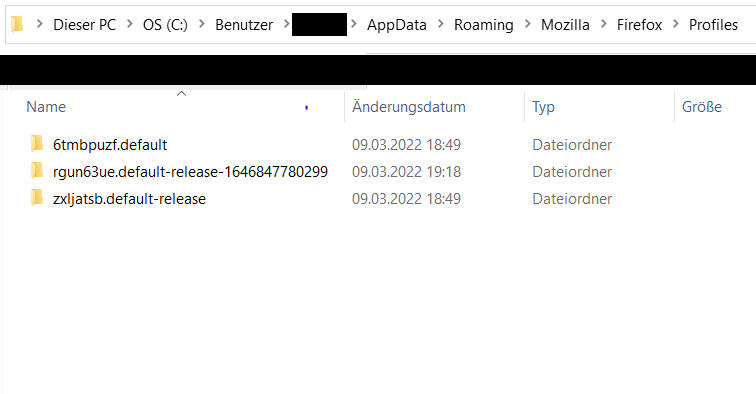
Hi all, I had to do a fresh installation of Firefox, so I made a backup of my profile folders to restore them and deinstalled Firefox completely. My main profile folder is called 6tmbpuzf.default and my additional profile folder is called zxljatsb.default-release. After the fresh installation, Firefox created a new profile: rgun63ue.default-release-1646847780299 I closed Firefox, copied my saved profile folders to the places where they belong (from roaming to roaming, from local to local) but when I open about:profiles, Firefox doesn't show any of my old profiles, only the new one! Why is that? What can I do so that Firefox shows them? I added images of my about:profiles page, the roaming and the local folder.
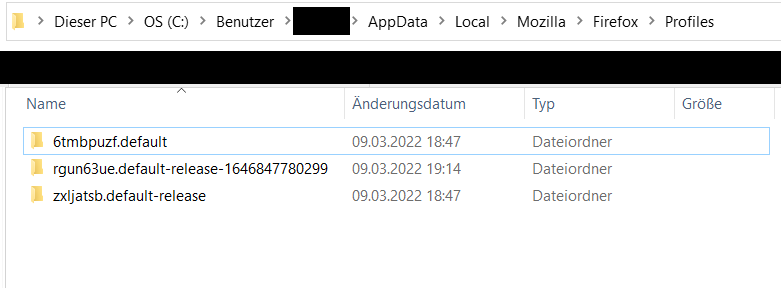
Připowěsnjene fota wobrazowki

Wot Diramel změnjeny

Wšě wotmołwy (1)

A profile needs to be registered in the Profile Manager (profiles.ini in the Firefox profile folder) in order for Firefox to use this profile.