


Address Book
Hopefully this is a simple question with a positive result.
I would like to know if it is possible to print address books to something other than a 'hard copy?'
Ideally I would like to print out the address book(s) to either pdf format or to a Word or Wordperfect document.
Thanks.
Wšě wotmołwy (5)
- Select address book name (not 'All Address Books' as that is only a virtual copy)
- Tools > Export
If you export as 'Comma Separated (system charset) (*.csv) file or (*.txt) file to a suitable storage location, you can open those files using eg: MSExcel or OpenOffice Calc or OfficeLibre Calc. So the info is easily read in column format very similar to the address book view in Thunderbird and unused columns can be removed to clean up the view. I find this is the better option.
If you export as vcard *.vcf file you can use Wordpad to read, but it means a lot of scrolling as the info in more of a label format.
If you open .txt files using Wordpad or Notepad they can look a bit messy to read.
W10 has a built-in printer, Microsoft Print to PDF. To customize the format of the address book print, consider using the Printing Tools NG add-on.
Wot sfhowes změnjeny
Thanks to both of you for replying. I tried both methods and both work as described.
The csv export worked fine.
The pdf format also worked well but the file produced was not as compact as I would have liked.
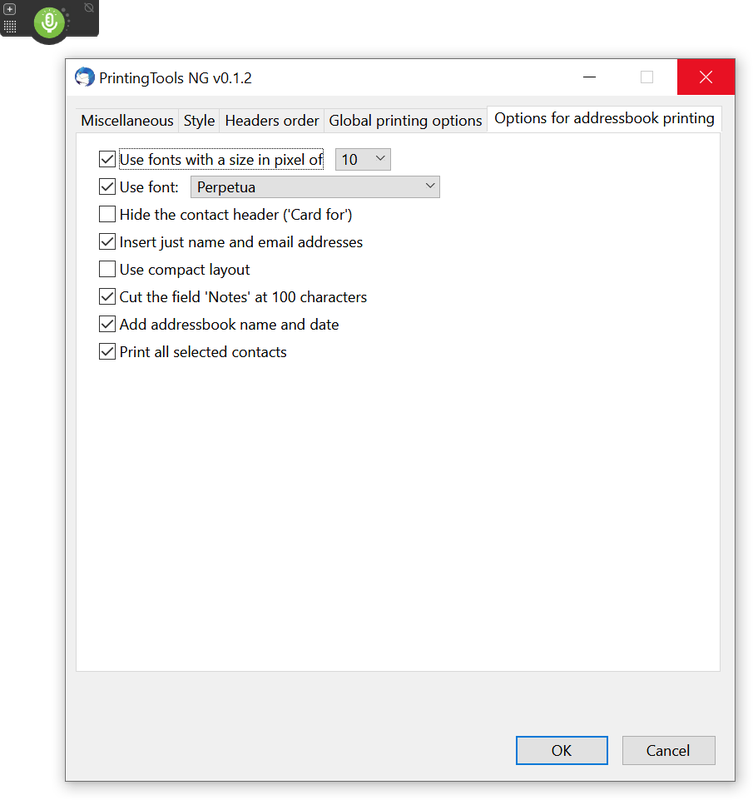
My preference is to use the pdf format but my question is whether there is a way to control how the address book is formatted for the pdf file. The problem is that after manipulating the printing options for producing a small pixel size (10) my test address book, which consisted of just 16 names and email addresses, filled nearly 2 pages as a pdf document. Most of my address books (mailing lists) consist of between 20 - 30 addresses and I would like to fit as many contacts on a single page as within visual reason (I'm guessing that would be about 50 or so).
Any suggestions? Note that in using the Printing Options window I only made selections in the "Options for addressbook printing" but did not make any changes to the 'defaults' in the other 4 tab options. In the "addressbook printing" tab I did place a checkmark in all 8 boxes after trying two other combinations that seemed to make sense but produced similar results of a 2 or 3 page pdf file.
Thanks.
Wot Andy změnjeny
It seems that even with all settings in the add-on to produce a compact output, there are only about 10 contacts per pdf page, so the best approach may be to just edit the csv in a spreadsheet or csv editor and organize it into multiple columns, then print to pdf.
The csv to spreadsheet to pdf is a workable solution though it involves much additional time and extra steps but I'm comfortable with doing that if necessary.
When I do the straight pdf there is too much space between entries -- almost a full inch or or so vertically -- is there a setting in any of the other tabs that might help? Or is only the 'addressbooks' tab the only one that applies to printing address books to pdf?
Thanks.