


Facebook crashes
I can log onto Facebook but as soon as I get to my feed the tab crashes. No other site but Facebook is causing this to happen. I've submitted the crash reports but that is it. Viewed it afterward but I can't make heads or tails of what it's saying. The tab crashes in "safe mode" as well. Hopefully someone reading this can help.
Wubrane rozrisanje
Thank you to those who posted responses to my issue. I didn't end up doing anything recommended and yet Facebook is working now. I'll count this as a win and move on.
Tutu wotmołwu w konteksće čitać 👍 0Wšě wotmołwy (4)

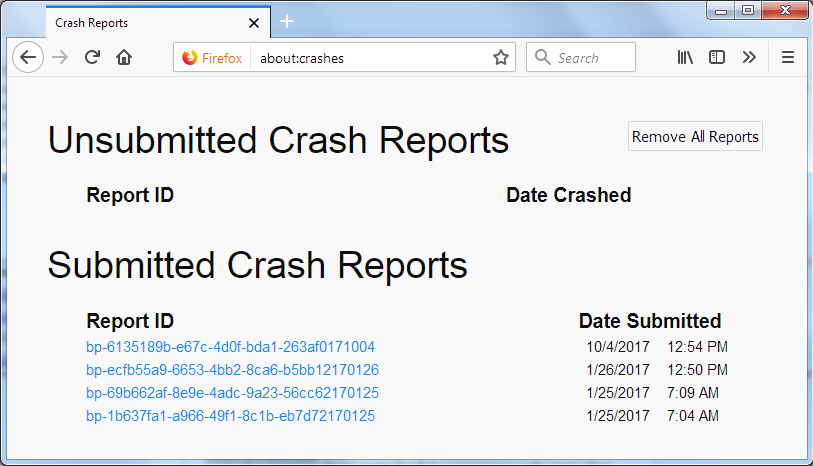
In the address bar, type about:crashes<enter>. Note: If any reports do not have BP- in front of the numbers/letters, click it to submit them.
The crash report is several pages of data. We need the report numbers to see the whole report.
Using your mouse, mark the most recent 7 - 10 Submitted crash reports, and copy them. Now go to the reply box and paste them in.
For more help on crash reports, see; https://support.mozilla.org/en-US/kb/firefox-crashes-asking-support
Go to the preferences (type about:preferences on address bar ) Then Click browser privacy and go to the cookies and site data. After that click manage data and Search for "Facebook"; Highlight everything and Delete all cookies highlighted Then Reload Facebook. You will have to log in again.
Wubrane rozrisanje
Thank you to those who posted responses to my issue. I didn't end up doing anything recommended and yet Facebook is working now. I'll count this as a win and move on.
Good to hear. Safe surfing.