


Can only receive messages, not send. Did everything recommended in the "cannot send messages" section. Still not working.(Exlusive to certain SMTP)

Im struggling to fix this problem, I tried every step recommended in the "cannot send messages section". The problem popped up last week, not after an update IRC.
Thunderbird is updated. The problem is exclusive to the SMTP mentioned in the screenshot. Sending mail through yahoo or gmx SMTP works fine. I can send mails through the webmail application of my provider.
I tried all 3 ports: 465/587 wont even connect to the SMTP when sending a mail.(Error: Stuck in connecting to SMTP... ) 8025 can connect with the SMTP but it still wont send the mail.(Error: Mail could'nt been send since the connection was lost during transmission, try again)
Firewall is not the issue either.
Does anyone have an idea what else I could try to fix the problem?
Wšě wotmołwy (6)
Screenshot didnt upload properly.
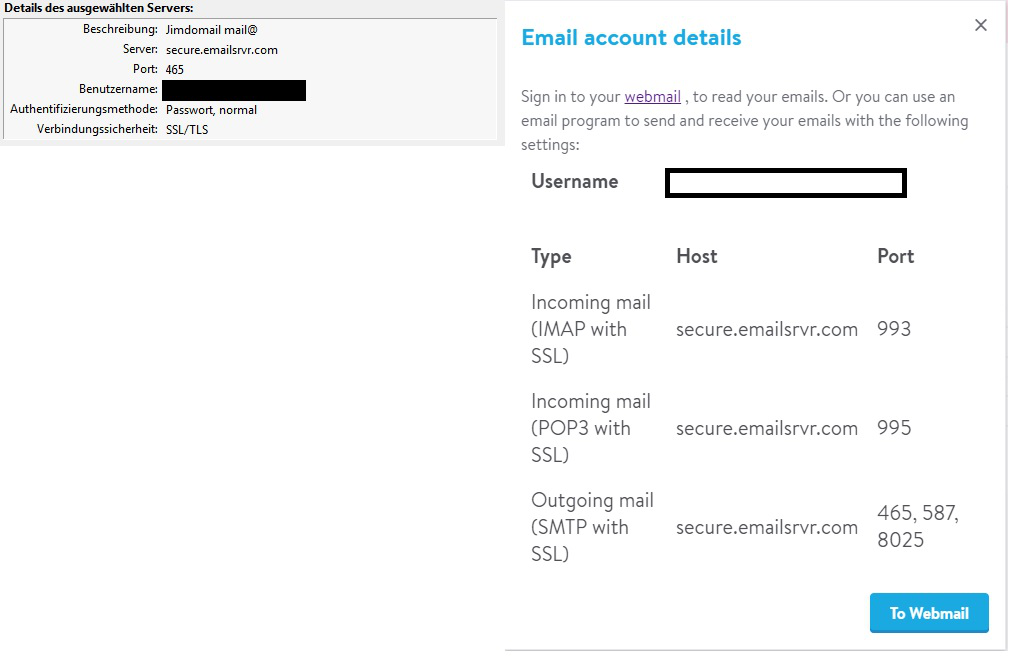

Not sure about the screenshot, it doesn't look like Thunderbird. In any case, there is no point trying arbitrary combinations of server settings, simply use what's required as per your email provider's information.
Please get that information from your email provider, apply it to Thunderbird, and also post it here.
Then, please post your Troubleshooting Information.
At the top right of the Thunderbird window, click the menu button  , then select Help > Troubleshooting Information.
Press the "Copy text to clipboard button" and paste the information into your reply.
, then select Help > Troubleshooting Information.
Press the "Copy text to clipboard button" and paste the information into your reply.
In the screenshot (on the right side) it shows the required server information from my provider, which sadly all won't work. I already contacted them too, no response yet though. But I have a strong feeling it's a Thunderbird issue. Thanks for the help! Heres the troubleshooting information:
Allgemeine Informationen
   Name: Thunderbird
   Version: 52.8.0
   User-Agent: Mozilla/5.0 (Windows NT 6.1; WOW64; rv:52.0) Gecko/20100101 Thunderbird/52.8.0
   Profilordner: Ordner öffnen
             (Lokaler Datenträger)
   Build-ID der Anwendung: 20180516145259
   Aktivierte Plugins: about:plugins
   Build-Konfiguration: about:buildconfig
   Speicherverwendung: about:memory
   Profile: about:profiles
 E-Mail- und Newsgruppen-Konten
   account1:
     INCOMING: account1, , (pop3) pop.mail.yahoo.com:995, SSL, passwordCleartext
     OUTGOING: , smtp.mail.yahoo.com:465, SSL, passwordCleartext, true
   account2:
     INCOMING: account2, , (none) Local Folders, plain, passwordCleartext
   account3:
     INCOMING: account3, , (imap) imap.gmx.net:993, SSL, passwordCleartext
     OUTGOING: , mail.gmx.net:465, SSL, passwordCleartext, true
   account15:
     INCOMING: account15, , (imap) secure.emailsrvr.com:993, SSL, passwordCleartext
     OUTGOING: , secure.emailsrvr.com:587, SSL, passwordCleartext, true
   account16:
     INCOMING: account16, , (imap) secure.emailsrvr.com:993, SSL, passwordCleartext
     OUTGOING: , secure.emailsrvr.com:465, SSL, passwordCleartext, true
 Absturzberichte
   https://crash-stats.mozilla.com/report/index/bp-79762029-a942-4461-867d-066d90171221 (21.12.2017)
 Erweiterungen
   Simple Locale Switcher, 1.0.2, true, simplels@nohamelin
   Dropbox for Filelink, 1.0.1, false, thunderbird-filelink-dropbox@mikeconley.ca
   Lightning, 5.4.8, false, {e2fda1a4-762b-4020-b5ad-a41df1933103}
   Recover deleted messages, 0.4, false, {8380f54c-9b7a-4107-b703-9b938e30fb54}
Wichtige modifizierte Einstellungen
Name: Wert
     accessibility.typeaheadfind.flashBar: 0
     browser.cache.disk.capacity: 358400
     browser.cache.disk.filesystem_reported: 1
     browser.cache.disk.smart_size_cached_value: 358400
     browser.cache.disk.smart_size.first_run: false
     browser.cache.disk.smart_size.use_old_max: false
     dom.apps.reset-permissions: true
     extensions.lastAppVersion: 52.8.0
     font.internaluseonly.changed: false
     font.name.monospace.el: Consolas
     font.name.monospace.tr: Consolas
     font.name.monospace.x-baltic: Consolas
     font.name.monospace.x-central-euro: Consolas
     font.name.monospace.x-cyrillic: Consolas
     font.name.monospace.x-unicode: Consolas
     font.name.monospace.x-western: Consolas
     font.name.sans-serif.el: Calibri
     font.name.sans-serif.tr: Calibri
     font.name.sans-serif.x-baltic: Calibri
     font.name.sans-serif.x-central-euro: Calibri
     font.name.sans-serif.x-cyrillic: Calibri
     font.name.sans-serif.x-unicode: Calibri
     font.name.sans-serif.x-western: Calibri
     font.name.serif.el: Cambria
     font.name.serif.tr: Cambria
     font.name.serif.x-baltic: Cambria
     font.name.serif.x-central-euro: Cambria
     font.name.serif.x-cyrillic: Cambria
     font.name.serif.x-unicode: Cambria
     font.name.serif.x-western: Cambria
     font.size.fixed.el: 14
     font.size.fixed.tr: 14
     font.size.fixed.x-baltic: 14
     font.size.fixed.x-central-euro: 14
     font.size.fixed.x-cyrillic: 14
     font.size.fixed.x-unicode: 14
     font.size.fixed.x-western: 14
     font.size.variable.el: 17
     font.size.variable.tr: 17
     font.size.variable.x-baltic: 17
     font.size.variable.x-central-euro: 17
     font.size.variable.x-cyrillic: 17
     font.size.variable.x-unicode: 17
     font.size.variable.x-western: 17
     general.useragent.locale: de
     gfx.direct3d.last_used_feature_level_idx: 0
     mail.openMessageBehavior.version: 1
     mail.winsearch.firstRunDone: true
     mailnews.database.global.datastore.id: 5ebc6bf3-8ae7-4e73-a0d7-307187b9d48
     mailnews.database.global.views.conversation.columns: {"threadCol":{"visible":true,"ordinal":"1"},"flaggedCol":{"visible":true,"ordinal":"3"},"attachmentCol":{"visible":false…
     mailnews.database.global.views.global.columns: {"threadCol":{"visible":true,"ordinal":"1"},"flaggedCol":{"visible":true,"ordinal":"3"},"attachmentCol":{"visible":false…
     media.gmp.storage.version.observed: 1
     network.cookie.prefsMigrated: true
     network.predictor.cleaned-up: true
     places.database.lastMaintenance: 1528180488
     places.history.expiration.transient_current_max_pages: 122334
     plugin.importedState: true
     plugin.state.flash: 0
     plugins.update.notifyUser: true
     security.sandbox.content.tempDirSuffix: {35f62833-9e03-429a-b665-3f47ad3fa987}
Grafik
     GPU #1
     Beschreibung: NVIDIA GeForce GTX 750 Ti
     Herstellerkennung: 0x10de
     Gerätekennung: 0x1380
     RAM: 2048
     Treiber: nvd3dumx,nvwgf2umx,nvwgf2umx nvd3dum,nvwgf2um,nvwgf2um
     Treiber-Version: 23.21.13.9101
     Treiber-Datum: 2-23-2018
     Features
     Direct2D: false
     DirectWrite: true (6.2.9200.16492)
     WebGL-Renderer: Google Inc. -- ANGLE (NVIDIA GeForce GTX 750 Ti Direct3D9Ex vs_3_0 ps_3_0) -- OpenGL ES 2.0 (ANGLE 2.1.0.2a250c8a0e15)
     AzureCanvasBackend: skia
     AzureCanvasAccelerated: 0
     AzureFallbackCanvasBackend: cairo
     AzureContentBackend: skia
JavaScript
Inkrementelle GC: 1
Barrierefreiheit
   Aktiviert: 0
   Barrierefreiheit verhindern: 0
Bibliotheken-Versionen
     Minimal vorausgesetzte Version
     Verwendete Version
     NSPR
     4.13.1
     4.13.1
     NSS
     3.28.6
     3.28.6
     NSS Util
     3.28.6
     3.28.6
     NSS SSL
     3.28.6
     3.28.6
     NSS S/MIME
     3.28.6
     3.28.6
What is the entire error message...word for word?
re : account15:
    INCOMING: account15, , (imap) secure.emailsrvr.com:993, SSL, passwordCleartext
    OUTGOING: , secure.emailsrvr.com:587, SSL, passwordCleartext, true
Please set this to 'STARTTLS' Report back on results.
I think its fixed now. I changed connection security to 'STARTTLS' and switched the port to 8025 and it finally worked.
Why it broke out of the blue in the first place is a mistery to me though...
Thanks everyone for the input and help, very much appreciated!!