


No Mailto option in "Applications." How do I make Gmail my default for email links?

The option in https://support.mozilla.org/en-US/kb/change-program-used-open-email-links doesn't work for FF 57. I type in mailto and nothing comes up. No options at all.
Wšě wotmołwy (10)
Hi, I'm not sure what you have tried, but would you please go to the 3-bar menu (or 'Tools') => Options => General and scroll down to 'Applications'. There you will find the option to choose Gmail - see screenshot :
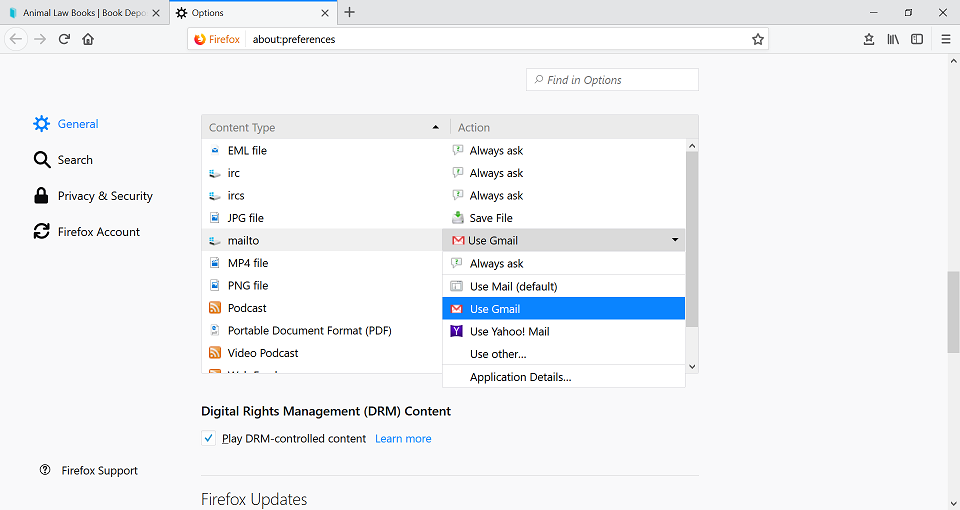
Wot Happy112 změnjeny
Happy112 said
Hi, I'm not sure what you have tried, but would you please go to the 3-bar menu (or 'Tools') => Options => General and scroll down to 'Applications'. There you will find the option to choose Gmail - see screenshot :
Thank you, but I tried that and there are no mailto options listed. The attached screenshots show all my applications. And none of them is an email program.
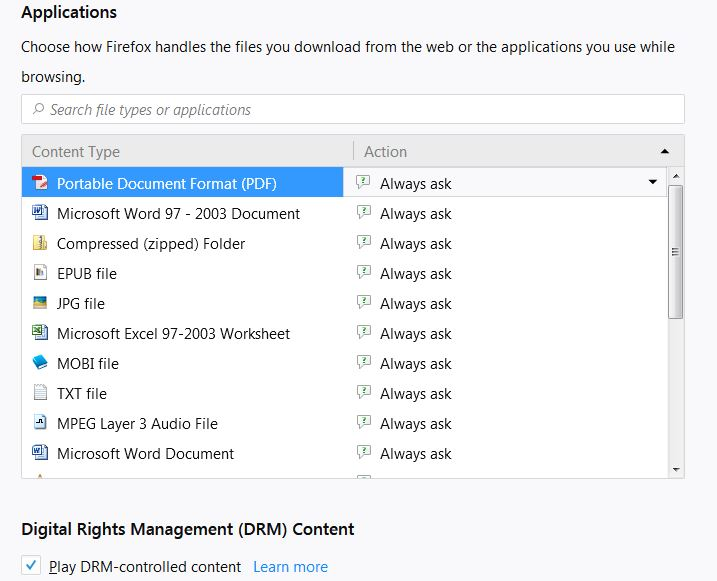
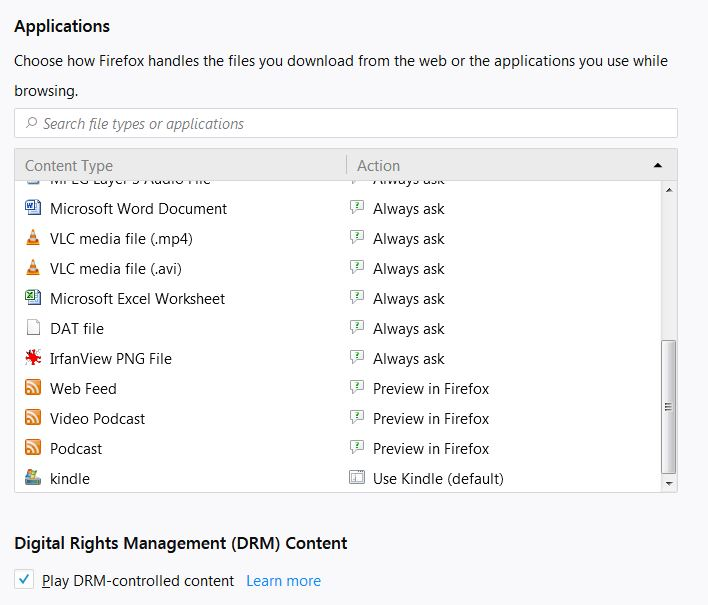
Bummer ! I wasn't expecting that ......
Would you please take a look at the Chosen Solution in this thread and see if that will work for you ?
Note : 'mimeTypes.rdf' is now handlers.json
Thanks for your help and your commiseration. The suggestion looks good, but I can't try it now. Will get back to you when I do. Thanks again. PS: The emailing of the answer is a good idea, but it would be better if Mozilla added a link to the email to go right back to this page. Just sayin'.
What happens when you click a mailto link? Do you get a little dialog presenting some choices or an error message or ??
If you need to set it up manually, here's how you could do it:
Open your Gmail mailbox. Then
(1) Open Firefox's Web Console in the lower part of the tab below your mailbox. You can do that using either:
- Ctrl+Shift+k (Mac: Command+Alt+k)
- "3-bar" menu button > Developer > Web Console
- (menu bar) Tools > Web Developer > Web Console
(2) Select and copy the following line of script (it's all one line -- ignore the fact that the forum creates links):
navigator.registerProtocolHandler('mailto','https://mail.google.com/mail/?extsrc=mailto&url=%s', 'Gmail mailto');
(3) In the tab with in your mailbox, paste the script next to the caret (>>) at the bottom of the Web Console, and press the Enter key (or Return key) to run the script. The first time, Firefox may ask you to take some action to prove you understand it's dangerous to run scripts from strangers.
An infobar should open at the top of the page. Click "Add Application". You now can close the Web Console by clicking the "X" on its top bar at the right.
Then you can test on an address such as the one earlier in this reply.
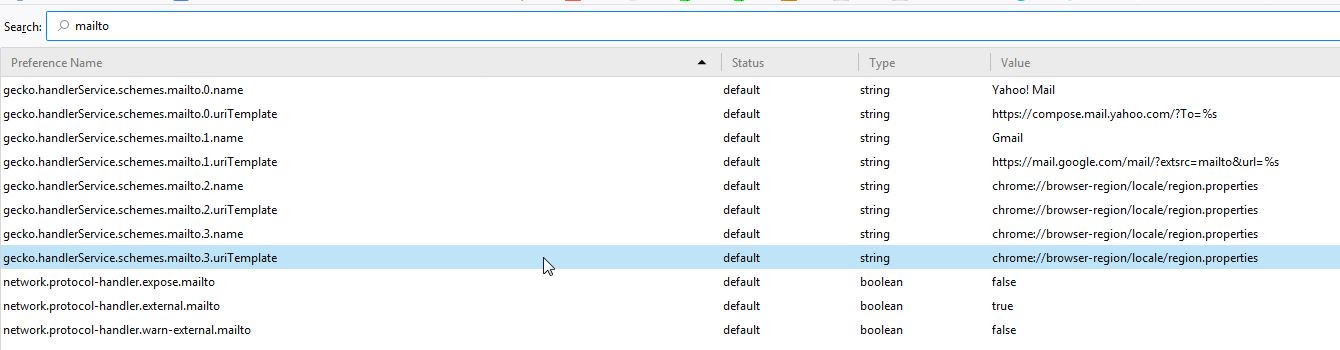
You can also check the mailto prefs on the about:config page and make sure they are default and not user set (bold).
You can reset user set (bold) pref(s) on the about:config page via the right-click context menu to the default value.
You can open the about:config page via the location/address bar. You can accept the warning and click "I accept the risk!" to continue.
jscher2000 said
What happens when you click a mailto link? Do you get a little dialog presenting some choices or an error message or ??
If you need to set it up manually, here's how you could do it:
Open your Gmail mailbox. Then
(1) Open Firefox's Web Console in the lower part of the tab below your mailbox. You can do that using either:
- Ctrl+Shift+k (Mac: Command+Alt+k)
- "3-bar" menu button > Developer > Web Console
- (menu bar) Tools > Web Developer > Web Console
(2) Select and copy the following line of script (it's all one line -- ignore the fact that the forum creates links):
navigator.registerProtocolHandler('mailto','https://mail.google.com/mail/?extsrc=mailto&url=%s', 'Gmail mailto');
(3) In the tab with in your mailbox, paste the script next to the caret (>>) at the bottom of the Web Console, and press the Enter key (or Return key) to run the script. The first time, Firefox may ask you to take some action to prove you understand it's dangerous to run scripts from strangers.
An infobar should open at the top of the page. Click "Add Application". You now can close the Web Console by clicking the "X" on its top bar at the right.
Then you can test on an address such as the one earlier in this reply.
Thanks. You're not going to believe this one.... I clicked on the mailto link and got a Windows spinning wheel for a couple of minutes. Then it opened Chrome with a Gmail message window! And now the email button that used to open Outlook also opens Chrome. Curiouser and curiouser. Frankly, as soon as you got to the FF web console, you went over my head. I appreciate your trying....
cor-el said
You can also check the mailto prefs on the about:config page and make sure they are default and not user set (bold). You can reset user set (bold) pref(s) on the about:config page via the right-click context menu to the default value. You can open the about:config page via the location/address bar. You can accept the warning and click "I accept the risk!" to continue.
Thank you. I tried that and I got some surprises. (See screenshot.) I got a list of default programs, topped off by an old Yahoo account that's no longer in use. And I couldn't see any way to remove it. There was a Gmail listing, but I don't know how to make that the default.
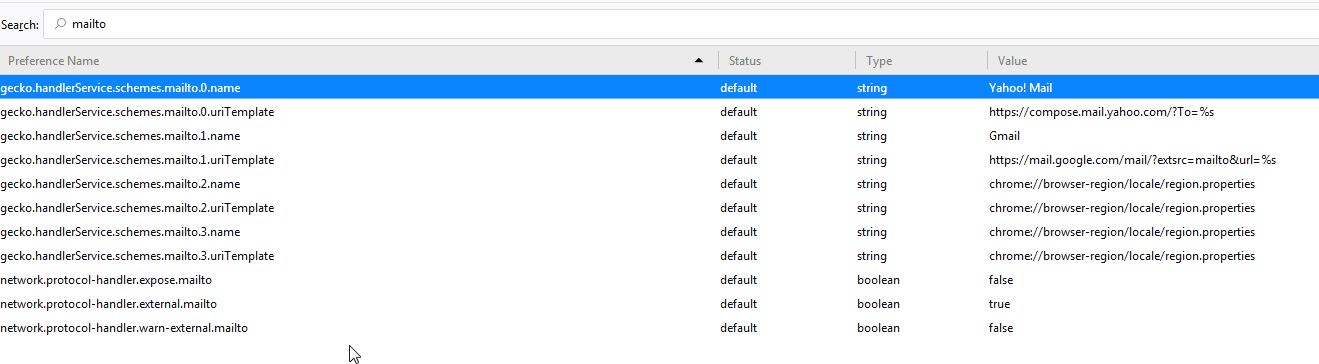
This is a mystery. I don't know how, but Chrome became my default mailto program. And I don't know how to change it.
Did you try to rename/remove handlers.json and, if present, delete mimeTypes.rdf in the Firefox profile folder with Firefox closed to reset all file actions?
You can use the button on the "Help -> Troubleshooting Information" (about:support) page to go to the current Firefox profile folder or use the about:profiles page.
- Help -> Troubleshooting Information -> Profile Directory:
Windows: Show Folder; Linux: Open Directory; Mac: Show in Finder - http://kb.mozillazine.org/Profile_folder_-_Firefox
See also: