


Undoing a Firefox "reset to defaults" -- change the order of the toolbars
I used to have my toolbars arranged in the following order (top to bottom): menu, navigation, tabs. Now, after resetting Firefox, my toolbars are in a different order: menu, tabls, navigation. I want them back in the original order. I'm using Firefox 16.0.2.
Note: the add-on, DragMyToolbars, has not been updated to work on my version of Firefox. I have the "Old Firefox data" file from the resetting.
Izabrano rješenje
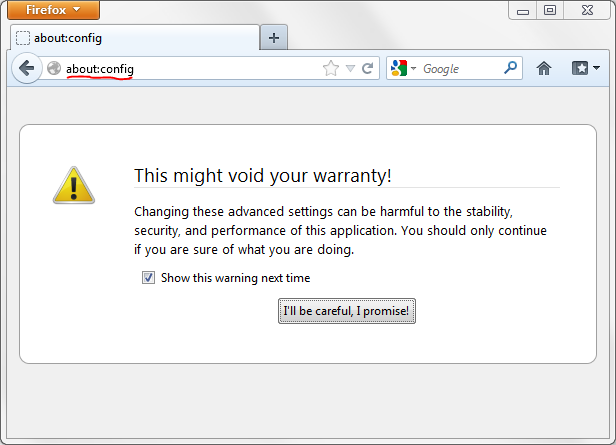
hello, for the moment you can still manually set "tabs to bottom" - enter about:config into the firefox location bar (confirm the info message in case it shows up), search for the preference named browser.tabs.onTop & toggle it to false by double-clicking it.
however this setting might lose its effect in a future version of the browser, for more information also see www.ghacks.net/2012/07/26/mozilla-tabs-on-bottom-feature-needs-to-go/
Pročitaj ovaj odgovor u kontekstu 👍 3Svi odgovori (6)
Odabrano rješenje
hello, for the moment you can still manually set "tabs to bottom" - enter about:config into the firefox location bar (confirm the info message in case it shows up), search for the preference named browser.tabs.onTop & toggle it to false by double-clicking it.
however this setting might lose its effect in a future version of the browser, for more information also see www.ghacks.net/2012/07/26/mozilla-tabs-on-bottom-feature-needs-to-go/
I'm not sure what you mean by "firefox location bar" -- do you mean the address bar? If so, when I enter "about.config" there, I just get my default search engine. Further, a search of my hard drive doesn't find an "about.config" file. Firefox Help doesn't seem to know "location bar" either.
Help is appreciated. Thanks. Jon
Thanks for that article, but I can't find the "Firefox" button, and the options under the Tools menu is of no help. Tis very frustrating.
I'm on Firefox 16.0.2, the latest and "greatest".
hello jon - yes, by "location bar" i meant the address bar!
please note that it's spelled about:config (with a colon).
Thank you very much -- this has addressed the problem!!!
Note: I gave the Firefox team the suggestion that they make this easier & more permanent.
Thanks again.
Current Firefox versions only show the "Tabs on Top" menu entry in the "View > Toolbars" menu and in context menus if the tabs aren't in the default position on top.
If the tabs are on top and the menu entry isn't available and you want to move the tabs below the navigation toolbar then you need to flip the browser.tabs.onTop pref to false on the about:config page.