


How do I change the wallpaper, turn it into a fox image?

Can you please give me some steps? Thank you for your time.
Svi odgovori (6)
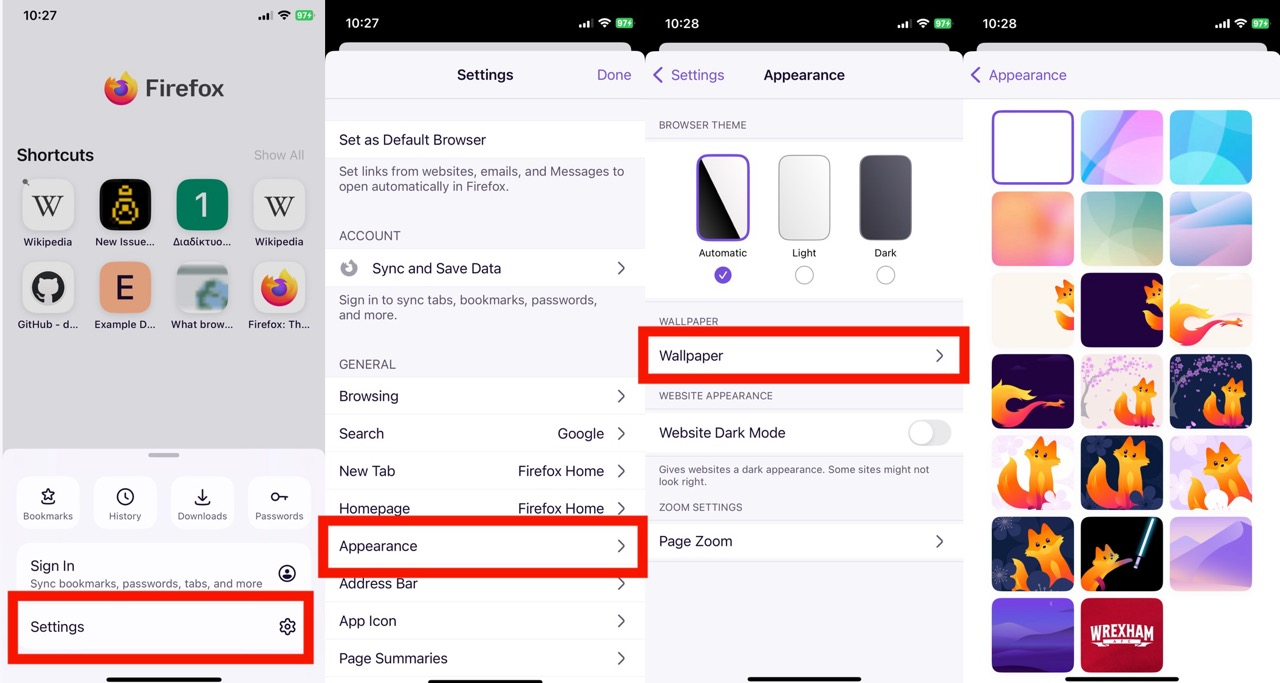
The "Wallpaper" settings are depending on the version either under homepage contents in Settings › Homepage or in browser appearance in Settings › Appearance.
Izmjenjeno od jbr
Hi Snowfox4355,
Please check out the following article to learn more about changing wallpaper on your Firefox for iOS. Change your wallpaper in Firefox for iOS
Apparently the article needs updating for the current versions, I'll make fresh screenshots and update it to the new menu location.
Izmjenjeno od jbr
jbr said
Apparently the article needs updating for the current versions, I'll make fresh screenshots and update it to the new menu location.
I saw your revision last night. But when I tried to validate the steps, I can't find the menu in Settings. I wonder if it's part of a gradual rollout.
It shouldn't be, however the last menu item in Appearance is hidden if the manifest for current wallpapers failed to load — they're pulled once a day from an asset storage bucket.
The screens look like this:
Aaaaah, that makes sense! I just approved your KB update. Thanks again for your help with it 🙌