


Awful new format

I hate this new vertical format. How do I get the old format back?
Odabrano rješenje
You are using the column layout. Click the menu in upper right (three stacked short bars) and then click Layout and then View and change there.
Svi odgovori (7)
Click View>layout and try the various options there.
I did that. All the options just make things worse. I think I need to find a new email client. I have been on Thunderbird since it started but this is too much.
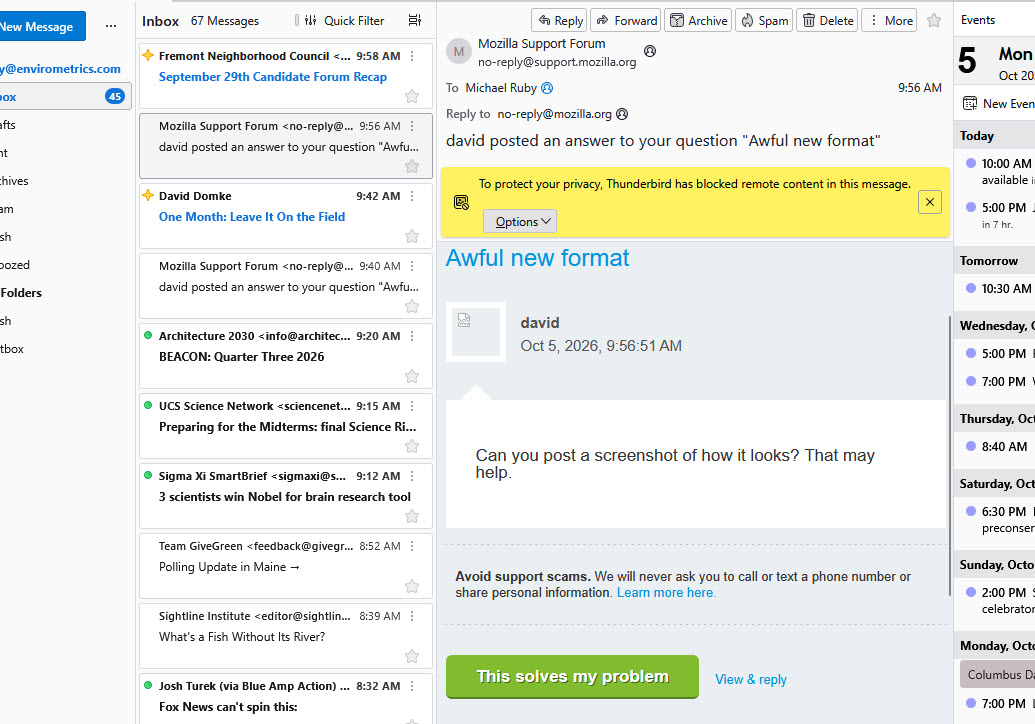
Can you post a screenshot of how it looks? That may help.
I am using 153.4.0esr (64-bit). There is no View option, only Appearance under Settings. Here is a partial screen shot of the screen. The old format was horizontal. I'm guessing they did this so it would look nice on phones.
Odabrano rješenje
You are using the column layout. Click the menu in upper right (three stacked short bars) and then click Layout and then View and change there.
Nothing to do with phones. You have Vertical View layout with card view. for message list The historical setup is Classic View Layout with table View for message list.