


Changing Thunderbird from IMAP to POP3

I have changed Thunderbird E-mail account from IMAP to POP3. My question is, How do I get all my E-mail folders from the IMAP into the new POP3 account. Nothing followed the changed accounts formats.
Svi odgovori (6)
I suggest you read the support article on the differences between IMAP and POP mail. See https://support.mozilla.org/en-US/kb/difference-between-imap-and-pop3
I have no idea why you made the change, but from what is posted here I do wonder if your choice of protocol actually meets your needs.
One of the primary differences between IMAP and POP is that POP only sees what is technically called a maildrop which most providers have interpreted to be the inbox, where incoming mail is "dropped" awaiting collection. It actually has no concept of folders so it will never bring mail that is stored somewhere other than the "maildrop" to the local machine.
Your only real choice here is to move mail to the inbox so it will download or use IMAP if synchronization of folders is important for you.
See RFC 1939 for full details of POP3 protocol. https://www.rfc-editor.org/rfc/inline-errata/rfc1939.html
Matt, Thank you for your response! To answer you question/comment from your help suggestion, I'm using Centurylink for my ISP. They are the only provider I currently have for E-mail. The IMAP was working when I initially signed up with them. About 2 years later they did a major upgrade to their system. From that time forward, things began to change for the worse. I battled with the S-L-O-W downloads. (Which got S--L--O--W--E--R and S---L---O---W---E---R!) This is why I have switched back to a POP3 Protocol and why I'm needing help to re-gain all my e-mail folders.
NO, I didn't want to do this, but after I tried all the different remedies I could think of, this one was the only way I got back to a usable E-Mail Client. Hated it, but something had to change. Centurylink had no remedy. They only blamed the issue with my PC, Router, Connection(s) etc..
When Microsoft changed their TPM for Windows 11 which trashed my current PC for any further updates, I was forced to purchase a newer PC and Laptop to accommodate the updates with Windows 11.
We will be getting Fiber here soon and I'm waiting for it to be completed. I'm also waiting for Thundermail and Thunderbird Pro to become available. As soon as those are released, I'll be eagerly looking into them for all my e-mail.

jmil43, I would think that you could have an IMAP account and a POP account in Thunderbird simultaneously and use the the ImportExportToolsNG add-on to export messages from the IMAP account and import them into folders in your POP account or your local folders account. Messages would stay in the same folder structure. You would not have to move them all into the POP inbox and file them later (if you file). When you are done copying them, you could make a back-up, delete the folders and messages off the server, and delete the IMAP account in Thunderbird.
Matt, is there a reason why that would not work?
(My response to the bad service from Centurylink would have been to switch to another e-mail service provider immediately instead of switching to a POP account.)
Izmjenjeno od Rick
Rick, Thank you for your response! I appreciate the help! Before reading your suggestion, I had setup another IMAP account. Now comes the download process. It will take some time to complete, due to Centurylink continually disconnecting the e-mail server! So please don't think I have abandoned my attempt to remedy this issue! I"ll be letting you now how progress is with the e-mail downloads to all the folders I have.
Once the operation has completed, I will go back through my folders and purge many that I have kept for reference. I may need some more help when I get to the point of saving those prior to the purge of folders I use only use for reference.
John
jmil43 said
Matt, Thank you for your response! To answer you question/comment from your help suggestion, I'm using Centurylink for my ISP. They are the only provider I currently have for E-mail. The IMAP was working when I initially signed up with them. About 2 years later they did a major upgrade to their system. From that time forward, things began to change for the worse. I battled with the S-L-O-W downloads. (Which got S--L--O--W--E--R and S---L---O---W---E---R!) This is why I have switched back to a POP3 Protocol and why I'm needing help to re-gain all my e-mail folders.
I think you will find your issues are not really related to your ISP, but your choice of scanning email with an antivirus. Nothing slows things down more that antivirus scanning and if you make the mistake of letting them install a toolbar in Thunderbird for spam or scams then your experience is almost certainly going to be poor. Generally folk to not look to the scanner because it does not advertise when it is working and when it is failing like other applications. The only time you really see it is when it want to frighten you about some "threat" is purports to have detected.
Do you have a third party antivirus program installed or a VPN. They are getting popular and are a constant source of email issues.
NO, I didn't want to do this, but after I tried all the different remedies I could think of, this one was the only way I got back to a usable E-Mail Client. Hated it, but something had to change. Centurylink had no remedy. They only blamed the issue with my PC, Router, Connection(s) etc..
Just keep in mind you only have synced copies of email locally in an IMAP account. you have to move them from the IMAP account to local folders in Thunderbird to break the connection to the server before you have a true local copy that you have call archived.
When Microsoft changed their TPM for Windows 11 which trashed my current PC for any further updates, I was forced to purchase a newer PC and Laptop to accommodate the updates with Windows 11.
Not really something I follow. I had to enable TPM in my motherboard bios to update to windows 11, To be honest many entry level computing devices are not really adequate to do more than browse the internet. SO if you purchased a device with limited memory of free disk space (I see most laptops come with this tiny SSD and that causes instant trouble with local storage for Thunderbird. The developers publish a system requirement for Thunderbird on each operating system. It is a ludicrous vague suggestion that will give you a very poor experience if you are just meeting it.
They say a minimum of 1gb or RAM. Windows struggles to run on that and virtual memory usage means everything runs poorly. Thunderbird will install and run, but asking it to do anything would be like watching molasses pour on a frosty morning. Windows itself has a 4Gb minimum and that is just to run windows. Double it and your will be getting close square it and you will be where many suggest you have to be.
Disk space is listed as 500mb. That will install the application, but you probably want your free disk space to be measures in gigabytes for things to function smoothly. I have a very small profile I use for testing. A couple of accounts with a few hundred emails, a couple of calendars and it occupies 1.2gb on disk. My daily profile that I have used for over 15 years is some 35Gb in size.
We will be getting Fiber here soon and I'm waiting for it to be completed.
That may not offer the result you are hoping for. Old wifi routers and antivirus are more likely to be a bottleneck than any modern internet co0nnection. I lived through the days of having a 56kb modem that never connected at more than half of that and the cursing of those that seny email with huge signature images that tied up all of my bandwidth for half an hour just to get a useless logo for an institution that I have no interest in. Then the cursing if the "fools" that replied and quoted including that image so a single email might have a half a dozen copies of it. So I understand where you are coming from. Slow is frustrating. Unexplained slow is even harder to accept. Personally I use starlink because I really do not have an acceptable terrestrial option.
>blockquote>
I'm also waiting for Thundermail and Thunderbird Pro to become available. As soon as those are released, I'll be eagerly looking into them for all my e-mail.
</blockquote> I am hoping for an invite to the beta, but I doubt it will be any faster than my existing mail with GMX, Google and Microsoft. Although historically Microsoft have had a habit of overloading their infrastructure so they can be sluggish.
My understanding it Centurylink have just changed their email infrastructure and now have new server setting and have transitioned from Q.com to Myctl.net email addresses. So I have to ask, where are you in all of that? As using old infrastructure might still work, but I would expect the outcome to be poor.
@Rick.... I personally have issues with using IMAP for backup as the local copies are nothing more than a glorified local cache and have none of the immutable qualities one would expect from an archive. While is is relatively common for folk to drag and drop messages from IMAP accounts to local folders, the process is not really well supported and data-loss is a frequent issue with timeouts and other IMAP failures resulting in things only appearing to have been done. I tend to always recommend using the import export tools NG addon to export mail from an IMAP account to an MBOX file before reimporting it to local folders using the same tool. Especially when the intent is to backup an entire folder of mail. The addon validates that the latest local copy is the latest the server has before making the individual email copy into the MBOX. This in itself is invaluable as it offers a degree to data integrity that is just not present in the drag and drop process. Using the tool to import the MBOX is nothing more than it copying the mbox into the Thunderbird profile in the correct place and it can be done manually using a file manager, but why try and tell someone where to put the file when the addon does it is the correct place for you.
There is certainly nothing wrong with having both an IMAP and a POP mail account in Thunderbird for the same email address and it was sort of where I was going in asking why the change to POP. We still have the slowness issue, exacerbated by a POP account now, so I do not think of it as a "cure". Having said that I have my main address for this forum in Thunderbird as both IMAP and POP, although you can run into issues if both are polled for mail at the same time. Thunderbird now hits multiple accounts at the same time instead of the historical sequential process, so I do experience a lot more connection failures than other folk on those accounts and it is a consideration.
@jmil43 What antivirus do you use? When you look in task manager (aly+shift+Esc) select the Performance entry.
Are any of the indications looking full up or extremely busy?
I have included a copy of my task manager just so you have something to compare.
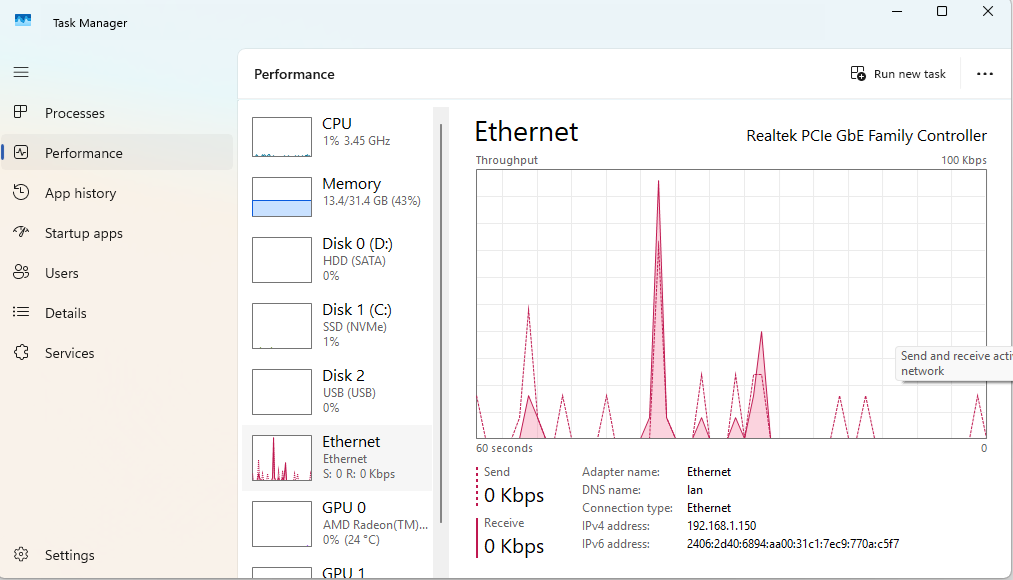
Once you get through that lot I think we might need to have a look in the developer console for network issue. But I will leave that. This reply is complicated enough as it is for now.
.
Matt said
jmil43 said
@Rick.... I personally have issues with using IMAP for backup as the local copies are nothing more than a glorified local cache and have none of the immutable qualities one would expect from an archive. While is is relatively common for folk to drag and drop messages from IMAP accounts to local folders, the process is not really well supported and data-loss is a frequent issue with timeouts and other IMAP failures resulting in things only appearing to have been done. I tend to always recommend using the import export tools NG addon to export mail from an IMAP account to an MBOX file before reimporting it to local folders using the same tool. Especially when the intent is to backup an entire folder of mail. The addon validates that the latest local copy is the latest the server has before making the individual email copy into the MBOX. This in itself is invaluable as it offers a degree to data integrity that is just not present in the drag and drop process. Using the tool to import the MBOX is nothing more than it copying the mbox into the Thunderbird profile in the correct place and it can be done manually using a file manager, but why try and tell someone where to put the file when the addon does it is the correct place for you. There is certainly nothing wrong with having both an IMAP and a POP mail account in Thunderbird for the same email address and it was sort of where I was going in asking why the change to POP. We still have the slowness issue, exacerbated by a POP account now, so I do not think of it as a "cure". Having said that I have my main address for this forum in Thunderbird as both IMAP and POP, although you can run into issues if both are polled for mail at the same time. Thunderbird now hits multiple accounts at the same time instead of the historical sequential process, so I do experience a lot more connection failures than other folk on those accounts and it is a consideration.Thanks for your thoughts, Matt. I didn't suggest IMAP as a back-up or copying files in the file system or keeping both IMAP and POP accounts after copying messages. Just wanted to confirm that using ImportExportToolsNG as you prescribe to copy files from an IMAP account to a POP account was an option for John because you had not mentioned it.