


Spam Icon Randomly appeared

I have 6 email accounts linked to Thunderbird. I noticed today on one of the accounts, along with inbox, drafts, sent, etc., there is now a spam icon. I didn't change any settings or even look at that email account today. This is the only account with that icon and it won't allow me to delete it. All settings between all accounts are the same, just this dang spam fire icon that I can't delete
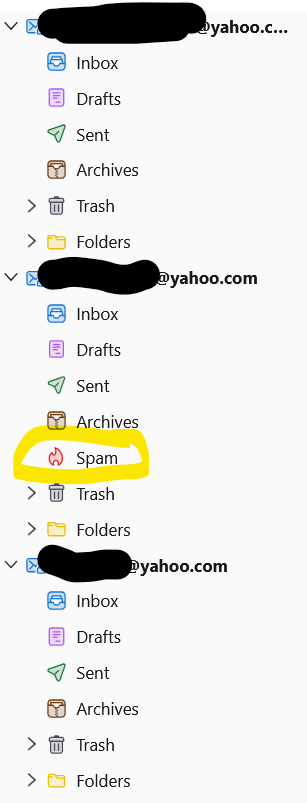
Izmjenjeno od Tracy
Svi odgovori (3)
Just guessing because you have not shared any configuration information )help > troubleshooting information)
But junk/SPAM/Bulk Mail in yahoo is a yahoo system folder for IMAP account not so for POP accounts, so is that account configured as IMAP.
It is IMAP, but all of my other yahoo accounts are IMAP and aren't showing the spam icon. All settings are the exact same between all accounts
Check all the Subscribe settings are the same and correct. The 'Spam' folder should be displaying.
Starting at the top:
- Right click on mail account name and select 'Subscribe'
- click on 'Refresh'
- Select all required folders and make sure all the server default folders are selected.
- click on 'OK'
In Account Settings select 'Spam Settings' (check this for each account) Make sure they are set up correctly and the Retention & Destination is also correct and using the Spam folder. https://support.mozilla.org/en-US/kb/thunderbird-and-junk-spam-messages