


Where can I find email settings like my ssl, protocaol, username, etc.?

My ISP has made a change for "third-party" accesses to its e-mail (which still works fine on its own website e-mail access page). I need to check my Username, Password, SSL, Protocol, Incoming & Outgoing Server Ports. BUT I don't see on my Thunderbird page where to find these: it's my preferred way to do e-mail! Where are they??
Svi odgovori (7)
See attached screenshot. They appear in two places. Let me know if you have trouble finding those screens. Start at the 'account settings' pane.
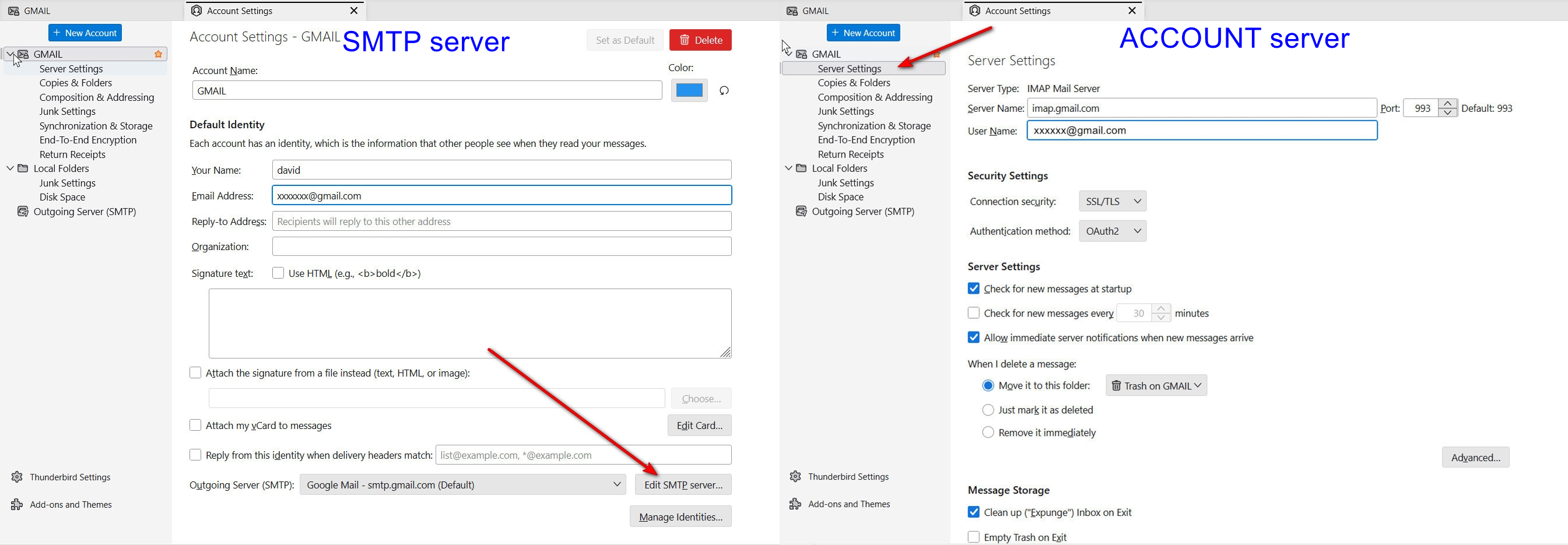
Thanks for this much direction. I'm now getting outgoing email to work on my Thunderbird, but when I request incoming mail, I get an error message: "An error occurred with the POP3 mail server." I found where several of the seven items/settings my ISP (Spectrum/Charter) instructed me are now needed for "third-party email sources" (like Thunderbird, which I so prefer to use than their website for e-mail) are located. Four of the seven are set as they instruct, the ones I could find--and comparing all my Server Settings, Copies & Folders, Spam Settings, Return Receipts (+ all the other listed setting pages listed under my e-address, as you pointed me to) to those settings on my wife's computer's Thunderbird (which works both incoming and out, using the same ISP): all these settings I can see look identical. But I do not see three of the settings my ISP says are now required: (1) My ISP Password, my Protocol setting (must be IMAP, they say), and Requires Authentication, which they require be checked or marked Yes. Where are these located?
Click to 'account settings' pane and then click the 'server settings' link in left sidebar for the account. It will say IMAP or POP and also shows authentication. Password is stored at settings>privacy&security
Thanks. I don't know why I failed to see these.
But I suspect I've found The Problem. My Server Type is set at "POP Mail Server." It now instead needs to be an IMAP protocol. But I don't see how to change this in my Th'bird Server Settings. How can I do this?
Thanks so much for your help!
- Eric Mendelson
You cannot change an account from POP to IMAP. What you need to do is create an IMAP account alongside the POP account
Okay, I see. ... although:
How do I go about doing that? Where do I start? Bear in mind that this e-mail account's currently set on my Th'bird as a POP Mail Server.
Thanks for sticking with me here, David.
- Eric
OK, click hamburger menu in upper right
- then, click the new account>email menu
- enter JUST name and email address, DO NOT enter password
- when you reach the screen for account type, I think it will default to IMAP. just continue until you are prompted for password.